Tag Archives: Hubspot

Creating Custom Modules in HubSpot

Creating Custom Modules in HubSpot: Extending Functionality and Flexibility

In the world of digital marketing and website development, HubSpot has emerged as a powerful platform that offers a wide range of tools and features. One of its standout capabilities is the ability to create custom modules, allowing businesses to extend the functionality and flexibility of their HubSpot websites. In this article, we will explore the concept of custom modules, their benefits, and how they can help businesses outrank their competitors in the online realm.

What are Custom Modules?

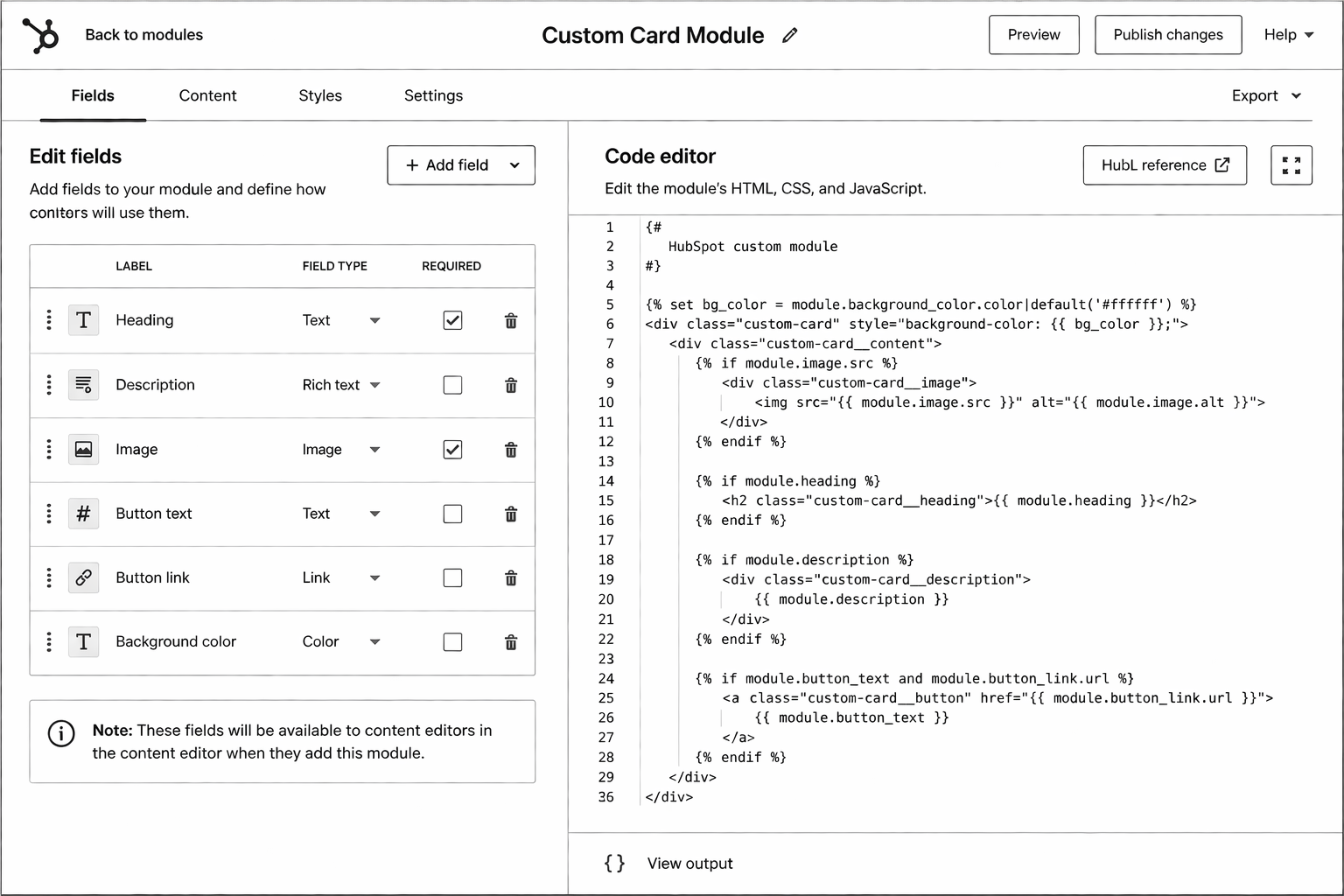
Custom modules in HubSpot are pre-built sections of code that can be easily integrated into a website’s design. These modules offer a high degree of customization, allowing businesses to create unique and tailored elements on their web pages. From custom headers and footers to interactive widgets and dynamic content, the possibilities are endless.

Benefits of Custom Modules

1. Enhanced Branding and Design

With custom modules, businesses can showcase their brand identity and create visually stunning websites. By designing modules that align with their brand guidelines and aesthetics, they can ensure a consistent and cohesive online presence. Custom modules also enable businesses to break free from the constraints of generic templates, allowing for a truly unique design that stands out from the competition.

2. Improved User Experience

User experience (UX) plays a crucial role in website engagement and conversions. Custom modules offer the flexibility to design intuitive and user-friendly interfaces, resulting in an enhanced browsing experience for visitors. Whether it’s creating interactive forms, personalized content recommendations, or intuitive navigation menus, businesses can optimize their websites for seamless user interactions.

3. Tailored Functionality

HubSpot’s custom modules empower businesses to add specific functionalities that cater to their unique requirements. From integrating third-party tools and APIs to creating custom contact forms and interactive elements, the possibilities are limitless. By tailoring the functionality of their websites, businesses can provide a more personalized experience to their visitors, ultimately driving engagement and conversions.

4. Easy Maintenance and Updates

One of the major advantages of using custom modules is the ease of maintenance and updates. Since these modules are designed to be reusable, any changes made to a module will be reflected across all pages where it is used. This eliminates the need for manual updates on every individual page, saving time and effort for businesses. Additionally, HubSpot’s user-friendly interface simplifies the process of making changes, even for non-technical users.

Lets Discuss

contact us

How Custom Modules Help with SEO

Now, let’s delve into how custom modules can positively impact a website’s search engine optimization (SEO) efforts:

1. Keyword-Rich Content

Custom modules allow businesses to create keyword-rich content that aligns with their SEO strategies. By strategically incorporating relevant keywords and phrases into module headings, titles, and descriptions, businesses can improve their website’s visibility in search engine results. This helps them outrank competitors and attract organic traffic from their target audience.

2. Mobile Responsiveness

In the era of mobile-first indexing, having a mobile-responsive website is crucial for SEO success. Custom modules can be designed to be fully responsive, ensuring optimal performance across various devices and screen sizes. This not only enhances the user experience but also improves the website’s search engine rankings, as search engines prioritize mobile-friendly websites in their results.

3. Page Load Speed

Page load speed is a critical factor for both user experience and search engine rankings. With custom modules, businesses can optimize their website’s performance by implementing efficient coding practices and optimizing file sizes. By reducing page load times, businesses can provide a faster and smoother browsing experience, leading to higher user satisfaction and improved SEO rankings.

Unlock the Power of Custom Modules with InboundWebHub! Start Creating Your Unique Website Today!

Schedule Your Free Call Now!

Conclusion

Creating custom modules in HubSpot offers businesses the opportunity to extend the functionality and flexibility of their websites. By leveraging the benefits of custom modules, such as enhanced branding, improved user experience, tailored functionality, and easy maintenance, businesses can create compelling websites that stand out from the competition. Additionally, custom modules play a significant role in boosting a website’s SEO performance by allowing for keyword-rich content, mobile responsiveness, and optimized page load speeds. Embracing the power of custom modules in HubSpot is a strategic step toward creating a robust online presence and achieving long-term digital marketing success.

That’s enough scrolling for now – chat to a Hubspot Expert today!

Contact Us

HubSpot Development Agency: How to Choose the Right Partner

Almost every HubSpot implementation fails because the team chose the wrong partner. Not because HubSpot is complex, but because 80% of certified HubSpot agencies treat certification as a marketing badge, not a practice discipline.

This guide covers HubSpot tier levels, red flags that expose weak partners, questions that separate tier-one implementers from tier-four problem shops, and how to evaluate proposals objectively. Written for RevOps heads, marketing leaders, and founders planning a HubSpot build or migration.

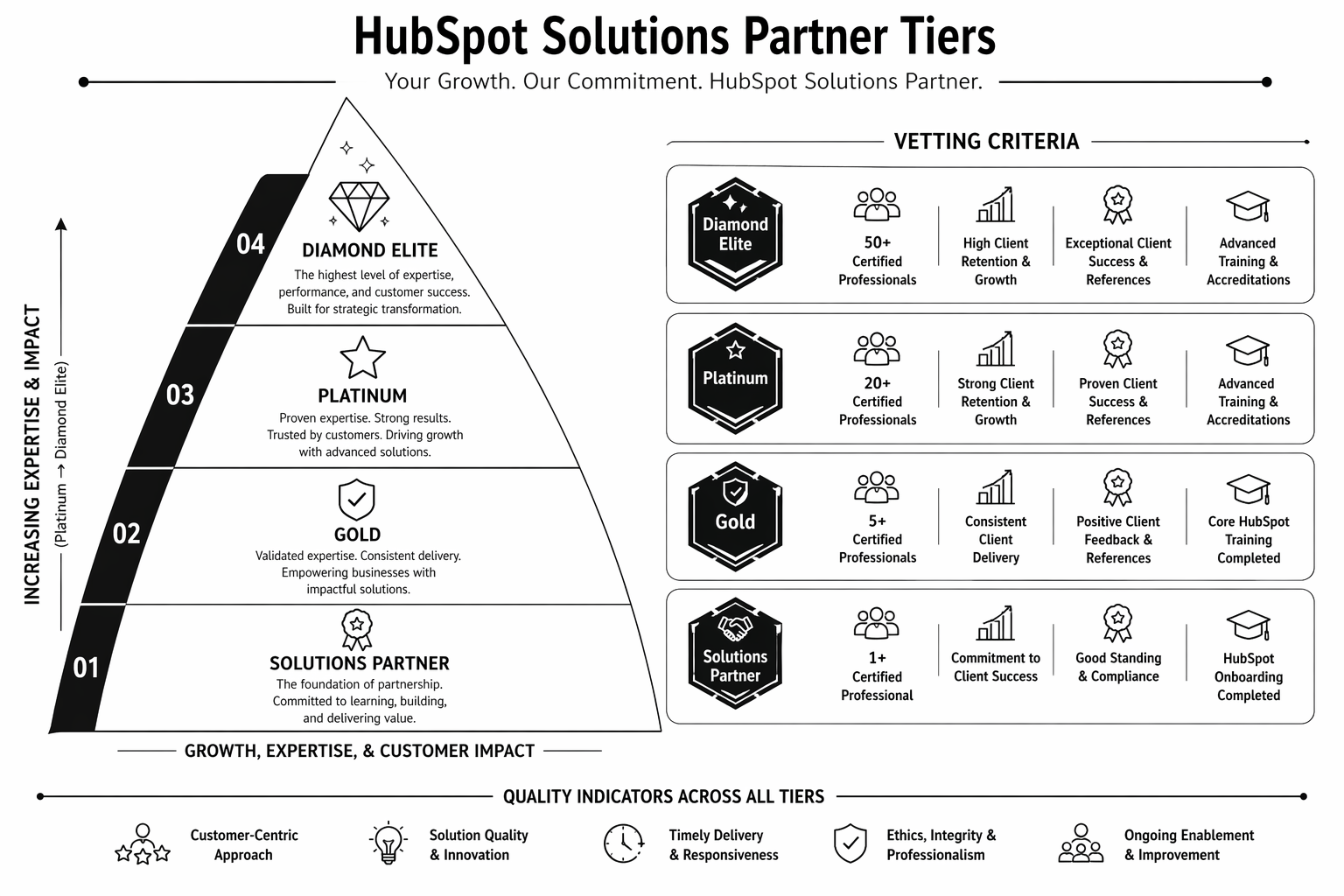
HubSpot Solutions Partner Tiers Explained

HubSpot’s official partner tier system:

  • Gold — Entry-level certification. Usually 1–5 people. Good for very basic implementations, single-module help.
  • Platinum — Mid-market focused. Typically 5–20 people. Strong for website builds, CMS work, most marketing automations.
  • Diamond — Enterprise focus. 20+ people. Strong across entire HubSpot stack. Premium pricing but capability justifies it.
  • Elite — Rare. Less than 20 worldwide. Top-tier implementation, training, custom development. £200k+ minimum projects.

Most teams should target Platinum partners for website/CMS work, Diamond if you have complex RevOps requirements.

Red Flags That Expose Weak Partners

  • Gold tier pitching for £80k+ projects. They lack the bench and depth. They’ll hire junior people or outsource, then you’ll carry the quality risk.
  • Portfolio showing only template setups. Not real builds. Agencies with depth have case studies, not screenshots.
  • Website mentions HubSpot once and nothing else. If HubSpot is not a major pillar of their practice, it’s not their focus.
  • Salesforce or Pipedrive expertise listed equally with HubSpot. CRM platforms are different. A generalist is not specialized.
  • Quoting a fixed timeline with no discovery phase. “12 weeks for your HubSpot migration” assumes they understand your scope. They don’t. Red flag.
  • No retainer support mentioned. HubSpot builds require ongoing care. Agencies that don’t offer retainers are implying “set and forget” is possible. It’s not.
  • “We build on Zapier/integromat instead of native workflows.” Third-party automation layers add cost, fragility, and vendor lock-in. Native workflows are the right pattern.

Questions That Expose Misalignment

“Walk us through your most complex HubSpot CMS Hub build. What was the CMS structure? How did you architect HubDB?” — Weak partners give generic answers. Strong partners have detailed opinions.

“Tell us about a HubSpot project that went wrong. What happened and how did you fix it?” — Experience surfaces here. “Everything goes smoothly” is a lie.

“What’s your approach to property mapping and data hygiene in HubSpot?” — Properties are the foundation. Sloppy mapping breaks everything downstream. Strong partners have a documented approach.

“Show us your retainer model. What’s included? What’s not? How do you prioritise requests?” — Good agencies have clarity. Bad ones make it up as they go.

“What’s your process for running smart content tests or multivariate experiments on HubSpot sites?” — HubSpot CMS has native A/B testing. If the agency doesn’t mention it or doesn’t use it, they’re treating CMS Hub like WordPress.

“Have you migrated from WordPress/Webflow to HubSpot? What was the URL strategy? How did you preserve SEO?” — Migration experience is a differentiator.

Pricing and Engagement Structures

Typical HubSpot website builds:

  • Small site (5–10 pages, basic CMS): £15k–30k
  • Growth-stage site (15–30 pages, HubDB, smart content): £40k–80k
  • Enterprise (30+ pages, complex RevOps, integrations): £80k–200k+

Retainers after launch: £1.5k–5k/month depending on scope, team size, and update velocity.

Red flags:

  • Project quotes without discovery phase built in.
  • Retainers below £1k/month (indicates minimal support).
  • Fixed-price with no change request process.
  • “Time-and-materials with no cap” (budget risk on your side).
Vetting Process: How to Actually Evaluate Partners

Step 1: Portfolio review. 5–10 projects minimum. Case studies with metrics, not screenshots. References from similar company stage/size.

Step 2: Reference calls. Talk to 2–3 past clients. Ask: Did they deliver on time? Did the implementation improve your metrics? Would you hire them again?

Step 3: RFP with clear scope. Send a detailed brief: current state, desired state, team composition, timeline expectations. See who asks clarifying questions vs. who submits a quote immediately.

Step 4: Discovery call quality. Best agencies do a deep discovery. Watch for:

  • Do they ask about your RevOps stack? Your CRM properties?
  • Do they understand your buyer journey?
  • Do they challenge your assumptions or just confirm them?

Step 5: Proposal evaluation. Look for:

  • Detailed scope and deliverables.
  • Phase breakdown with milestones.
  • Team composition (who’s building? who’s managing?).
  • Post-launch retainer included or separate?
  • Clear SLAs for response time and support.

Evaluating HubSpot agencies and need a second opinion? Our HubSpot specialists can review proposals and advise on fit. Book an agency evaluation call.

After You’ve Hired: Protect Your Project

  • Weekly syncs, not monthly. Catches issues early.
  • Staged payments. 33% discovery/planning, 33% build, 33% launch + training.
  • Design approval gate. You approve IA and designs before build starts. Changes after this point = scope creep.
  • Retainer scope in writing. How many hours per month? What’s included? What’s not?
  • Knowledge transfer. Before launch, the team should know how to run basic operations in HubSpot. Training is non-negotiable.

If you’re comparing platforms before choosing HubSpot, see HubSpot CMS vs WordPress to confirm fit first.

FAQ

Is a Platinum-tier partner enough for my HubSpot website?

For most B2B SaaS companies, yes. Diamond is premium if you have complex RevOps or enterprise needs, but Platinum delivers strong website and CMS builds.

What questions should I ask a HubSpot agency?

See the “Questions That Expose Misalignment” section above. Focus on specifics and past projects, not theoretical capability.

How do I know if a HubSpot agency is overcharging?

Compare proposals from 2–3 similar-tier agencies. If one quote is 2x+ higher with the same scope, ask why. Could be more experienced, could be padding.

Should I hire an agency or do HubSpot in-house?

If you have strong in-house ops and CRM expertise, in-house works. For most teams, agency is faster and reduces risk. Hybrid works too: agency for build, in-house for ongoing ops.

What’s the difference between a HubSpot agency and a general web agency?

HubSpot agencies specialise in CRM-native architectures, property mapping, and lifecycle design. General web agencies treat HubSpot like a CMS. Different discipline entirely.

Conclusion: The Right Partner Pays for Itself

HubSpot implementations that fail usually fail because of partner choice, not platform choice. The right Platinum or Diamond partner reduces risk dramatically and often delivers ROI in the first quarter.

Spend extra time on vetting. The partner you choose determines your project’s outcome as much as the platform does.

Need help evaluating agencies or choosing a HubSpot partner? Our team can advise on fit. Book a consultation.


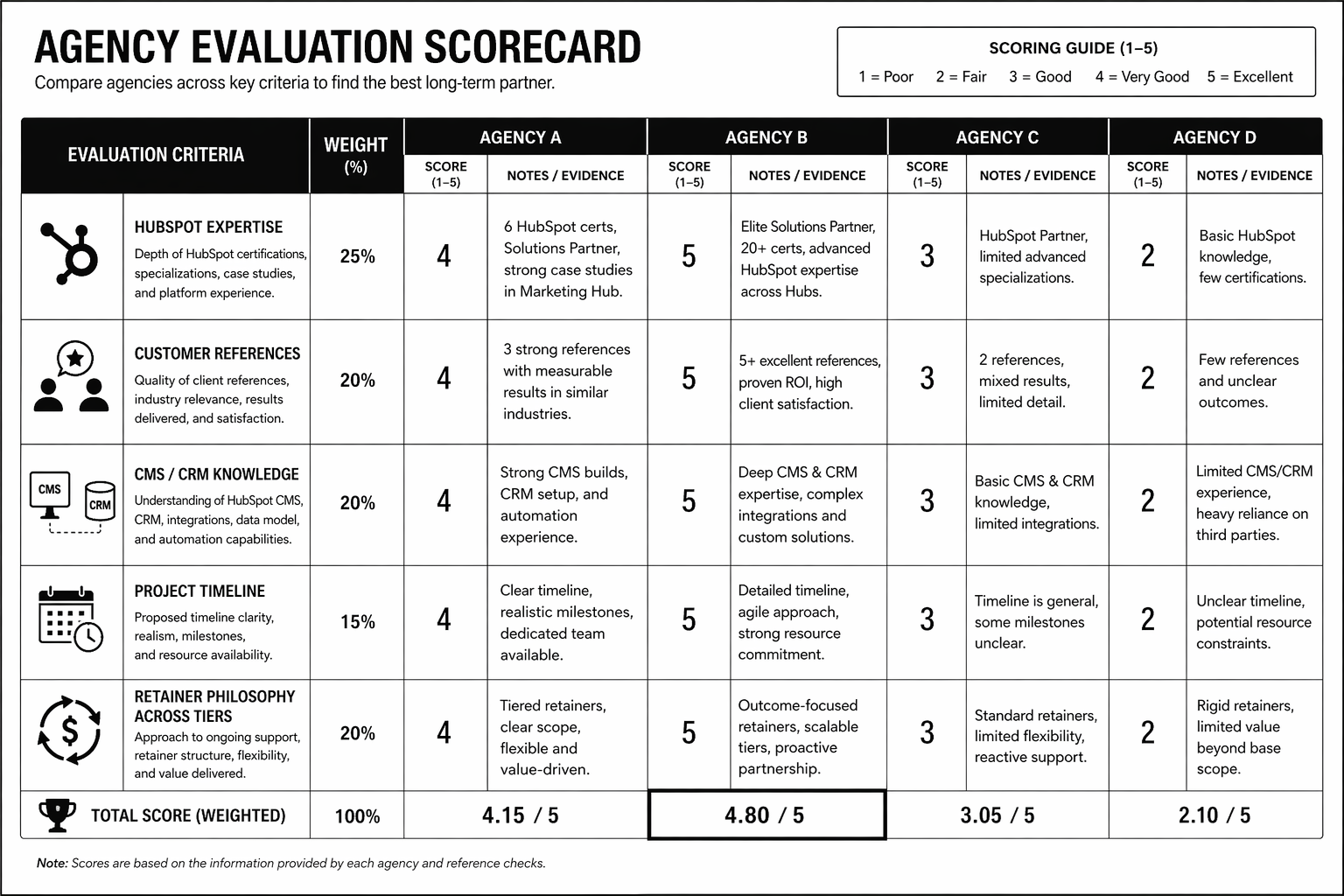
The HubSpot Agency Scorecard
— a detailed rubric to evaluate proposals and rank partner fit by Tier, capability, and cultural alignment.
That’s enough scrolling for now – chat to a Hubspot Expert today!

Contact Us

HubSpot Website Design: The 2026 Playbook for Growing Companies

Most HubSpot website design projects go wrong for the same reason: the website gets built like a WordPress site that happens to live on HubSpot. No HubDB. No smart content. No CRM-aware personalisation. No lifecycle-tied CTAs. Companies pay $3,000+ a month for CMS Hub Professional and use maybe 20% of its power.

If you’re on HubSpot — or considering it — this playbook shows how to build a site that earns its CMS licence. It’s written for marketing leaders, RevOps heads, and founders at companies doing $2M–$100M ARR who need their website to function as a closed-loop revenue engine, not a brochure.

What HubSpot Website Design Actually Is

HubSpot CMS Hub is a content management system with a CRM baked into it. That one sentence is why it exists and why it costs more than WordPress.

HubSpot website design is the practice of building marketing sites that use that CRM connection intentionally — where every form submission, page visit, and CTA click updates a contact record, triggers a workflow, and feeds lead scoring. Done well, the site itself becomes a revenue tool. Done badly, it’s a very expensive blog.

There are three tiers of CMS Hub:

  • Starter (~£21/month) — basic hosting, limited.
  • Professional (~£375/month) — smart content, A/B testing, SEO recommendations. The real floor for serious teams.
  • Enterprise (~£1,470/month) — memberships, adaptive testing, hierarchical teams. For enterprise-scale marketing.

Full pricing breakdown is in our HubSpot CMS Hub pricing guide.

Why HubSpot Website Design Matters in 2026

1. Closed-loop attribution is no longer optional. GA4 broke multi-touch attribution for a lot of teams. HubSpot’s native first-touch, last-touch, and linear attribution — tied directly to contacts — is now one of the cleanest ways to prove marketing ROI to a CFO.

2. Buyer journeys got longer. Gartner’s 2025 B2B buying research shows the average decision group is now 11 people. Static websites don’t keep up. HubSpot’s smart content and CRM-aware personalisation let you serve different messaging to cold visitors, known leads, and existing customers on the same page.

3. AI needs a data source. Every AI-powered personalisation or sales assistant tool depends on structured contact and engagement data. HubSpot CRM is that source of truth. When your website is wired into HubSpot, AI actually has something to work with. Our AI automation services team builds on top of this constantly.

How HubSpot CMS Hub Works (The Real Architecture)

There are six layers worth knowing. If your current HubSpot site is missing three of them, it’s underbuilt.

1. Theme and Design System

HubSpot themes are the parent design framework. A good one has a tokenised design system — typography, spacing, colour variables — exposed in global theme settings so non-developers can make safe brand updates.

2. Modules

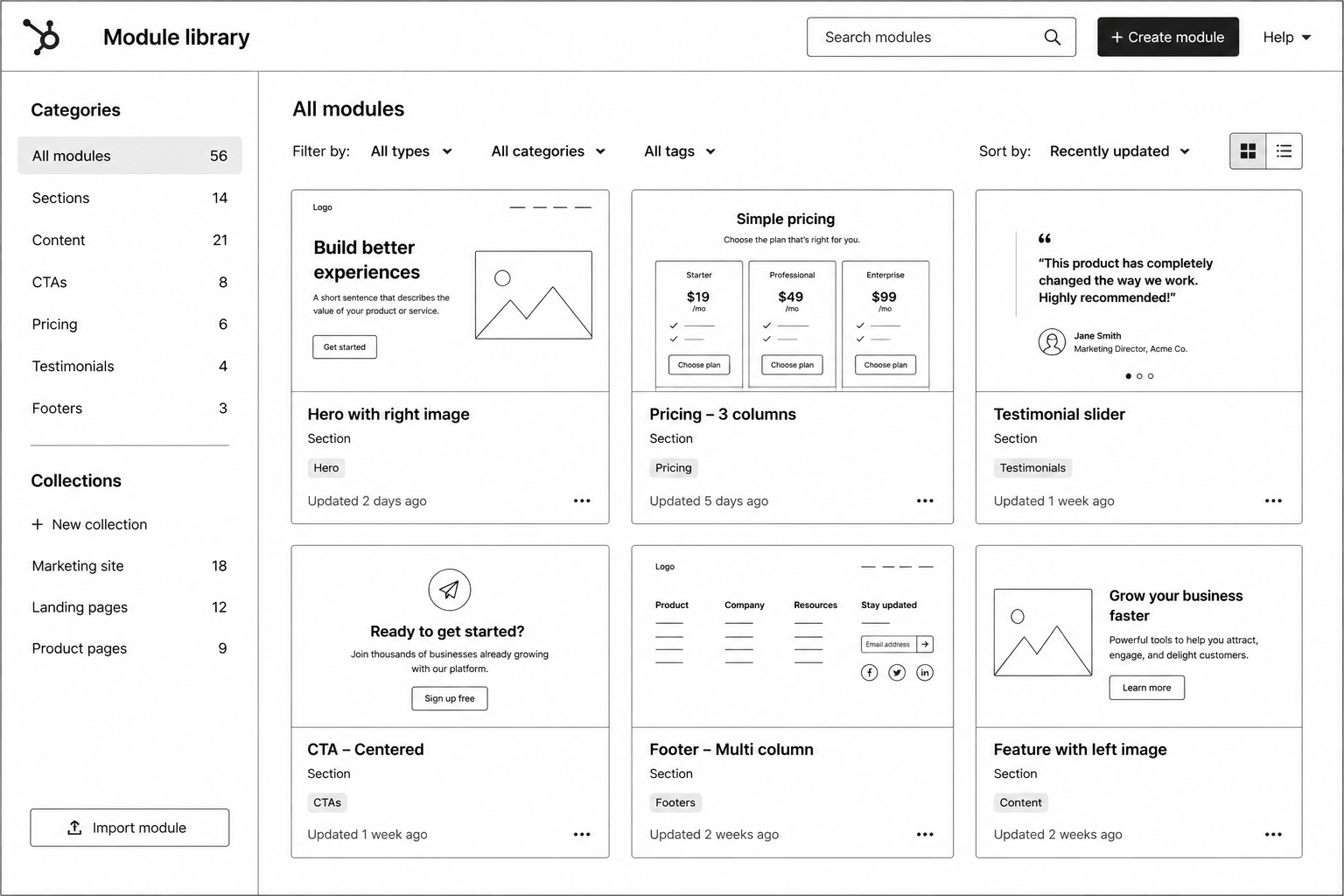
Reusable page sections. Hero, testimonial carousel, pricing table, logo wall, etc. Well-built modules have editable fields for copy, image, CTA, and variation. Marketing ships pages without engineering.

3. Templates

Pre-configured combinations of modules for specific page types (landing, blog, resource, pricing). Templates enforce layout consistency at scale.

4. HubDB

HubSpot’s native database. Powers dynamic pages like case studies, integrations directories, team members, event calendars. This is the feature most HubSpot sites never use, and it’s the single biggest unlock.

5. Smart Content

Rules-based content variations based on list membership, lifecycle stage, country, device, or referral source. A CFO visiting from a Demandbase-identified account can see different hero copy than a cold visitor.

6. CRM Integration

Forms, pop-ups, chatbots, and CTAs all write directly to contact records. Workflows fire on form submission. Lifecycle stages auto-update. Lead scoring reacts to page views. This is where HubSpot earns its price tag.

Step-by-Step Guide: Designing a HubSpot Site That Converts

Here’s the exact process we run for a new HubSpot build.

Step 1 — Revenue architecture first. Before design starts, map the ICP, lifecycle stages, required properties, and lead-scoring model in HubSpot CRM. The site has to feed this.

Step 2 — Information architecture. Sitemap built around buyer questions, not internal org chart. Pillar pages for primary topics. Hub pages for solutions.

Step 3 — Module-first design. Design 15–20 reusable modules in Figma. Every page is built from these. No bespoke one-off pages.

Step 4 — Smart content map. Identify 3–5 high-value pages where smart content makes sense. Typically: homepage, pricing, key solution pages. Define variants by lifecycle stage.

Step 5 — HubDB schemas. Design the tables before building them. Case studies, integrations, changelog. Include filter fields.

Step 6 — Development. Build the theme, modules, templates, and HubDB-powered pages. Wire forms to workflows.

Step 7 — Lifecycle enablement. CTA blocks that swap based on lifecycle stage. Gated content tied to smart forms that only ask for new info.

Step 8 — Launch + instrument. Attribution reports, conversion dashboards, and weekly performance reviews built in HubSpot reporting.

Running HubSpot already and not seeing the conversion impact you expected? We run free 45-minute HubSpot audits for growth-stage B2B teams. Book yours here — we’ll show you three specific gaps costing you pipeline.

Best Tools and Stack for HubSpot Sites in 2026

  • Zerys or ClearScope — Content optimisation for HubSpot blog.
  • Databox — Executive dashboards pulling from HubSpot + GA4 + ad platforms.
  • Segment — For companies needing cleaner event data than HubSpot’s native tracking.
  • Clearbit (now HubSpot Breeze Intelligence) — Enrichment on form fills.
  • 6sense or Demandbase — Intent data layered on top of HubSpot contact records.
  • Looping in a specialist — The average in-house marketer uses ~30% of HubSpot. A HubSpot development partner gets you to 80%+.

Common HubSpot Website Design Mistakes

1. Treating the CMS like WordPress. Page after page of static content, no HubDB, no smart content. You’re paying enterprise prices for a brochure.

2. Forms that don’t map to CRM properties. Submissions come in as lead chaos. Sales complains the data’s dirty. Fix: map every form field to a specific CRM property before building the form.

3. No lifecycle-aware CTAs. Returning customers see “Book a demo” on every page. Fix: rule-based CTA blocks that swap by lifecycle stage.

4. Theme lock-in to a single developer. Custom theme that only the original agency can modify. Fix: themes should follow HubSpot’s design manager best practices so any certified partner can pick them up.

5. No redirect strategy on migration. Teams moving from WordPress to HubSpot lose 20–40% of organic traffic because they skip redirect mapping. Our WordPress to HubSpot migration guide covers this.

FAQ

Is HubSpot CMS better than WordPress?

For B2B companies already on HubSpot Marketing or Sales Hub, yes — the native CRM integration is worth the price. For content-heavy sites with no CRM dependency, WordPress is cheaper. Full comparison in our HubSpot CMS vs WordPress post.

How much does a HubSpot website design project cost?

Typical range: £20k–£80k / $25k–$100k for a marketing site with smart content and HubDB. Enterprise builds with full RevOps integration run £80k+.

Do I need HubSpot certified developers?

For anything beyond basic template edits, yes. HubL (HubSpot’s templating language), serverless functions, and CMS Hub architecture require specific expertise.

How long does a HubSpot site build take?

6–12 weeks for a new build. 10–16 weeks for a migration from WordPress. Longer if you’re rearchitecting CRM simultaneously.

Can I use HubSpot CMS without Marketing Hub?

Technically yes, but you lose 60% of the reason to use it. The CRM-content integration is the product.

Conclusion: Build HubSpot Like It’s a Revenue System

A HubSpot site built like a WordPress site is overpriced. A HubSpot site built like a RevOps instrument — smart content, HubDB, lifecycle-aware CTAs, forms wired into workflows — pays back the licence inside a quarter.

If you’re investing in HubSpot, invest in it properly. That means a design and development partner that builds for the CRM connection, not around it.

Our HubSpot development team works with SaaS and B2B brands in the UK and USA to build and rebuild HubSpot sites that actually drive pipeline. Book a free HubSpot audit — 45 minutes, and we’ll show you exactly where your current site is leaking leads.


The HubSpot Website Audit Checklist
— 42-point teardown we use on every client audit, covering CMS architecture, smart content, CRM hygiene, and lifecycle-aware design.

That’s enough scrolling for now – chat to a Hubspot Expert today!

Contact Us

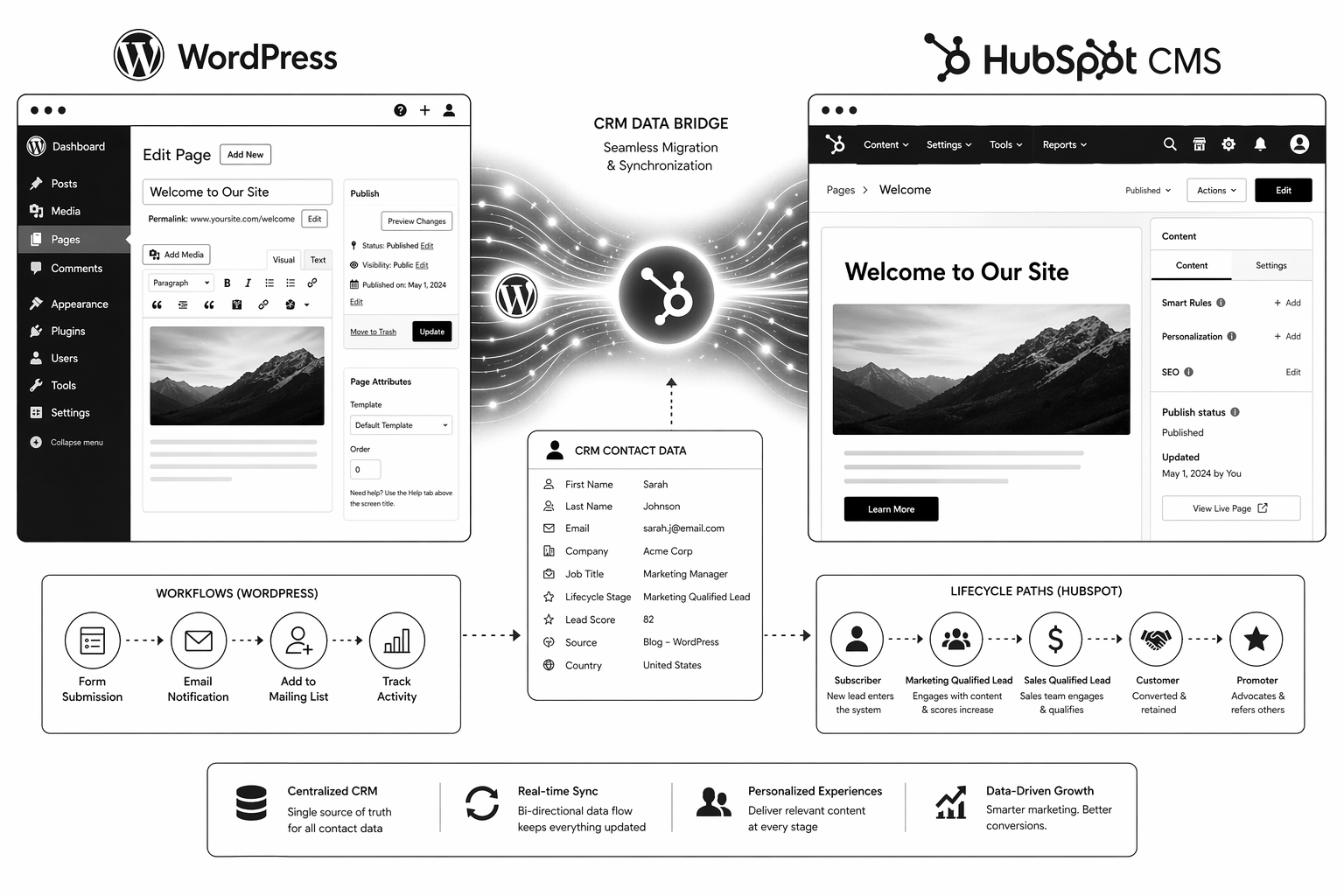
How to Migrate from WordPress to HubSpot CMS (Without Losing Traffic)

WordPress to HubSpot CMS migrations are one of the most under-scoped projects in B2B SaaS. Teams see HubSpot CMS Hub as a drop-in WordPress replacement. It’s not. It’s a fundamentally different system with different data models, different CRM integration patterns, and different SEO implications.

This guide covers realistic scope, the process that protects traffic, and where most teams underestimate complexity. Written for marketing leaders and RevOps heads planning the move.

Why WordPress to HubSpot Migrations Are Bigger Than You Think

WordPress is a content-first platform. HubSpot is a CRM-first platform that happens to have a CMS. The difference matters for:

  • Data model. HubSpot requires properties, contact records, and lifecycle mapping. WordPress is content records + optional metadata.
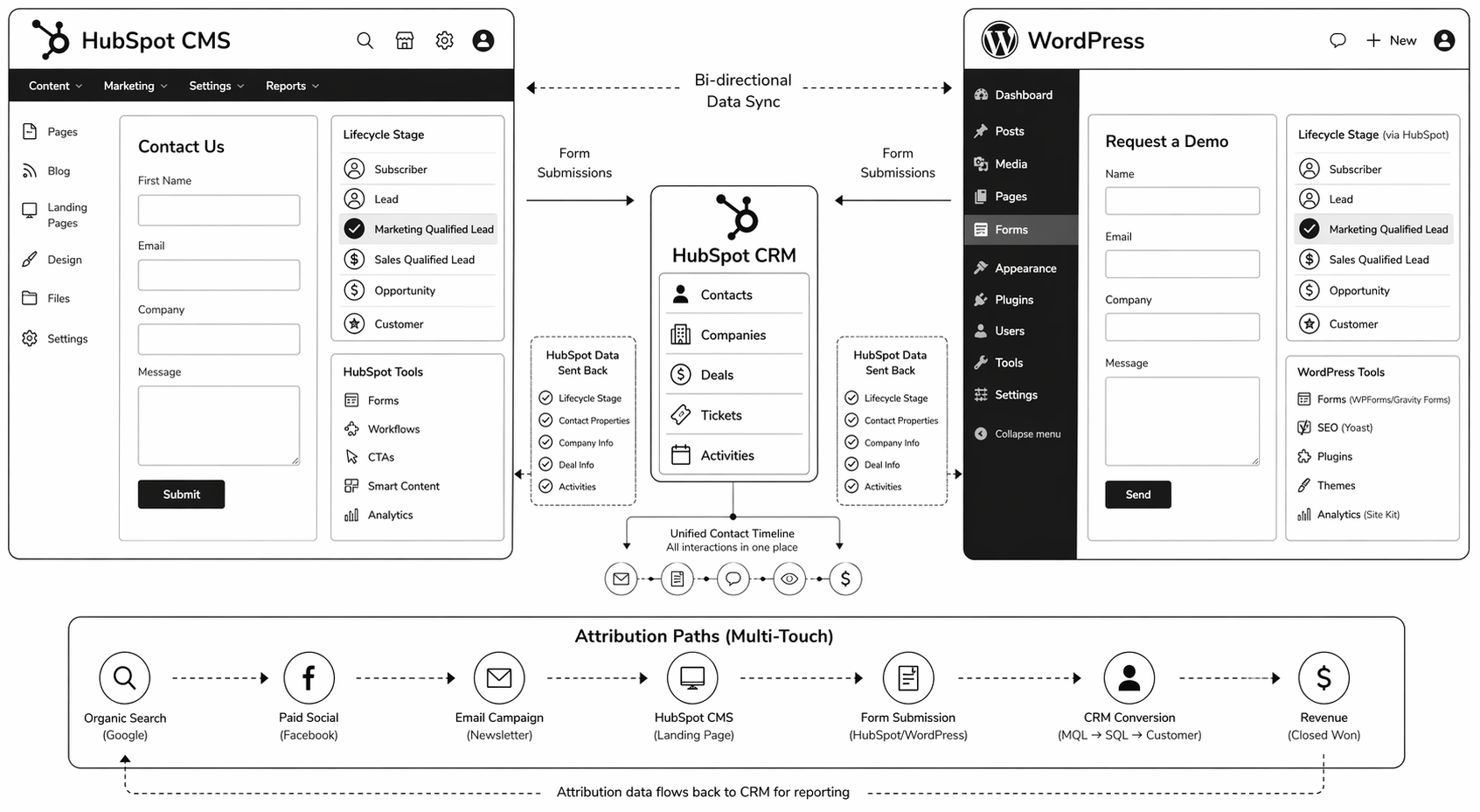
  • Form architecture. WordPress forms go to an email or third-party service. HubSpot forms feed directly into CRM. This requires property mapping.
  • CMS scale. HubSpot CMS performs well up to 500–1000 CMS items. Beyond that, editing can feel slow.
  • URL structure. URL preservation is harder on HubSpot than Webflow because the CMS model is different.
  • Team workflow. WordPress teams often use plugins and custom workflows. HubSpot mandates a specific RevOps structure.

With planning, none of these are blockers. Without planning, they compound into a multi-quarter nightmare.

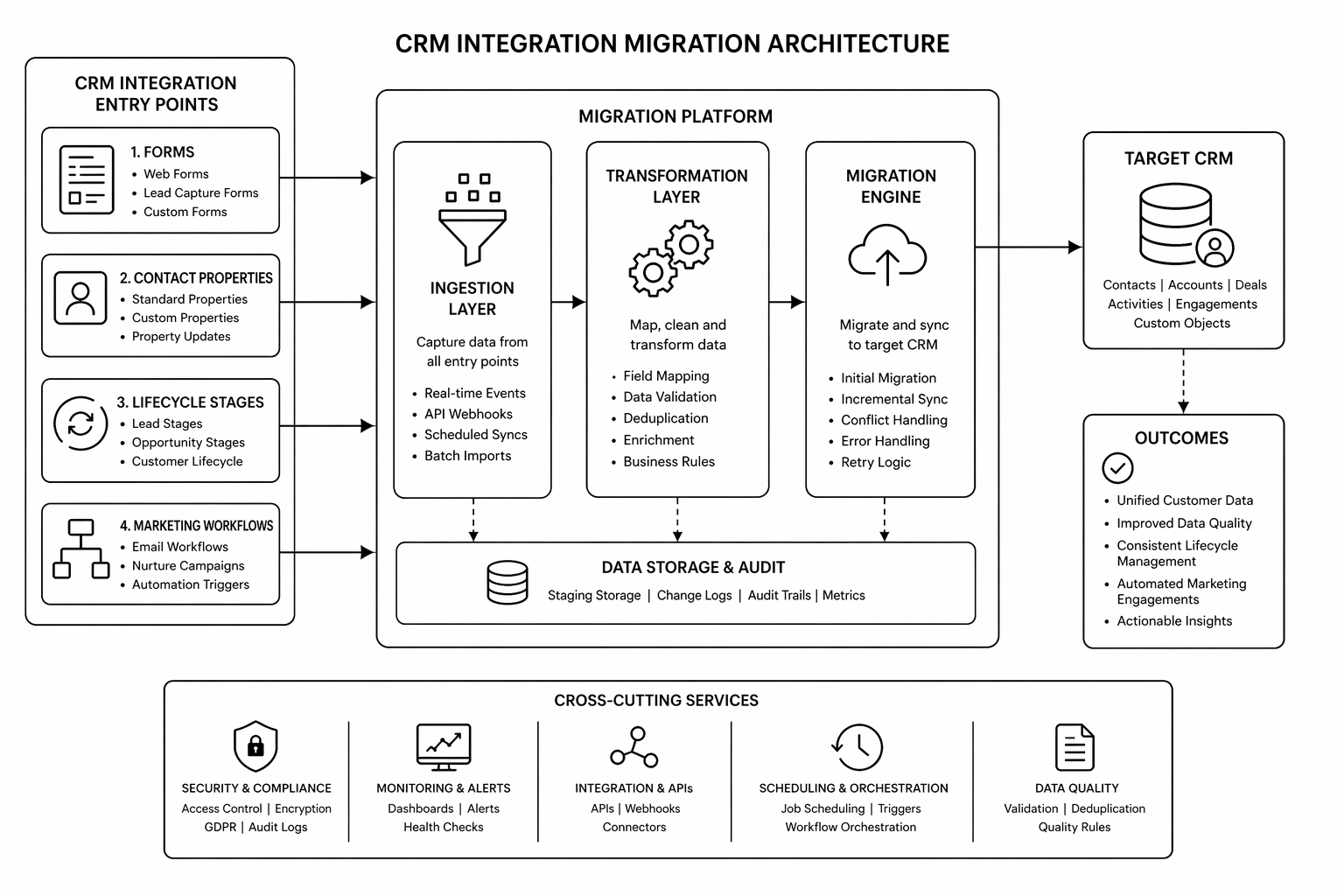
Pre-Migration: The Audit Phase (Weeks 1–3)

1. Content audit. How many pages? How many blog posts? Which pages drive traffic? Which rank for keywords? Export this to a spreadsheet.

2. Current metadata audit. Export all meta titles, descriptions, and existing canonicals from WordPress. You’ll need to reapply these in HubSpot.

3. Form audit. How many forms do you have? What fields do they collect? Where do submissions go currently? This maps to HubSpot CRM property creation.

4. Integration audit. What plugins/integrations does WordPress currently connect to? Which of these are critical? Which can be replaced by HubSpot native features?

5. URL structure decision. Keep existing URL structure or restructure? URL changes cost SEO link equity. Only restructure if the benefit outweighs the cost.

Planning Phase: CRM Architecture (Weeks 4–6)

6. HubSpot property mapping. Every form field should map to a specific CRM property. Every contact data point should have a designated property. Document this before building anything in HubSpot.

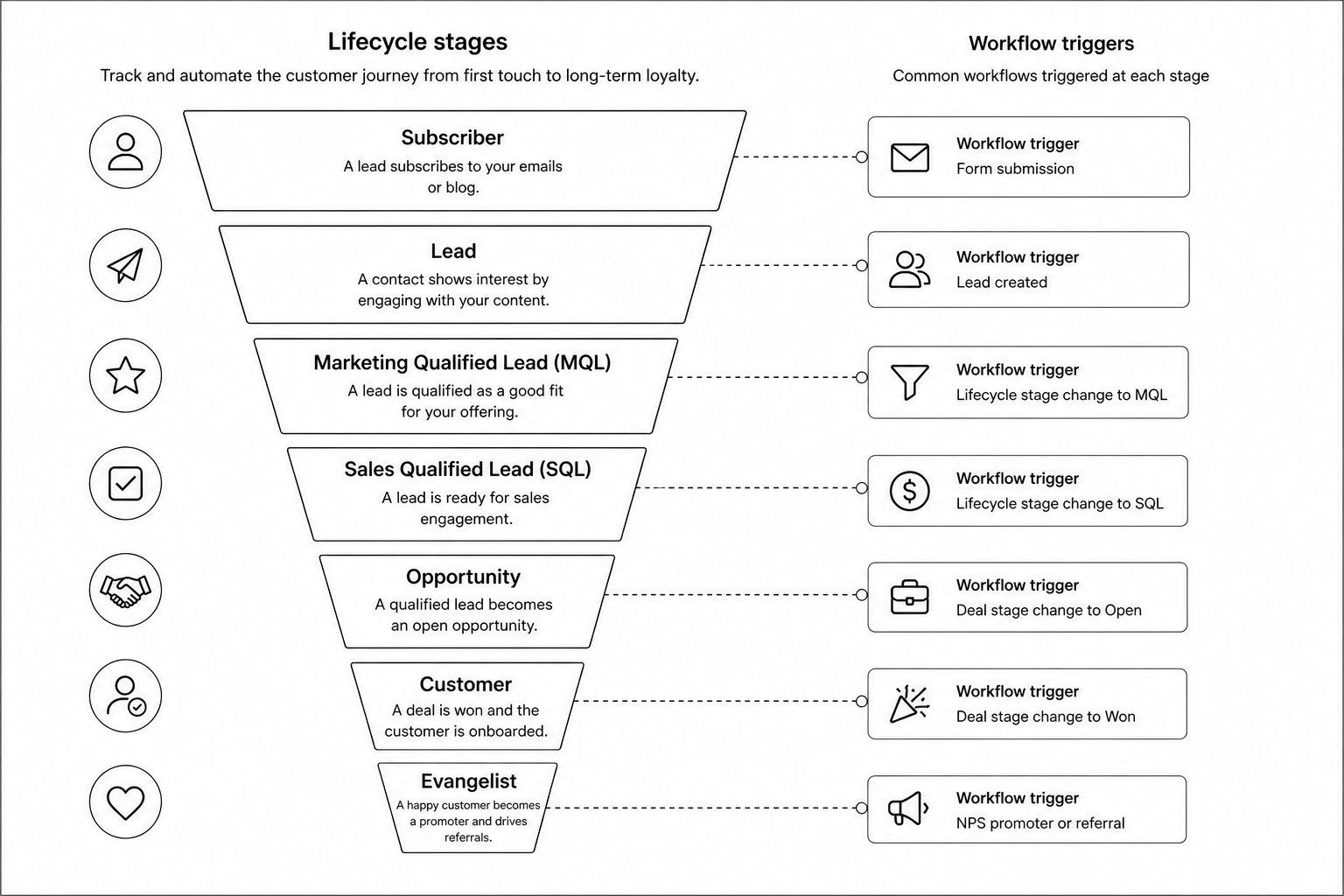
7. Lifecycle model alignment. Where do leads enter the funnel? Which contacts are qualified for what? This determines workflows, smart content, and reporting.

8. HubDB schema design. Blog, case studies, integrations directory, team members — anything dynamic should use HubDB tables. Design the schema before building.

9. 301 redirect strategy. URL mapping from old WordPress URLs to new HubSpot URLs. Use one-to-one redirects. Never redirect high-traffic pages to the homepage.

Build Phase: Implementation (Weeks 7–14)

10. HubSpot theme and modules. Build the design system and reusable modules first. All pages should use these — no bespoke one-off designs.

11. Content migration. Import blog posts, pages, and assets. Use HubSpot’s content import or manual migration depending on volume. Test thoroughly.

12. Form and workflow setup. Build each form with correct property mapping. Set up workflows to fire on form submission. Test the full flow with real submissions.

13. Smart content rules. Create lifecycle-aware content variations for key pages (homepage, pricing, key solutions).

14. SEO technical setup. Meta titles and descriptions for every page. Schema markup. Canonical tags. Sitemap generation. Robots.txt configuration.

QA Phase: Pre-Launch Validation (Weeks 15–16)

15. Redirect testing. Spot-check 100+ old URLs. Verify they land on the correct new page with no chain redirects.

16. Form submission testing. Every form should post contact data correctly to CRM and trigger intended workflows.

17. Analytics and event mapping. GA4 event structure should match new page hierarchy. Test tracking on key conversion pages.

18. Mobile and browser testing. All key pages on mobile, tablet, Chrome, Safari, Firefox, Edge.

19. Lighthouse and Core Web Vitals. All green on key pages before launch.

Launch Phase (Week 17)

20. Pre-cutover. New Search Console property created, sitemap submitted, DNS cutover scheduled.

21. DNS change. Point domain to HubSpot. Ideally Tuesday or Wednesday morning.

22. Monitoring. First 48 hours: constant attention. Watch for crawl errors, 404s, traffic anomalies.

Post-Launch Phase (Weeks 18–24)

23. Traffic monitoring. Traffic dips are normal weeks 2–4. Recovery by 60–90 days is typical. If slower, audit redirects and technical setup.

24. Ranking recovery. Pages should recover original rankings. If not, check for schema breaks, meta changes, or internal linking issues.

25. CRM data quality. Audit form submissions for data anomalies or missing properties. Fix mapping issues.

Planning a WordPress to HubSpot migration? The right partner maps pre-move risk and locks architecture before building. Book a HubSpot migration audit.

Common Mistakes

1. Starting build before CRM architecture is locked. Three weeks into development, team realizes the property model is wrong. Rebuild required. Fix: spend extra time in planning phase.

2. Misaligning URL structure. Team changes URLs for “cleaner paths” without redirect strategy. Traffic tank and link equity lost. Fix: preserve old URL structure whenever possible.

3. Not testing forms before launch. Launch day, forms stop submitting. Sales team notices first. Fix: week of form testing in staging with real data.

4. Underestimating content audit. 200 pages exists in WordPress. Team assumes it can be migrated in a day. Reality: 3 weeks of property mapping, form field alignment, and data cleanup. Fix: budget time accurately.

5. Weak internal linking strategy. Pages migrated, but no updated internal linking. Blog never compounds. Fix: audit and update internal links during migration.

Also compare with HubSpot CMS vs WordPress to confirm platform fit before you start.

FAQ

How long does WordPress to HubSpot migration take?

8–16 weeks depending on content volume, complexity of CRM data model, and integration dependencies. Most migrations sit at 12 weeks.

Will I lose traffic?

A 2–4 week dip is normal. With proper redirects and content parity, most sites recover within 60–90 days. Losses beyond 30% suggest a technical issue.

Can I keep WordPress for a while and migrate gradually?

You can run both systems in parallel for 2–4 weeks during launch to catch issues. Running indefinitely creates maintenance debt and confusion for visitors.

Do I need a HubSpot-certified partner?

Not essential, but helpful. HubSpot-specialized teams understand HubDB schema design, property mapping, and workflow architecture faster than generalists.

What if my current WordPress URLs have lots of backlinks?

Preserve URLs through 301 redirects. The backlinks stay valuable when the URL redirects correctly to the topically similar new page.

Conclusion: Migration Success Requires Process, Not Heroics

WordPress to HubSpot migrations fail when teams skip planning or underestimate scope. They succeed when the team spends the first third of the project on architecture and redirect planning, not on building.

Use this framework. Your margins on the project depend on it.

Need guidance through the process? Our HubSpot development team has migrated 30+ B2B SaaS sites. Book your migration audit.


The WordPress to HubSpot Migration Playbook
— a detailed roadmap covering architecture decisions, CRM schema design, and launch monitoring.

That’s enough scrolling for now – chat to a WordPress Expert today!

Contact Us

HubSpot CMS Hub Pricing: Is It Worth It in 2026?

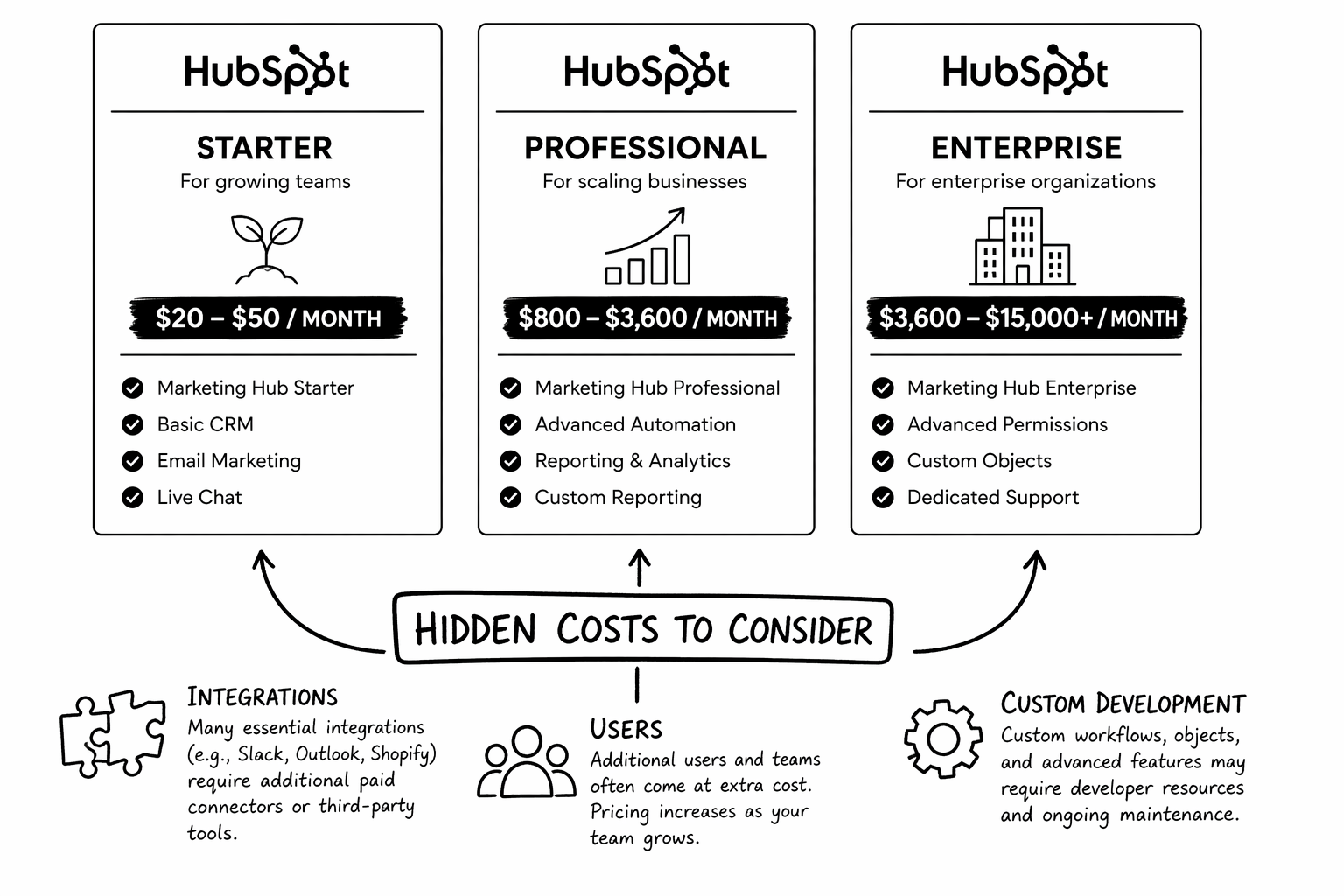
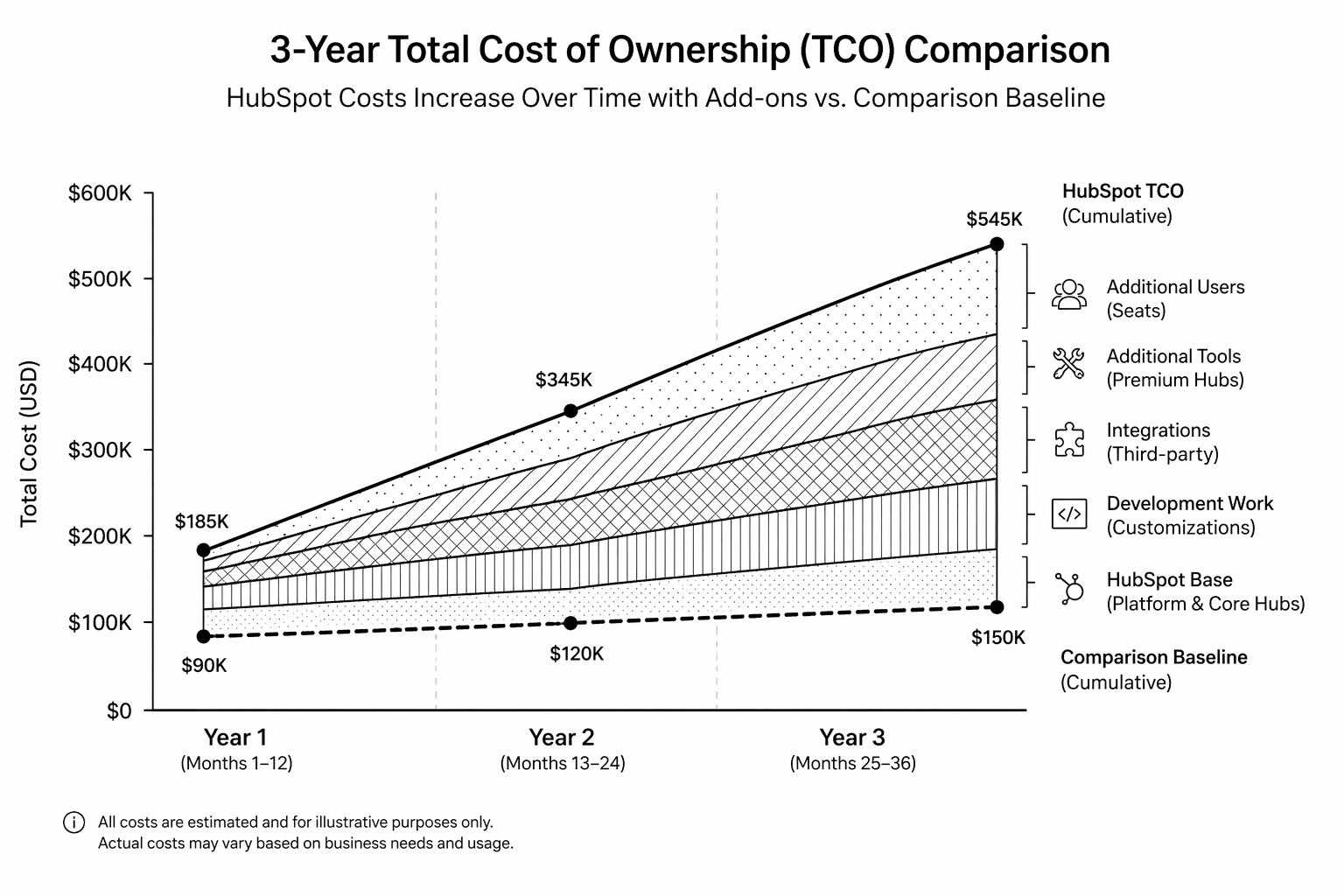
HubSpot CMS Hub pricing looks simple on their website: Starter (~£21/month), Professional (~£375/month), Enterprise (~£1,470/month). Teams see that and think “OK, we budget £400/month.”

Then they go live. Six months in, they’ve added users, custom workflows, integrations, and development work. Total bill is 3–4x the original estimate. This guide covers real HubSpot CMS Hub pricing in 2026 — the platform costs, the hidden costs, and whether it delivers ROI compared to WordPress or Webflow.

HubSpot CMS Hub Tiers: Baseline Costs

  • Starter (~£21/month or ~$25) — Basic hosting, landing pages, no CRM integration worth mentioning. Not for serious use.
  • Professional (~£375/month or ~$500) — Smart content, A/B testing, CMS Hub + CRM integration. This is the real starting point for B2B teams.
  • Enterprise (~£1,470/month or ~$2,000) — Priority support, advanced features, membership sites. For enterprise-scale marketing.

Annual cost on Professional: ~£4,500. Sounds reasonable. But wait.

Hidden Costs That Add Up Fast

1. Additional CRM users. Each CRM user seat costs £50–120/month. A team of 5 marketing + sales people using the CRM: +£4,000–7,000/year.

2. Marketing Hub add-ons. Email marketing, automation, landing pages, ads tools often require Marketing Hub Professional tier as a prerequisite. Add £400–1,000/month.

3. Third-party integrations. Clearbit enrichment, 6sense intent data, Demandbase, Databox — each integration costs £100–500/month.

4. Development and customisation. Custom HubL templates, serverless functions, workflows — often £2,000–8,000 in implementation, then ongoing maintenance.

5. Data overage. Contact overage charges if you exceed your plan’s contact limit. Can run £50–200/month depending on growth.

6. Professional services. HubSpot consulting, training, onboarding: £5,000–50,000 depending on scope and partner tier.

Real Year-One Cost Range (Professional Tier):

  • Lean setup: CMS Hub Professional only = £4,500–5,000
  • Typical setup: CMS Hub + Marketing Hub Pro + 2–3 integrations + basic dev work = £15,000–25,000
  • Mature setup: CMS Hub + Marketing Hub + Sales Hub + multiple integrations + custom dev + consulting = £40,000–80,000+

HubSpot CMS vs WordPress vs Webflow: True Cost

WordPress (Year One): Self-hosted (£50–200) + premium theme (£200–400) + plugins (£500–2,000) + development/customisation (£5,000–20,000) = £5,750–22,600. Requires strong in-house technical ownership for ongoing care.

Webflow (Year One): Platform (£180–240 annually) + custom build (£8,000–60,000) = £8,180–60,240. Lower operational overhead post-launch.

HubSpot CMS Hub (Year One): Platform (£4,500–1,470/month) + add-ons, integrations, dev work (£10,000–75,000) = £14,500–87,000+. Highest up-front cost but tightest CRM alignment if B2B SaaS is your model.

HubSpot pricing is highest up front but lowest operational drag long-term if your team is CRM-heavy. WordPress is cheapest initial but highest maintenance debt. Webflow is sweet spot for speed without long-term ops complexity.

When HubSpot CMS Pricing Justifies Itself

HubSpot CMS ROI equation: CMS cost + integration cost + dev cost should be less than the value of better attribution, faster campaign iteration, and higher lead conversion.

It justifies itself when:

  • You already use HubSpot CRM for sales/marketing, so the CMS is an incremental cost, not a new platform.
  • You have 50+ MQLs/month and attribution directly impacts budget decisions.
  • Your team runs frequent A/B tests and needs CMS-native testing.
  • You need smart content and lifecycle-aware experiences.

It doesn’t justify itself when:

  • You’re a content-heavy publisher with minimal CRM use (use WordPress or Webflow instead).
  • You don’t have budget or team depth for integrations and custom work.
  • You’re cost-optimising and CRM integration is low-priority.

Evaluating HubSpot CMS Hub for your team? Our team can map realistic costs and ROI before implementation. Book a HubSpot pricing consultation.

FAQ

Is HubSpot CMS Hub cheaper than WordPress?

Usually no in Year One. Usually yes by Year Three if you account for WordPress maintenance, security, and plugin sprawl. HubSpot is “expensive platform, cheap ops.” WordPress is “cheap platform, expensive ops.”

Can I start on Starter tier and upgrade later?

Technically yes, but Starter is limiting. Most teams outgrow it in 2–3 months and upgrade to Professional. Budget for Professional from the start.

What’s included in Enterprise tier?

Priority support, advanced features like memberships and custom role management. For most B2B teams, Professional is sufficient. Enterprise is for large companies with complex requirements.

Do I need Marketing Hub to use CMS Hub?

No, but you lose 50% of the value without it. CMS Hub alone is just hosting. CMS Hub + Marketing Hub integration is where the ROI lives.

How do I forecast HubSpot costs accurately?

Audit current stack and integration needs, count team users who’ll need CRM access, identify custom development needs, get partner quotes for implementation. Build conservatively — hidden costs will emerge.

Conclusion: HubSpot Pricing Is Front-Loaded, Not Hidden

HubSpot CMS Hub is expensive compared to WordPress or Webflow. But it’s not hidden expensive — it’s explicit. The ROI comes from tighter marketing-sales alignment and better attribution, not from the platform itself.

If B2B SaaS is your model and CRM alignment matters, HubSpot usually pays for itself inside 18 months. If you’re a content publisher or early-stage team, pick Webflow or WordPress instead.

Need help forecasting costs for your team? Our HubSpot specialists model total cost before you commit. Book a pricing review.


The HubSpot vs WordPress TCO Calculator
— a practical worksheet to model software, maintenance, and team-time cost over 36 months for each platform.

That’s enough scrolling for now – chat to a Hubspot Expert today!

Contact Us

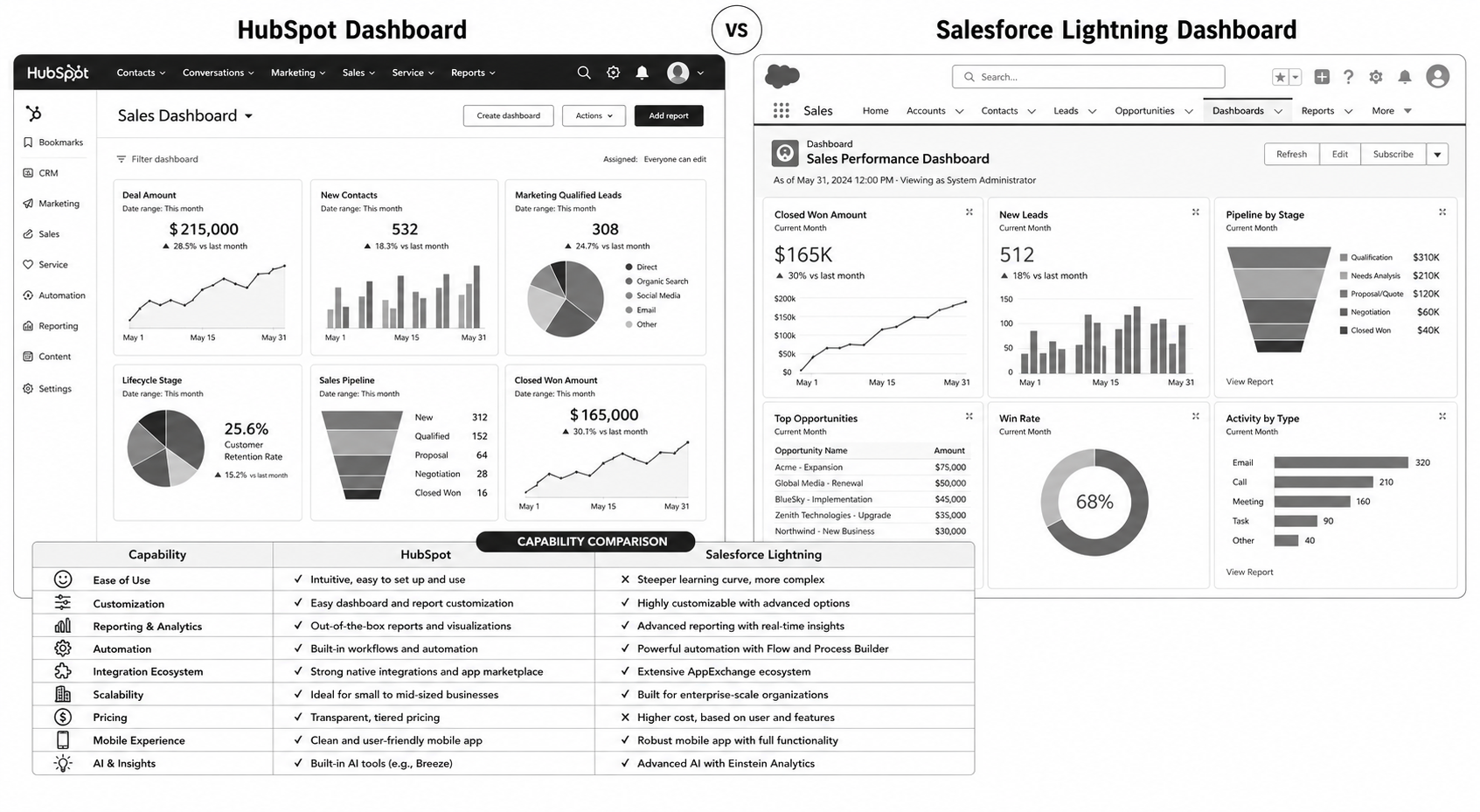
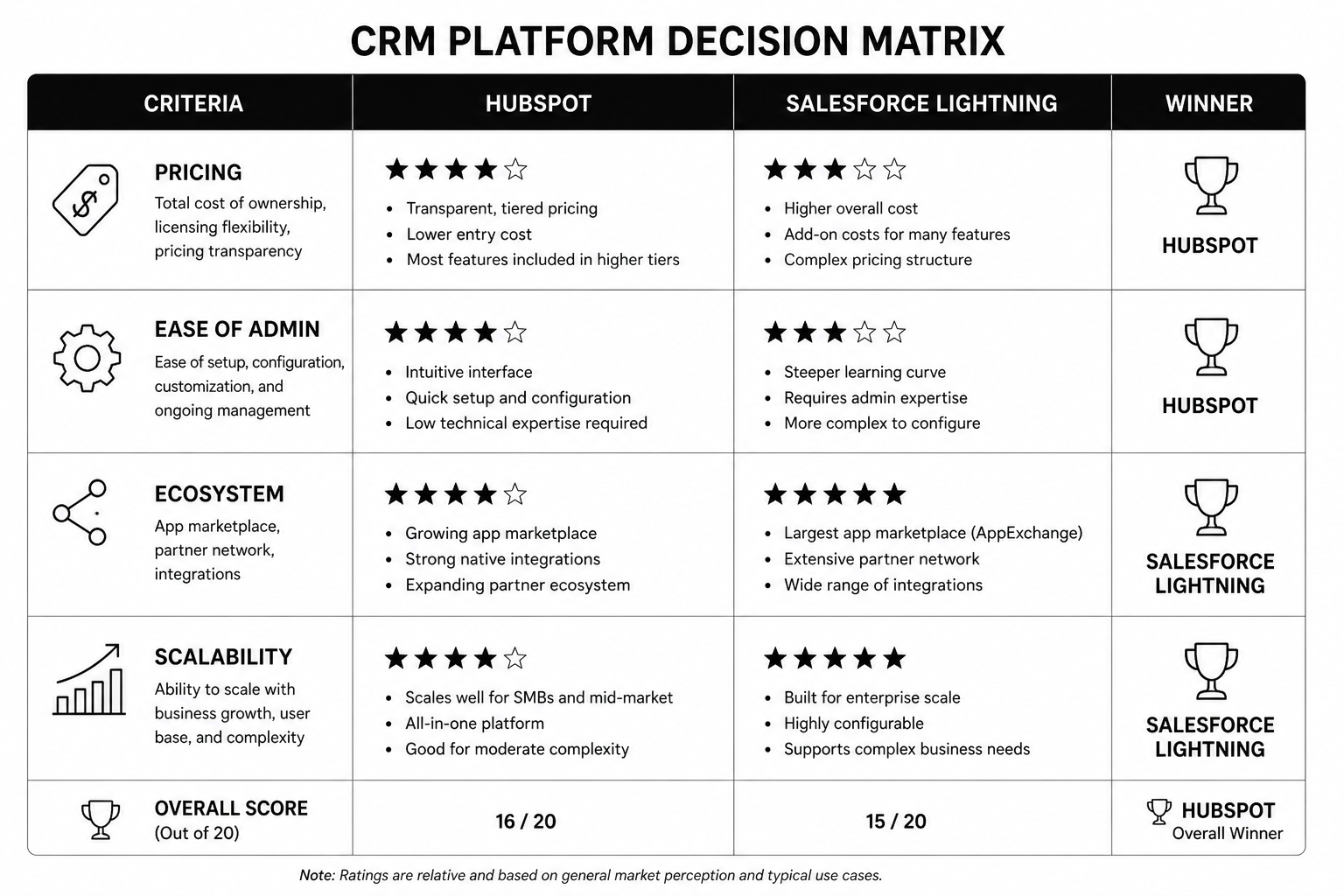
HubSpot CMS vs WordPress: Which Is Better for B2B SaaS in 2026?

The HubSpot CMS vs WordPress decision is one of the highest-leverage choices a B2B SaaS marketing team makes. It affects content velocity, CRM data quality, attribution confidence, and how quickly pipeline insights can turn into page-level changes.

Most comparisons treat this like a template battle. It is not. In 2026, this is a systems question: do you want a tightly integrated revenue platform, or a flexible CMS stack you can assemble yourself?

The Core Difference

WordPress is a highly extensible CMS that can connect to almost anything. HubSpot CMS is a CRM-native CMS designed to work as part of one growth system. WordPress gives freedom. HubSpot gives alignment.

  • WordPress strength: ecosystem breadth and custom flexibility.
  • HubSpot strength: lifecycle-aware content, native attribution, and cleaner operations.
  • B2B SaaS reality: most teams need execution speed and data consistency more than endless plugin optionality.

Pricing and TCO: What You Actually Pay

WordPress usually looks cheaper on paper: low hosting costs, open-source core, low-cost themes. But B2B SaaS teams often add premium plugins, analytics layers, form tools, ABM tooling, and maintenance retainers that increase total cost over time.

HubSpot CMS has a higher upfront platform cost but reduces tool sprawl and integration overhead if you are already inside HubSpot for CRM and marketing automation. The cost is concentrated, but execution is often cleaner.

If you need exact tier-level breakdowns, use our HubSpot CMS Hub pricing guide alongside this comparison.

Marketing and Sales Alignment

This is where HubSpot CMS vs WordPress becomes less debatable for many SaaS teams. HubSpot CMS is built for closed-loop operations. Form activity, page engagement, lifecycle updates, and campaign attribution live in one record.

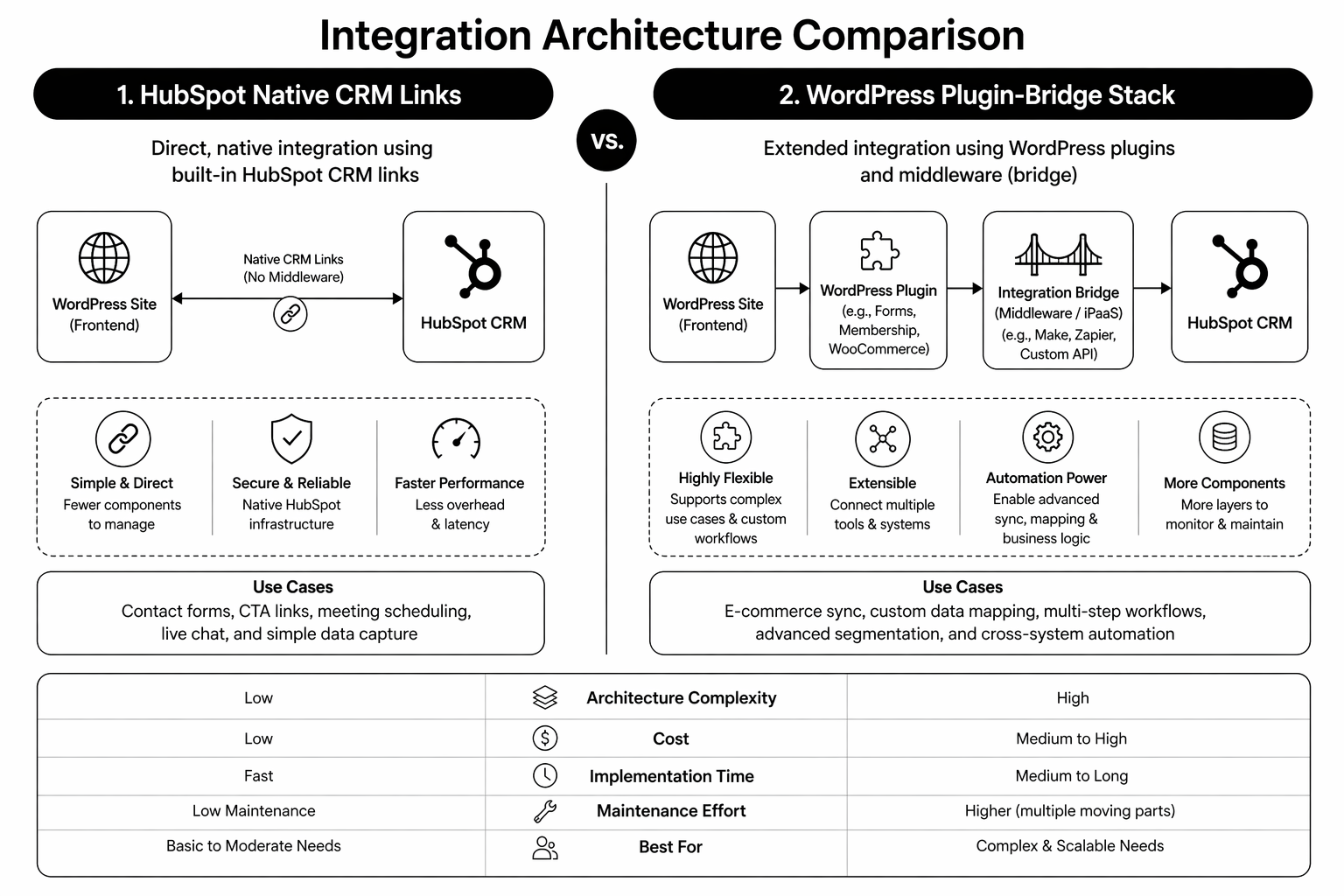
WordPress can replicate this with integrations, but each additional connector adds failure points. If marketing and sales alignment is already fragile, a stack that needs constant integration maintenance usually makes it worse.

SEO and Content Performance

Both platforms can rank very well. WordPress has stronger plugin-level SEO tooling variety. HubSpot offers robust built-in SEO controls and cleaner operational consistency for content teams that do not want to manage plugin complexity.

If your team publishes a lot, consistency matters more than feature depth. A platform your team can use correctly every week tends to outperform a platform with more theoretical power.

When HubSpot CMS Is Usually Better

  • You already use HubSpot CRM and Marketing Hub extensively.
  • You need lifecycle-aware CTAs and smart content without custom engineering.
  • You need clear attribution tied directly to contact and pipeline data.
  • Your team wants fewer tools, fewer integrations, and faster execution cycles.

When WordPress Is Usually Better

  • You require highly custom backend workflows and niche plugin logic.
  • You have strong internal technical ownership for long-term maintenance.
  • Your CRM strategy is not HubSpot-centric.
  • You prefer stack flexibility over native system coherence.

Planning a CMS move this year? Our team maps migration scope, tracking continuity, and implementation risk before platform decisions are final. Book a HubSpot migration audit.

Migration Considerations

Moving from WordPress to HubSpot is usually less about design and more about data model decisions: URL structure, HubDB schema, form-to-property mapping, and attribution continuity. Teams that skip this prep often preserve page design while breaking pipeline reporting.

Use a structured checklist before any move. Our WordPress to HubSpot migration guide walks through the implementation order.

Also compare strategic overlap with Webflow vs WordPress if you’re deciding across multiple CMS options.

FAQ

Is HubSpot CMS better than WordPress for B2B SaaS?

For CRM-driven B2B SaaS teams, often yes. The native alignment between site, CRM, and attribution usually creates faster execution and cleaner reporting.

Is HubSpot CMS more expensive?

Upfront platform cost is higher. Total cost can be competitive when you account for plugin spend, integration maintenance, and operational drag in WordPress stacks.

Can WordPress match HubSpot functionality?

Technically yes, with the right plugins and integrations. The trade-off is complexity and ongoing maintenance overhead.

Should early-stage SaaS choose WordPress or HubSpot CMS?

If budget is tight and CRM complexity is low, WordPress can be fine. If the team is already committed to HubSpot and needs fast RevOps alignment, HubSpot CMS can be the better strategic choice earlier.

How long does WordPress to HubSpot migration take?

Most B2B SaaS migrations run 8 to 16 weeks depending on content volume, CRM schema complexity, and integration dependencies.

Conclusion: Choose Based on System Fit, Not Feature Lists

The right answer in HubSpot CMS vs WordPress is the platform your team can run as a repeatable growth system. For many B2B SaaS companies in 2026, that means HubSpot CMS because CRM and content are already inseparable. For others, WordPress remains the right fit where flexibility is genuinely required.

If your decision criteria are still fuzzy, start with pipeline requirements first, then pick the CMS that supports them with the least operational friction.

Need an external view before migrating? Our HubSpot development specialists can map platform fit and implementation risk. Book your audit.


The HubSpot vs WordPress TCO Calculator
— a practical worksheet to model software, maintenance, and team-time cost over 36 months.

That’s enough scrolling for now – chat to a Hubspot Expert today!

Contact Us

HubSpot Marketing Automation Playbook: 12 Workflows That Drive Pipeline

HubSpot Marketing Automation Playbook in 2026 is won by execution quality, not platform hype. Teams that perform consistently align strategy, implementation, and measurement into one operating system. This guide gives the practical framework, internal link map, and optimization cadence to do that.

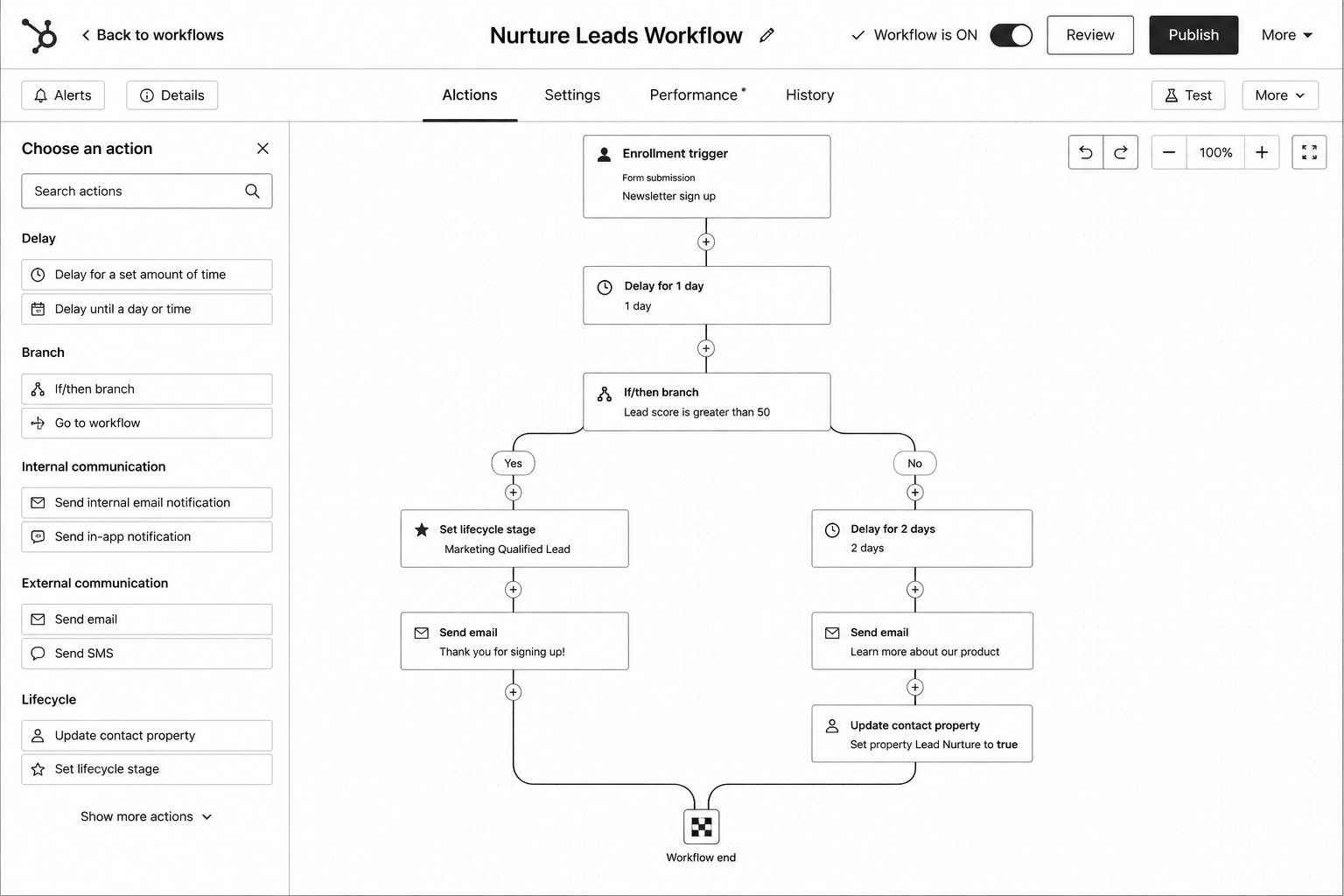
HubSpot workflow features are powerful and underused. Here are the 12 automations every B2B team should run in 2026. If you want implementation help, work with HubSpot partner services. For connected strategy, also review Hubspot CRM Implementation and Automate Marketing with AI.

What HubSpot Marketing Automation Playbook Means in Practice

HubSpot marketing automation wins when workflow logic is clean, lifecycle definitions are aligned, and every automation has a measurable business purpose. The highest-performing teams run fewer but better workflows.

Why hubspot marketing automation Matters in 2026

1. Workflow sprawl creates operational debt quickly.

2. AI content amplifies segmentation mistakes when trigger logic is weak.

3. Pipeline reporting now depends on lifecycle automation quality.

Step-by-Step Playbook

1. Align lifecycle rules

Lock MQL, SQL, and opportunity definitions with sales leadership.

2. Prioritize 12 workflows

Start with routing, nurture, trial activation, and stalled-deal recovery.

3. Add suppression logic

Prevent conflicting sends and duplicate branch behavior.

4. Map KPI ownership

Assign one owner and one KPI per workflow.

5. Run monthly cleanup

Archive low-value automations and tighten weak branches.

Mid-article CTA -> Need support applying this to your stack? Marketing ops audit and get a scoped roadmap with timeline, owners, and KPI targets.

Tools, References, and Benchmarks

  • Workflow naming standard
  • Lifecycle SLA matrix
  • Automation debt review board
  • Semantic keyword targets to distribute naturally: hubspot workflows, lifecycle marketing automation, b2b marketing automation

Use these references during planning and QA: HubSpot Knowledge BaseHubSpot developer docs, and Salesforce product documentation.

Common Mistakes That Kill Performance

  • Automating before data hygiene
  • No suppression logic
  • Tracking opens instead of pipeline impact

FAQ – HubSpot Marketing Automation Playbook

How long does a hubspot marketing automation project usually take?

Most teams can ship an initial version in 4 to 8 weeks, then improve outcomes over one quarter with a weekly optimization cadence.

Is hubspot marketing automation relevant for UK and US teams?

Yes. The core framework is consistent across both markets. Differences are usually compliance details, buying behavior, and GBP/USD planning.

What should we measure first for hubspot marketing automation?

Track one leading metric, one conversion metric, and one revenue metric so execution stays tied to business impact.

Should we run this in-house or with a specialist partner?

If your team has deep expertise and bandwidth, in-house can work. If speed and risk control matter, working with a specialist partner is usually faster.

What is the most common failure mode?

Teams skip governance after launch. Data quality drifts, process quality declines, and performance plateaus. A simple weekly operating rhythm prevents this.

Conclusion

HubSpot Marketing Automation Playbook performs best when execution decisions are tied to measurable outcomes from day one. Use this playbook to prioritize what matters, reduce risk, and create a repeatable optimization rhythm.

Want a specialist team to accelerate delivery? Talk to HubSpot partner services or book a consultation and we will map a practical rollout plan.

Download the HubSpot Workflow Library to implement this framework with templates and checklists.

That’s enough scrolling for now – chat to a Hubspot Expert today!

Contact Us

HubSpot Custom Modules and Themes: A Developer Deep Dive

HubSpot Custom Modules and Themes in 2026 is won by execution quality, not platform hype. Teams that perform consistently align strategy, implementation, and measurement into one operating system. This guide gives the practical framework, internal link map, and optimization cadence to do that.

HubSpot’s drag-and-drop power lives in custom modules. Here’s the developer-grade approach the best CMS sites use. If you want implementation help, work with HubSpot CMS team. For connected strategy, also review Hubspot Website Design Playbook and Hubspot Development Agency.

What HubSpot Custom Modules and Themes Means in Practice

HubSpot custom modules are reusable building blocks that let marketing teams ship fast without breaking design systems. In 2026, module strategy is a conversion and governance decision, not just a developer preference.

Why hubspot custom modules Matters in 2026

1. High-velocity teams need modular systems, not one-off page builds.

2. HubL and theme structure directly influence performance and editor reliability.

3. Reusable modules reduce QA overhead because patterns are tested once and reused.

Step-by-Step Playbook

1. Design module taxonomy

Define global, section, and page-level modules before coding.

2. Set strict field rules

Use defaults, naming standards, and validation for editor safety.

3. Sync design tokens

Align typography, spacing, and colors into reusable standards.

4. Add performance guardrails

Keep module JS lean and optimize media loading.

5. Publish editor playbook

Document how and when each module should be used.

Mid-article CTA -> Need support applying this to your stack? HubSpot dev consultation and get a scoped roadmap with timeline, owners, and KPI targets.

Tools, References, and Benchmarks

  • HubSpot CLI workflow
  • Module naming standard
  • Editor QA checklist
  • Semantic keyword targets to distribute naturally: hubspot theme development, hubspot custom module tutorial, hubspot hubl

Use these references during planning and QA: HubSpot Knowledge BaseHubSpot developer docs, and Salesforce product documentation.

Common Mistakes That Kill Performance

  • Building near-duplicate modules
  • Ambiguous field labels
  • No module governance for future editors

FAQ – HubSpot Custom Modules and Themes

How long does a hubspot custom modules project usually take?

Most teams can ship an initial version in 4 to 8 weeks, then improve outcomes over one quarter with a weekly optimization cadence.

Is hubspot custom modules relevant for UK and US teams?

Yes. The core framework is consistent across both markets. Differences are usually compliance details, buying behavior, and GBP/USD planning.

What should we measure first for hubspot custom modules?

Track one leading metric, one conversion metric, and one revenue metric so execution stays tied to business impact.

Should we run this in-house or with a specialist partner?

If your team has deep expertise and bandwidth, in-house can work. If speed and risk control matter, working with a specialist partner is usually faster.

What is the most common failure mode?

Teams skip governance after launch. Data quality drifts, process quality declines, and performance plateaus. A simple weekly operating rhythm prevents this.

Conclusion

HubSpot Custom Modules and Themes performs best when execution decisions are tied to measurable outcomes from day one. Use this playbook to prioritize what matters, reduce risk, and create a repeatable optimization rhythm.

Want a specialist team to accelerate delivery? Talk to HubSpot CMS team or book a consultation and we will map a practical rollout plan.

Download the HubSpot Custom Module Starter Kit to implement this framework with templates and checklists.

That’s enough scrolling for now – chat to a Hubspot Expert today!

Contact Us

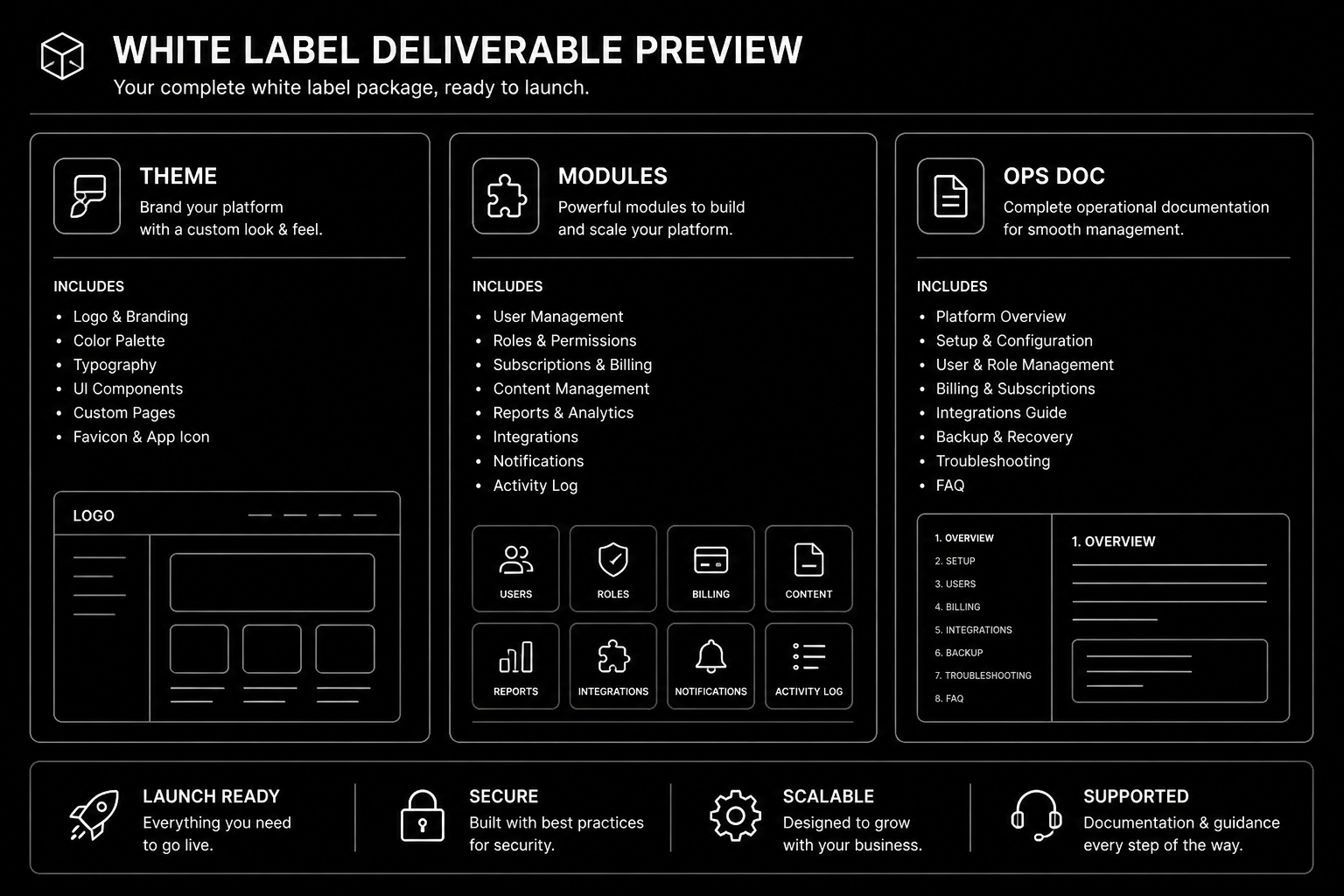
White Label HubSpot Agency: How Partners Scale Without Hiring

White Label HubSpot Agency in 2026 is won by execution quality, not platform hype. Teams that perform consistently align strategy, implementation, and measurement into one operating system. This guide gives the practical framework, internal link map, and optimization cadence to do that.

White label HubSpot lets agencies deliver CMS Hub builds at full margin without hiring HubSpot specialists. Here’s how. If you want implementation help, work with HubSpot CMS team. For connected strategy, also review White Label Web Development and Hubspot Development Agency. You can also align execution with get a custom quote for cross-functional delivery.

What White Label HubSpot Agency Means in Practice

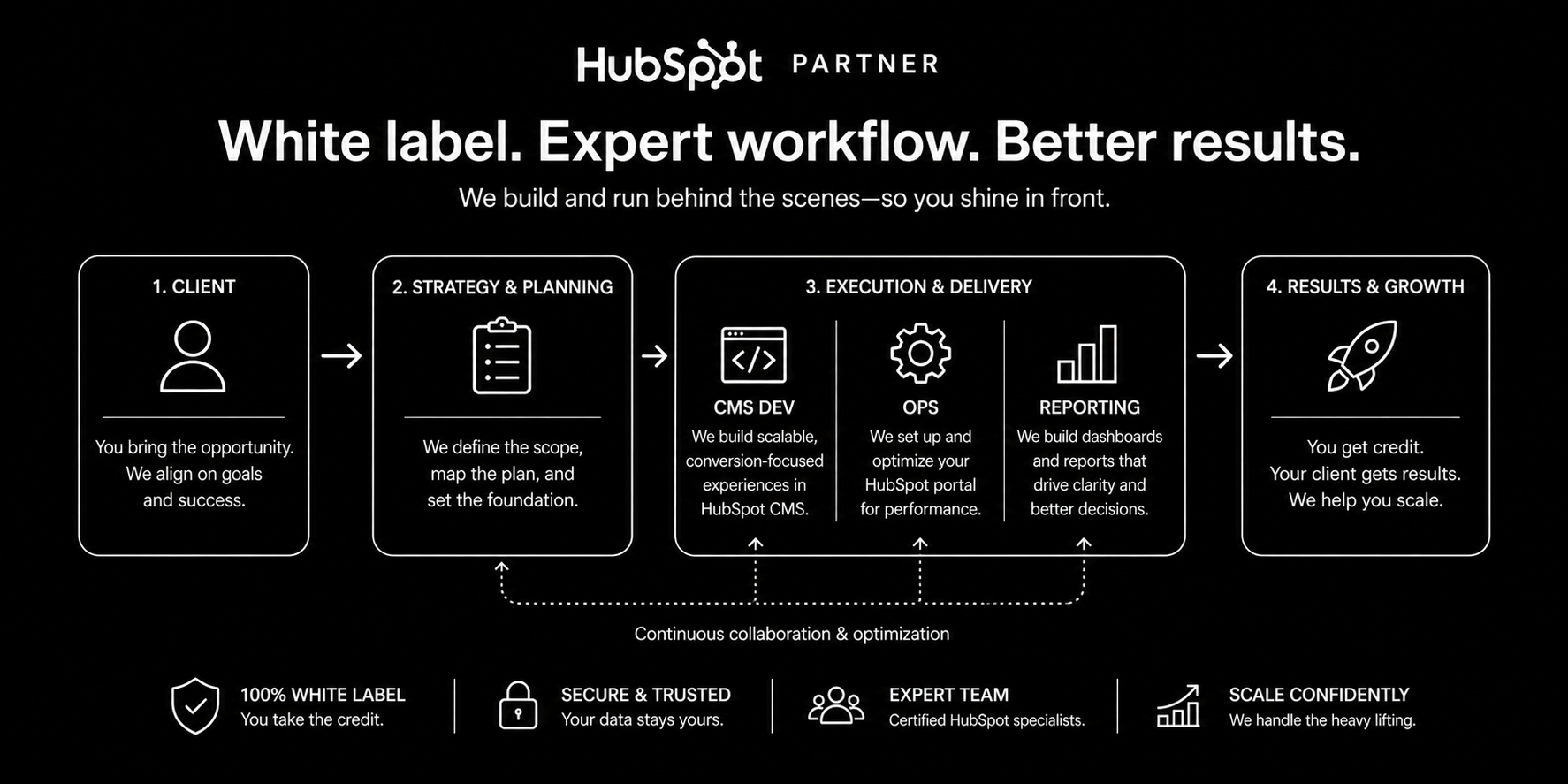
A white label HubSpot agency setup lets agencies ship CMS and RevOps work without staffing every specialty internally. Success depends on clean handoffs, transparent delivery, and strict quality gates.

Why white label hubspot Matters in 2026

1. HubSpot work spans CMS, automation, and reporting depth.

2. Partner quality directly impacts retention and referrals.

3. Unclear handoffs create rework and delivery delays.

Step-by-Step Playbook

1. Define capability lanes

Separate module dev, automation, and reporting ownership.

2. Set handoff standards

Document required inputs and acceptance criteria per deliverable.

3. Establish communication rhythm

Run weekly syncs and clear escalation paths.

4. Package progress visibility

Share delivery status without exposing internal complexity.

5. Score partner performance quarterly

Track margin, quality, speed, and client sentiment.

Mid-article CTA -> Need support applying this to your stack? HubSpot partner intro and get a scoped roadmap with timeline, owners, and KPI targets.

Tools, References, and Benchmarks

  • HubSpot white-label SOP
  • Acceptance criteria checklist
  • Quarterly partner scorecard
  • Semantic keyword targets to distribute naturally: white label hubspot partner, outsource hubspot dev, hubspot agency partner

Use these references during planning and QA: Asana project management resourcesAtlassian agile playbooks, and PMI delivery resources.

Common Mistakes That Kill Performance

  • Unclear role ownership
  • No pre-delivery QA gate
  • No partner performance tracking

FAQ – White Label HubSpot Agency

How long does a white label hubspot project usually take?

Most teams can ship an initial version in 4 to 8 weeks, then improve outcomes over one quarter with a weekly optimization cadence.

Is white label hubspot relevant for UK and US teams?

Yes. The core framework is consistent across both markets. Differences are usually compliance details, buying behavior, and GBP/USD planning.

What should we measure first for white label hubspot?

Track one leading metric, one conversion metric, and one revenue metric so execution stays tied to business impact.

Should we run this in-house or with a specialist partner?

If your team has deep expertise and bandwidth, in-house can work. If speed and risk control matter, working with a specialist partner is usually faster.

What is the most common failure mode?

Teams skip governance after launch. Data quality drifts, process quality declines, and performance plateaus. A simple weekly operating rhythm prevents this.

Conclusion

White Label HubSpot Agency performs best when execution decisions are tied to measurable outcomes from day one. Use this playbook to prioritize what matters, reduce risk, and create a repeatable optimization rhythm.

Want a specialist team to accelerate delivery? Talk to HubSpot CMS team or book a consultation and we will map a practical rollout plan.

Download the HubSpot White Label Partnership Brief to implement this framework with templates and checklists.

That’s enough scrolling for now – chat to a Hubspot Expert today!

Contact Us