
 Website Designing
 Web Development
 Mobile Applications
 Marketing
 CMS & Ecommerce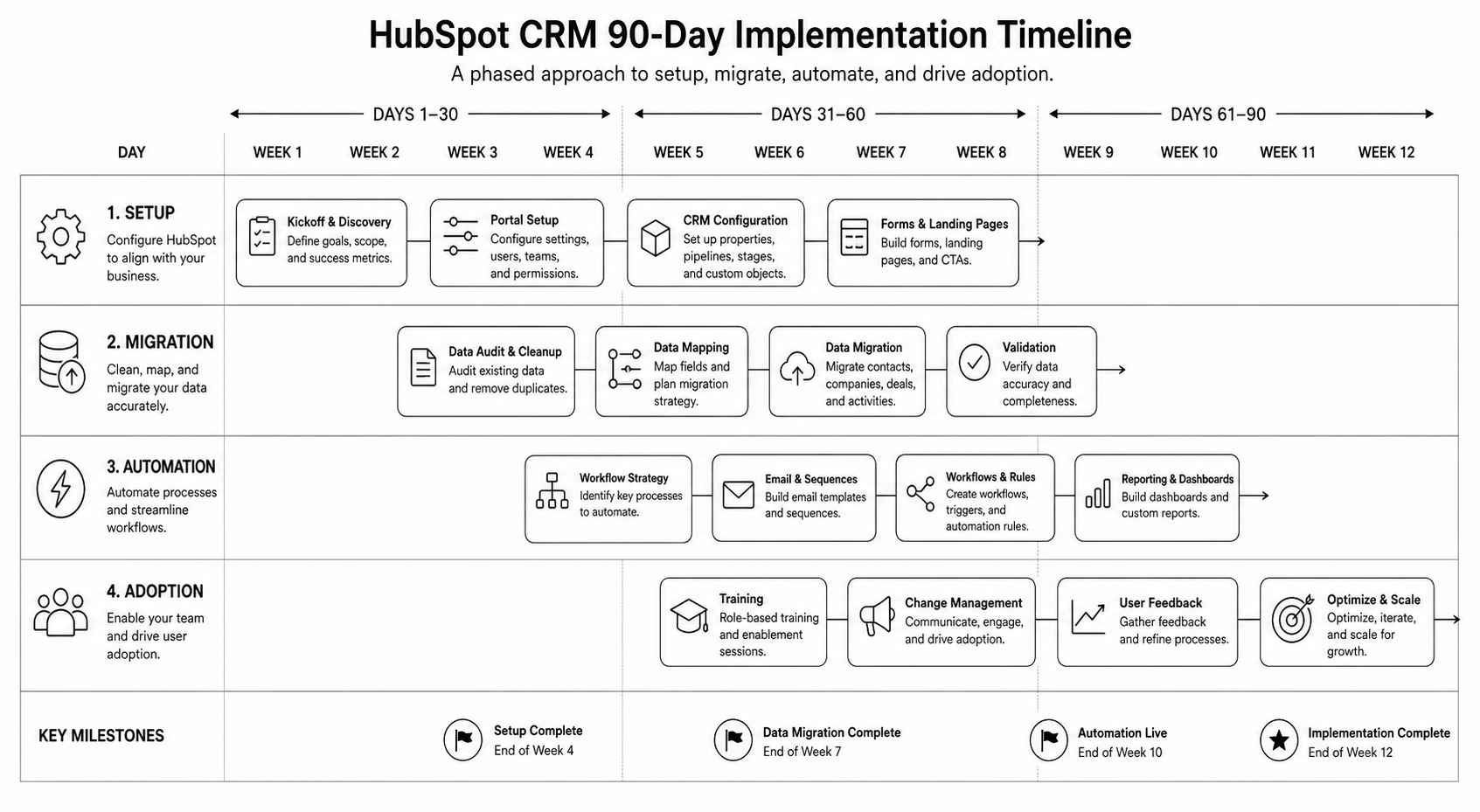
Table of Contents
HubSpot CRM Implementation Guide: 90-Day Rollout for B2B Companies
HubSpot is the easy CRM to start using and one of the harder CRMs to implement well. The product is designed to be turn-key — and that’s precisely why most rollouts stall. Teams import a contact list, configure a couple of pipelines, and call it live. Six months later, sales is back in spreadsheets and marketing has lost track of which leads are real.
This HubSpot CRM implementation guide is the 90-day rollout plan our HubSpot development team runs for B2B companies between 10 and 250 employees. It covers data model, migration, automation, reporting, and the adoption playbook that decides whether the CRM lasts past month four.
If you’re still deciding between HubSpot and Salesforce, read the HubSpot vs Salesforce comparison first.
What HubSpot CRM Implementation Actually Means
Implementation is more than a setup checklist. A real HubSpot CRM implementation is a structured project that aligns four things: your data model, your sales process, your marketing automation, and your team’s daily behaviour. Each one is solvable; the integration of all four is where most projects fail.
A successful rollout produces:
- A clean, deduplicated database with consistent property naming
- Pipelines that match how your team actually sells
- Automation that does the busywork without breaking edge cases
- Reports that surface the metrics leadership actually checks
- Adoption from sales, marketing, and CS without daily friction
Why HubSpot CRM Implementation Matters in 2026
Three forces make 2026 the year to do this properly.
1. HubSpot’s AI features only work on clean data. Breeze (HubSpot’s AI suite) summarises deals, scores leads, and drafts outreach. Garbage data in, garbage AI out. The teams getting real value from Breeze in 2026 are the ones who fixed their data model first.
2. RevOps is now a board-level conversation. Pipeline visibility, attribution, and forecast accuracy are CFO concerns. A messy CRM costs you in meetings, not just operations.
3. Sales-led + product-led hybrids need real CRM rigor. If your B2B motion blends inbound, outbound, and product-qualified leads, your CRM needs to track all three cleanly — and most don’t.
How a 90-Day HubSpot CRM Rollout Works
The rollout splits into three 30-day phases: foundation, automation, and adoption. Most failed rollouts skip phase one and rush to phase two — automating broken processes makes them worse, not better.
Days 1–30: Foundation
- Stakeholder mapping. Identify the daily users (SDRs, AEs, marketing, CS) and the data consumers (leadership, finance).
- Data model design. Define properties on Companies, Contacts, Deals, Tickets. Document property purpose, type, and ownership.
- Pipeline architecture. Design pipelines and stages around your actual sales process — not HubSpot’s defaults.
- Lifecycle stages. Define what each stage means (Lead → MQL → SQL → Opportunity → Customer) and the criteria for transitions.
- Migration plan. If migrating from another CRM, map fields, owners, and history. Plan deduplication.
- User permissions. Set up teams, roles, and access. Default settings expose too much.
Days 31–60: Automation
- Workflows for lifecycle transitions. Automatic stage updates based on behaviour, not just manual changes.
- Lead routing. Round-robin, territory-based, or AE-of-the-month — whatever matches your model.
- Lead scoring. Start simple (rules-based), graduate to predictive once you have data. See AI lead scoring guide.
- Email sequences and templates. Library of approved outbound and follow-up templates per persona.
- Task automation. Auto-create follow-up tasks at stage transitions; auto-create check-ins for stalled deals.
- Integration setup. Connect tools that feed CRM data — calendar, email, calling, Slack, your CMS, your product analytics.
Days 61–90: Adoption
- Training by role. SDRs, AEs, marketing, and CS each need different training. Generic onboarding fails.
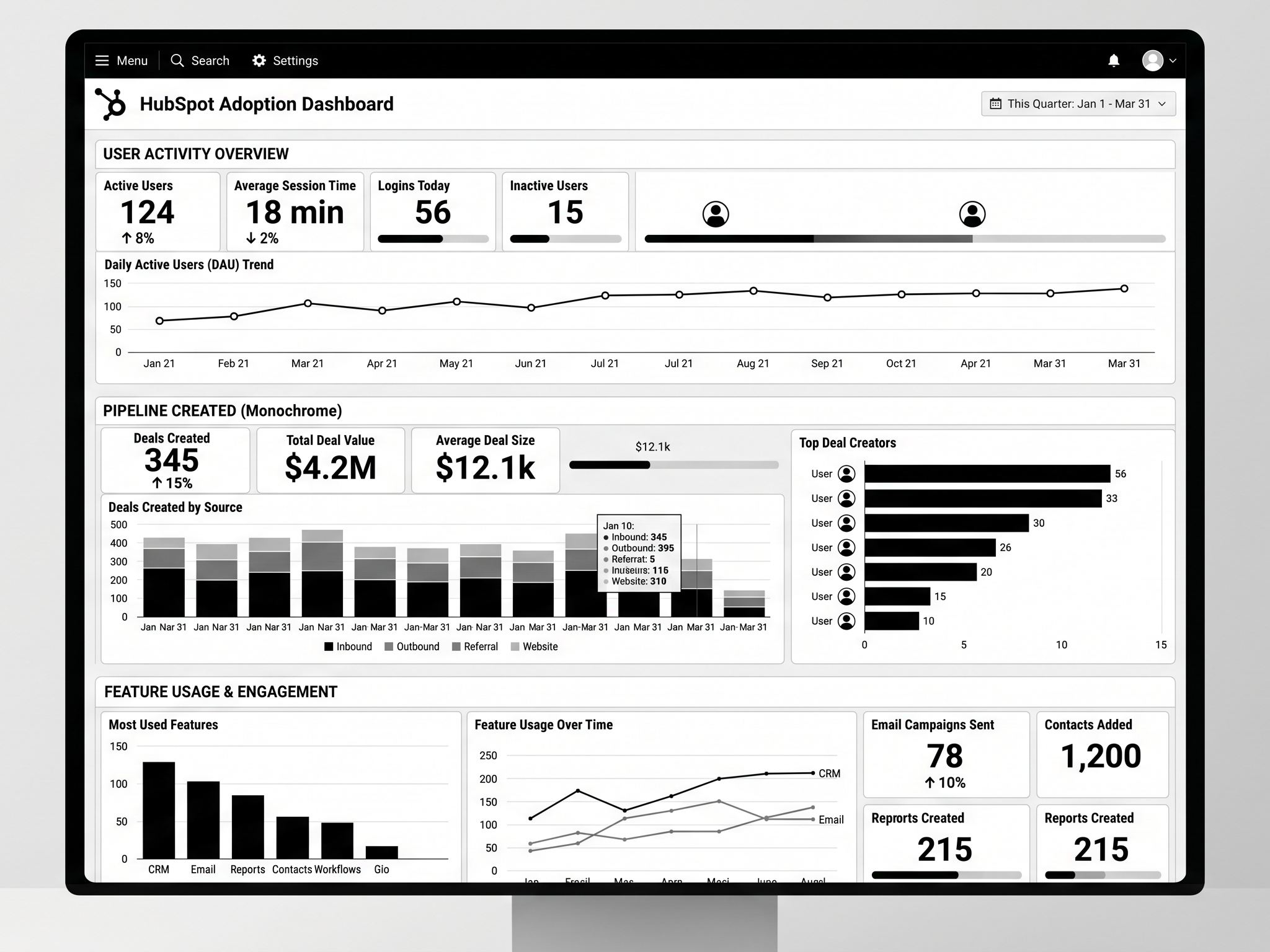
- Reporting and dashboards. Build the 5–8 dashboards leadership will actually check weekly. Cull the rest.
- Daily standup integration. Make CRM the source of truth for the metrics discussed in standup.
- Hygiene rituals. Weekly deal review, monthly data audit. Without these, the CRM degrades within 90 days.
- Manager enablement. Sales managers must run reviews from HubSpot, not from spreadsheets. Otherwise reps never trust the system.
- Iteration cadence. Quarterly review of properties, workflows, and reports. Prune, don’t accumulate.
Mid-article CTA → Need a HubSpot specialist to run the 90 days for you? Book a HubSpot CRM rollout call and we’ll scope the project in 30 minutes.
Step-by-Step: The Foundation Phase in Detail
1. Audit your current state
Before you touch HubSpot: document the existing process. What CRM (or spreadsheet) is being used? What pipelines exist? What reports run? Where does data leak?
2. Design the data model on paper
List every property your team needs on each object. Group them: identification (name, email), firmographic (company size, industry), behavioural (last visit, last email open), commercial (deal value, close date), operational (owner, source, status).
3. Set up the HubSpot account properly
- Configure currency (multi-currency if you sell across UK/USA)
- Set timezone, fiscal year
- Create teams matching your org structure
- Set up users with appropriate permissions
- Configure the master Brand Kit (logo, colors) for templates
4. Create custom properties before importing data
If you import first and add properties later, you’ll have inconsistent data. Property-first, then import.
5. Build pipelines and stages
For sales: typical 5–7 stages from Connected to Closed Won/Lost. For CS: separate pipeline for renewals and expansions. For support: ticket pipeline with priority and SLA.
6. Configure lifecycle stages and lead status
Define the criteria. Document them. Make them automatic where possible (workflows that move contacts from Lead to MQL based on score thresholds).
7. Migrate data with a clean import file
Dedupe, standardise (capitalisation, country codes, phone formats), map owners, validate emails. Import companies first, then contacts, then deals.
8. Validate
Spot-check 50 records across all object types. Confirm associations, property values, and ownership. Fix the data model before automating on top of it.
Best Tools for HubSpot CRM Implementation
- HubSpot Operations Hub — for data quality, sync, and custom-coded actions. Worth the upgrade for >100-employee implementations.
- Insycle — bulk data cleansing and dedup. Saves weeks on migration projects.
- HubSpot’s Migration IQ — for Salesforce-to-HubSpot migrations specifically.
- Reveal or Crossbeam — partner-data overlay. Rich for B2B account expansion.
- Default Tasks app — for automated task creation at stage transitions.
- Looker Studio + HubSpot connector — for cross-tool reporting (HubSpot + product + ad spend).
Common HubSpot Implementation Mistakes
- Importing data before designing properties. The single most common failure mode. Inconsistent data is hard to clean later.
- Copying competitor pipelines. Your sales process isn’t theirs. Design for how your team actually sells.
- Over-automating early. Rules nobody understands break in production. Start with manual processes, automate once you’ve seen the edge cases.
- Skipping training. A perfect CRM with no adoption is worse than a clunky one used daily.
- No data hygiene rituals. Without weekly hygiene, the CRM degrades quickly.
- Treating Marketing Hub and Sales Hub as separate projects. They share data — implement them together.
- Ignoring HubSpot AI from day one. Breeze is genuinely useful when configured early. See marketing AI guide.
FAQ — HubSpot CRM Implementation
How long does HubSpot CRM implementation take?
For B2B companies under 250 employees, 90 days is a realistic full rollout including foundation, automation, and adoption. Larger orgs or complex Salesforce migrations can take 6 months.
How much does HubSpot CRM implementation cost?
Platform costs vary by hub and seat count (typically $2k–$15k/mo for mid-market). Implementation services from a HubSpot partner agency typically run $15k–$80k depending on complexity. Worth pricing properly — bad implementations are expensive to redo.
Should I hire a HubSpot partner agency or do it in-house?
If RevOps is a permanent function in your org, hire in-house long-term but use a partner for the rollout. If RevOps is a one-time project, partner-led is cleaner. See the HubSpot agency selection guide.
Can I use HubSpot CRM for free?
Yes — HubSpot’s free CRM is genuinely capable. The free tier holds for <50-person teams with simple pipelines. Past that, paid hubs unlock the automation and reporting needed for serious RevOps.
Does HubSpot replace Salesforce?
For most B2B companies under 500 employees, yes. Above that, the answer depends on data complexity, ecosystem dependencies, and admin overhead tolerance. See the HubSpot vs Salesforce comparison.
How do I get my sales team to actually use HubSpot?
Three levers: make it easier than the alternative (mobile + Gmail/Outlook integration), make manager reviews run from it, and tie compensation visibility to it. The first 60 days of behavioural reinforcement decide adoption.
Conclusion: Implementation Is Where HubSpot ROI Is Won or Lost
HubSpot is one of the best CRMs for B2B companies — but only if implementation is done with the same rigor you’d apply to any other system that runs your revenue operations. The 90-day plan above isn’t aggressive; it’s the realistic baseline for a rollout that sticks.
Our HubSpot development team has run CRM implementations for B2B SaaS, professional services, and ecommerce brands across the UK and USA. Book a HubSpot rollout call and we’ll scope your 90-day plan in 30 minutes.
Download the HubSpot 90-Day Implementation Plan — the exact roadmap and checklist we run for clients.