Inbound WebHub logo
Web Development
Resources
Free audit
Free HubSpot Portal Audit
Get an instant audit of your HubSpot portal with actionable insights to improve CRM setup, automation, marketing, and overall performance.
Start Free Audit
button arrowbutton arrow
AI Automation

AI Lead Scoring: A Practical Implementation Guide for B2B

time
12 MIN
date
May 11, 2026
AI Lead Scoring: A Practical Implementation Guide for B2B
In this article

Most B2B lead scoring models are a spreadsheet of guesses. Ten points for a job title, five for an email click, twenty for a pricing page visit. They made sense when someone set them up, but buyer behaviour has changed and the points haven't. Sales stops trusting the score, and marketing keeps sending leads that never convert.

AI lead scoring replaces guessed weights with patterns learned from your own closed-won and closed-lost deals. Done well, it tells sales who to call first. Done badly, it's a black box that scores everyone 72. This guide covers how it works, what data you need, how to roll it out in your CRM and how to keep it accurate.

Rule-based vs AI lead scoring

Rule-based scoring adds and subtracts points based on criteria you choose. It's transparent and easy to start, but weights are subjective and drift out of date.

AI (predictive) scoring trains a model on historical outcomes. It finds which combinations of fit and behaviour actually preceded a deal, and updates as new data arrives. HubSpot, Salesforce and other CRMs include predictive scoring in higher tiers, and you can build custom models when you need more control.

Most teams get the best results with both: a simple fit score that sales can understand, plus a predictive score that ranks leads within that fit.

What data the model needs

  • Outcomes. Enough closed-won and closed-lost deals, linked to the contacts and companies involved. Without clean outcomes, there is nothing to learn from.
  • Fit data. Industry, company size, region, job function and seniority, stored as consistent properties rather than free text.
  • Behaviour data. Page views, form fills, email engagement, meetings, product usage for product-led companies, and sales activity.
  • Time. When each action happened, so recent activity counts more than activity from a year ago.

Step 1: audit and clean your data

Before any model, fix the basics. Deduplicate contacts and companies, standardise job titles and industries into picklists, make sure deals are associated with the right contacts, and fill critical fields through enrichment. Remove test records, students and competitors from the training set. A model trained on messy data will confidently learn the wrong lessons.

Step 2: define what a good lead means

Decide what the score predicts. "Becomes an opportunity within 90 days" is usually a better target than "closes a deal", because there are more examples to learn from and the feedback is faster. Agree on the definition with sales before building anything.

Step 3: choose your approach

  1. Native CRM scoring. The fastest route. HubSpot's lead scoring tool and Salesforce Einstein provide fit and engagement scoring inside the CRM, with little setup.
  2. A custom model. Gives full control over features and targets, using your data warehouse and a simple, interpretable model such as logistic regression or gradient-boosted trees, with scores written back to the CRM.
  3. Enrichment plus rules plus AI. A practical middle path: enrich firmographics, score fit with clear rules, and use AI to rank engagement and summarise why a lead is hot.

Start with the simplest option that answers your question. Increase complexity only when the simple version is in use and you can measure the gap.
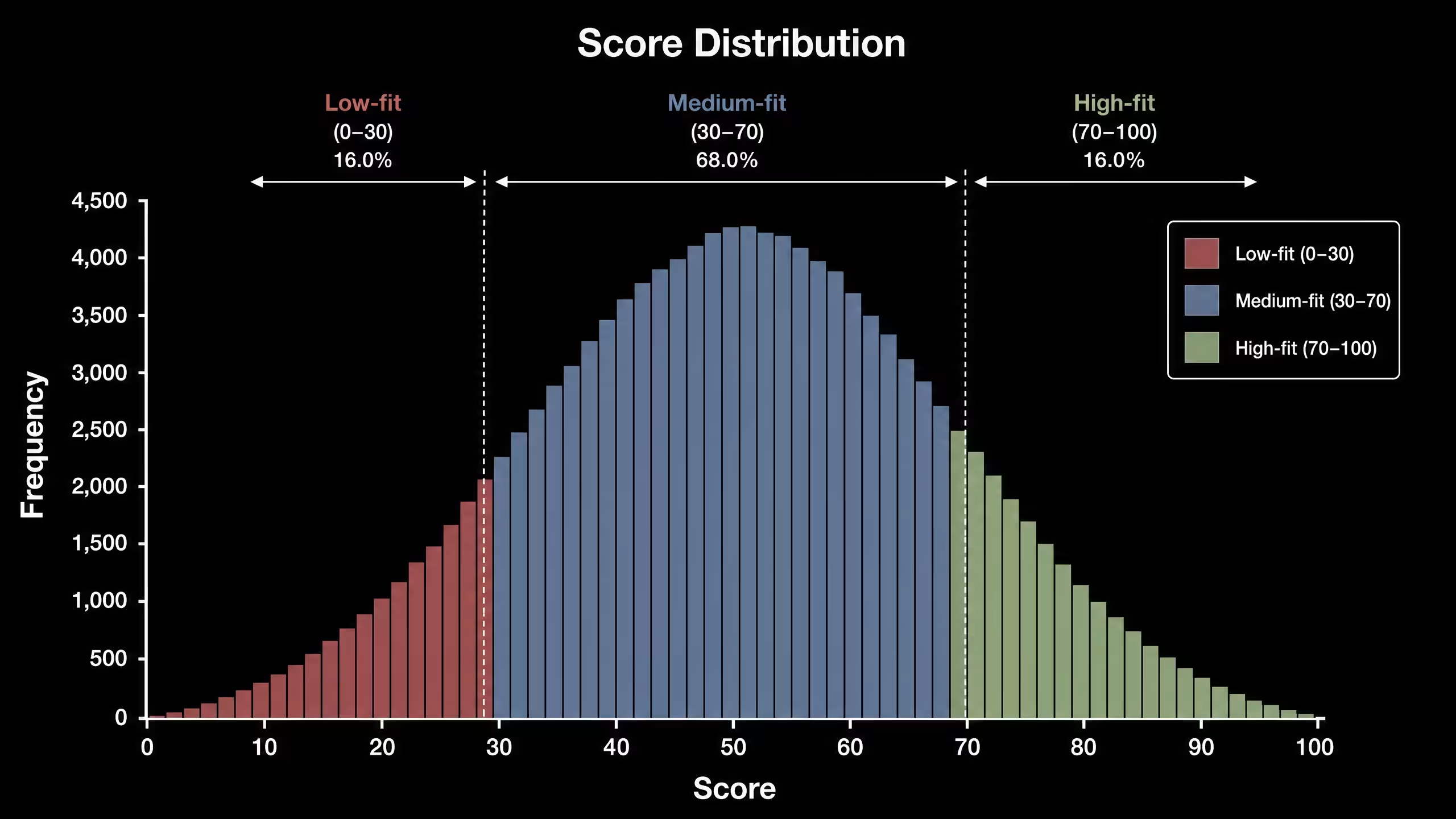
Lead score distribution

Step 4: turn scores into actions

A score nobody acts on is just another property. Map score bands to specific next steps:

  • High fit, high intent: route to sales immediately and alert the owner.
  • High fit, low intent: nurture with relevant content and retarget.
  • Low fit, high intent: qualify quickly, often through a short call or self-serve option.
  • Low fit, low intent: keep in general marketing; don't spend sales time.

Build these bands into routing, lifecycle stages and sales views. Our HubSpot workflow playbook shows the handoff workflows that make scores useful.

Step 5: explain the score

Sales trusts scores it can understand. Show the top reasons next to each score, for example "VP-level, target industry, visited pricing twice this week". Many CRMs show contributing factors; if yours doesn't, an AI summary of recent activity on the record works well.

Step 6: measure and recalibrate

Compare conversion rates by score band every month. A good model shows a clear step up from low to high bands. Recalibrate thresholds at least quarterly, and retrain when you launch new products, enter new markets or change your ideal customer profile.

Common mistakes

  • Training on dirty data. Duplicates and missing associations teach the model false patterns.
  • No action per band. Scores without routing rules change nothing.
  • Hiding how it works. If sales can't see why a lead scored high, they ignore it.
  • Setting and forgetting. Buyer behaviour changes; your model has to change with it.
  • Scoring contacts only. In B2B, account-level signals matter. Combine contact and company scores where several people are buying.

FAQ

How much data do I need for AI lead scoring?

Enough historical outcomes for patterns to be reliable. If you only have a few dozen closed deals, start with rule-based fit scoring and native CRM tools, and add predictive scoring as volume grows.

Does HubSpot have AI lead scoring?

Yes. HubSpot's lead scoring tool supports fit and engagement scores, and higher tiers include AI-assisted scoring. Check your edition for the exact features.

How long does implementation take?

A native CRM setup can be live in a few weeks. A custom model, including data cleanup and sales rollout, usually takes one to two months.

Will AI scoring replace SDR judgement?

No. It prioritises who to look at first. SDRs still qualify, and their feedback should flow back into the model.

Conclusion

AI lead scoring works when it sits on clean data, predicts a clear outcome, triggers specific actions and stays explainable. Start simple, prove it in your CRM and recalibrate regularly. If you'd like help setting it up, see our AI automation and HubSpot CRM setup services, read how AI sales agents use these scores, or book a call.

AI Lead Scoring Implementation Kit — CRM audit templates, predictive scoring framework, score-band action matrix, workflow blueprints, KPI dashboards, and implementation checklists for high-performing B2B sales teams.

KEEP BUILDING
title arrow

You've got the plan. Let's build it.

We turn the frameworks you just read into the flows, pages, and automation behind them — under your brand, always.

Keep reading

View all articles
button arrowbutton arrow
HubSpot Agent Hub: Which Breeze Agents to Turn On First
hubspot
AI Automation

HubSpot Agent Hub: Which Breeze Agents to Turn On First

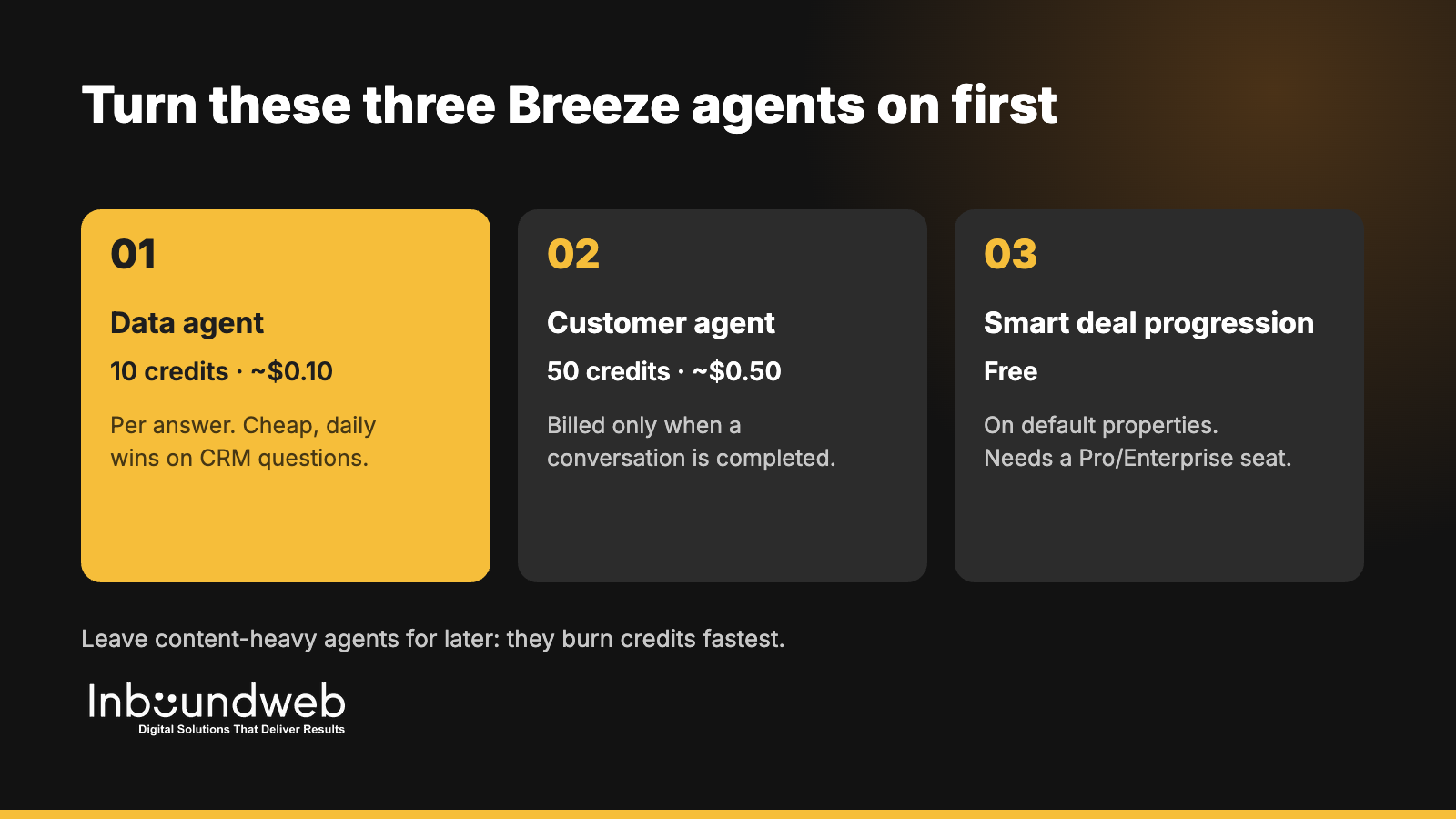
Short answer: HubSpot Agent Hub is the central place, live on all paid hubs from Starter up, where you manage Breeze agents, agentic workflows and their run history. Most B2B teams should turn on three agents first: the data agent (10 credits, about $0.10 per answer), the customer agent (50 credits, about $0.50 per resolved conversation) and smart deal progression (free on default properties). Leave content-heavy agents for later, because they burn credits fastest.

HubSpot used its Unbound 2026 event in October to put Agent Hub at the centre of the platform, alongside new beta agents for campaigns, nurture emails and targeted pages. This guide explains what Agent Hub does, what each Breeze agent costs in credits, and a 30-day rollout order that gets value without blowing your monthly credit allowance.

Key takeaways

  • Agent Hub is live on all hubs, Starter and above. It shows your agents, workflows, items that need attention and an inbox of agent runs.
  • Credits cost $0.01 each. Professional portals include 3,000 credits a month and Enterprise portals 5,000. Unused credits don't roll over.
  • Start with cheap, high-frequency agents: data agent, customer agent and smart deal progression.
  • Content agent costs 1,000 credits (about $10) per asset. Three assets would use a Professional portal's entire monthly allowance.
  • Clean CRM data comes first. Agents act on your properties, so bad data produces confident, wrong outputs.

What is HubSpot Agent Hub?

HubSpot Agent Hub is a central workspace for managing Breeze AI agents and agentic workflows in one place. It shows every agent you've set up, the workflows they run, items flagged for human attention and an inbox of agent runs. It's live on all hubs from Starter up, and agent actions consume HubSpot credits.

Before Agent Hub, agents were scattered across Service, Sales and Marketing settings. Now RevOps teams get one place to see what each agent did, what it cost and where a person needs to step in. That matters for governance: you can audit an agent's work the same way you'd review a new hire's first month.

Source: MarTech's coverage of HubSpot Unbound 2026, October 2026.

Which Breeze agents are available, and what do they cost?

HubSpot offers around a dozen Breeze agents in 2026, each billed per action in credits worth $0.01 each. Prices range from 10 credits for a data agent answer to 1,000 credits for one content asset. Customer and prospecting agents moved to pay-when-complete pricing on April 14, 2026.

AgentWhat it doesCredits per actionApprox. costStatus
Data agentAnswers a prompt about one CRM record or researches a property10$0.10Live
Customer agentResolves a support or sales chat conversation50$0.50Live
Prospecting agentResearches a lead and recommends outreach100$1.00Live
Smart deal progression (Notetaker)Reads meetings and emails, suggests deal updates and next steps0 on default properties; 10 per custom property$0–$0.10Live
Churn risk signalFlags customers likely to cancel from conversations and recordsUses creditsVariesLive
Nurture agentPersonalises a nurture email at send time10$0.10Public beta
Knowledge base agentDrafts a new help article200$2.00Beta
Campaign agent + content agentBuilds a campaign plan; content agent generates each approved assetPlan free; 1,000 per asset$10 per assetPublic beta
Revenue agentStarts collection outreach on an invoice500$5.00Beta
AI action in a workflowRuns one AI step inside a workflow10$0.10Live

Credit figures from Supered's October 2026 Breeze credit breakdown and MarTech's Unbound 2026 coverage. HubSpot changes credit rates often, so confirm current pricing in your portal's billing page before you budget.

How do HubSpot AI credits work?

Each HubSpot credit costs $0.01, and every paid portal gets a monthly allowance: 500 credits on Starter, 3,000 on Professional and 5,000 on Enterprise. Allowances don't stack across hubs, so a multi-hub customer gets the highest single allowance. Unused credits expire at month end, and extra capacity costs $10 per 1,000 credits.

Here's what a Professional portal's 3,000 monthly credits buys if spent on one agent:

  • 300 data agent answers, or
  • 60 customer agent conversations, or
  • 30 prospecting agent leads, or
  • 3 content agent assets.

That's why the rollout order matters. A team that starts with content generation can exhaust its allowance in a day, while the same credits would run a month of data enrichment.

Which Breeze agents should a B2B team turn on first?

B2B teams should start with the data agent, the customer agent and smart deal progression, because they're cheap per action, run daily and fix problems sales and support already feel. Add the prospecting agent once your ICP properties are clean. Leave the content and campaign agents until you have a credit budget and a brand-voice review step.

The three Breeze agents to turn on first: data agent, customer agent and smart deal progression
PriorityAgentWhy firstPrerequisite
1Smart deal progressionFree on default properties; fixes stale deal stages and missing next stepsSales Hub or Service Hub Pro/Enterprise seat; meeting recording on
2Data agentFills firmographic gaps (industry, size, tech stack) that power routing and scoringDefined ICP properties and a dedupe pass
3Customer agentDeflects repetitive chat questions 24/7, billed only when it resolvesAn up-to-date knowledge base and clear handoff rules
4Prospecting agentResearches target accounts and drafts first-touch outreach for repsClean ICP data and approved messaging
5Nurture + campaign agentsPersonalisation at scale once the basics workMarketing Hub Pro/Enterprise, brand guidelines, approval workflow

A 30-day Agent Hub rollout plan

A practical Agent Hub rollout takes about 30 days: one week to clean data and set guardrails, two weeks to pilot two or three agents with a small team, and a final week to review outputs, credit use and handoff rules before you scale.

  1. Days 1–7: Prepare. Audit and dedupe contacts and companies, define ICP and lifecycle properties, update your knowledge base, and set a monthly credit budget per agent.
  2. Days 8–14: Pilot. Turn on smart deal progression for one sales pod and the data agent on a 500-record segment. Review every suggestion manually.
  3. Days 15–21: Expand. Launch the customer agent on one chat channel with a human handoff after two failed answers. Track resolution rate and escalations.
  4. Days 22–30: Review and scale. Compare credit spend with hours saved, tighten prompts and properties, and decide which agents roll out team-wide.

If your CRM isn't ready for agents yet, start with our 90-day HubSpot CRM implementation guide.

Common mistakes with HubSpot AI agents

  • Switching on agents before cleaning data. Agents amplify whatever is in your CRM, including duplicates and outdated properties.
  • No credit budget. Set alerts and per-agent limits so one experiment doesn't drain the month.
  • No human review step. Keep a person approving agent outputs that reach customers until accuracy is proven.
  • Measuring activity, not outcomes. Track resolved tickets, meetings booked and hours saved, not agent runs.
  • Ignoring custom agents. When Breeze doesn't fit a process, a custom agent or an external AI workflow connected to HubSpot often does.

Do you need a partner to set up Agent Hub?

You don't need a partner to switch agents on, but most B2B teams benefit from help with the groundwork: data cleanup, property design, knowledge base structure, guardrails and custom agents for processes Breeze doesn't cover. Those decide whether agents save hours or create cleanup work.

Inbound WebHub's 30+ certified specialists set up HubSpot portals, workflows and AI agents for B2B teams, and deliver the same work white-label for agencies. See our AI agent services, HubSpot workflows and automation and CRM setup, or read what works with AI sales agents in 2026. Ready to plan your rollout? Book a call.

FAQ

Is HubSpot Agent Hub free?

Agent Hub itself is included on all paid hubs from Starter up. The agents you run from it consume HubSpot credits, which come with a monthly allowance and cost $0.01 each beyond that.

How many credits does a HubSpot Professional portal get?

Professional portals include 3,000 credits a month, Starter 500 and Enterprise 5,000. Allowances don't stack across hubs, and unused credits don't roll over.

What does the HubSpot customer agent cost?

The customer agent uses 50 credits, about $0.50, per conversation. Since April 14, 2026 it bills only when a conversation is completed.

Which HubSpot tier do I need for Breeze agents?

Agent Hub works from Starter up, but several HubSpot-built agents and all agentic workflows need Professional or Enterprise. Smart deal progression needs a Sales Hub or Service Hub Professional or Enterprise seat.

Can a partner build custom agents in HubSpot?

Yes. Custom agents are in beta and bill per action unit. Partners can also connect external AI workflows to HubSpot through its APIs when Breeze doesn't fit a process.

AI Chatbot for Ecommerce: Which One and How to Deploy It in 2026
AI Automation

AI Chatbot for Ecommerce: Which One and How to Deploy It in 2026

AI Chatbot for Ecommerce in 2026 is won by execution quality, not platform hype. Teams that perform consistently align strategy, implementation, and measurement into one operating system. This guide gives the practical framework, internal link map, and optimization cadence to do that.AI chatbots finally lift ecommerce conversion not just deflect tickets. Here's the 2026 stack and deployment plan. If you want implementation help, work with our AI automation team. For connected strategy, also review AI Automation for Business and Website Redesign Guide. You can also align execution with Shopify development for cross-functional delivery.

What AI Chatbot for Ecommerce Means in Practice

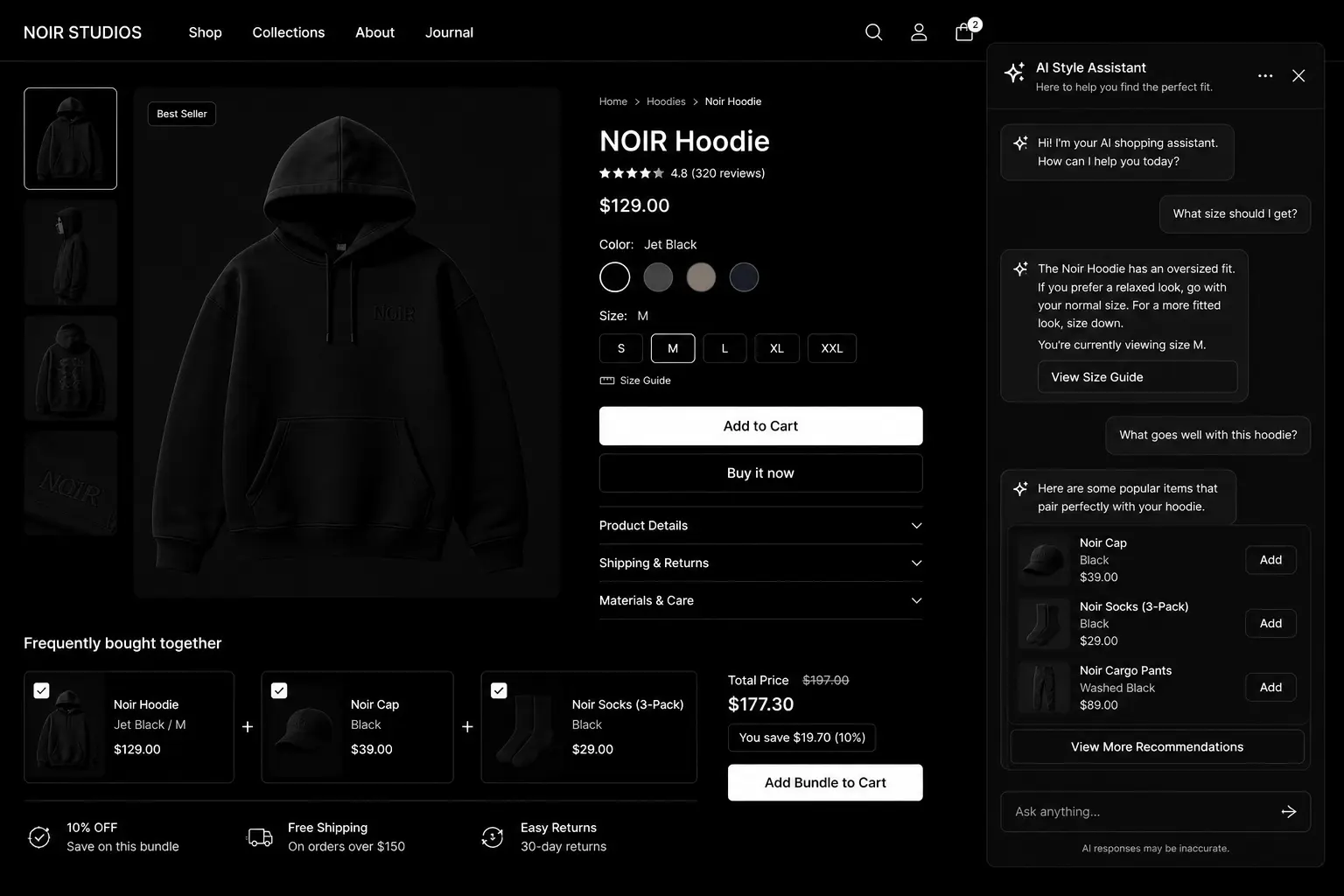
An AI chatbot for ecommerce should improve conversion, AOV, and customer confidence - not only reduce support tickets. High-performing deployments are intent-aware and deeply integrated with catalog and order data.

Why ai chatbot for ecommerce Matters in 2026

1. Modern bots influence product discovery and purchase confidence.2. Shopify integrations improve answer quality and speed.3. Customers now expect instant contextual help.

Step-by-Step Playbook

1. Pick one conversion-first use case

Start with sizing help, recommendations, or checkout support.

2. Connect product and order context

Integrate catalog and order data for accurate answers.

3. Set fallback escalation paths

Route complex or sensitive issues to human support quickly.

4. Deploy on high-intent pages

Prioritize PDP, cart, and checkout-adjacent surfaces.

5. Measure revenue impact

Track conversion, AOV, and CSAT before and after launch.Mid-article CTA -> Need support applying this to your stack? AI chatbot scoping and get a scoped roadmap with timeline, owners, and KPI targets.

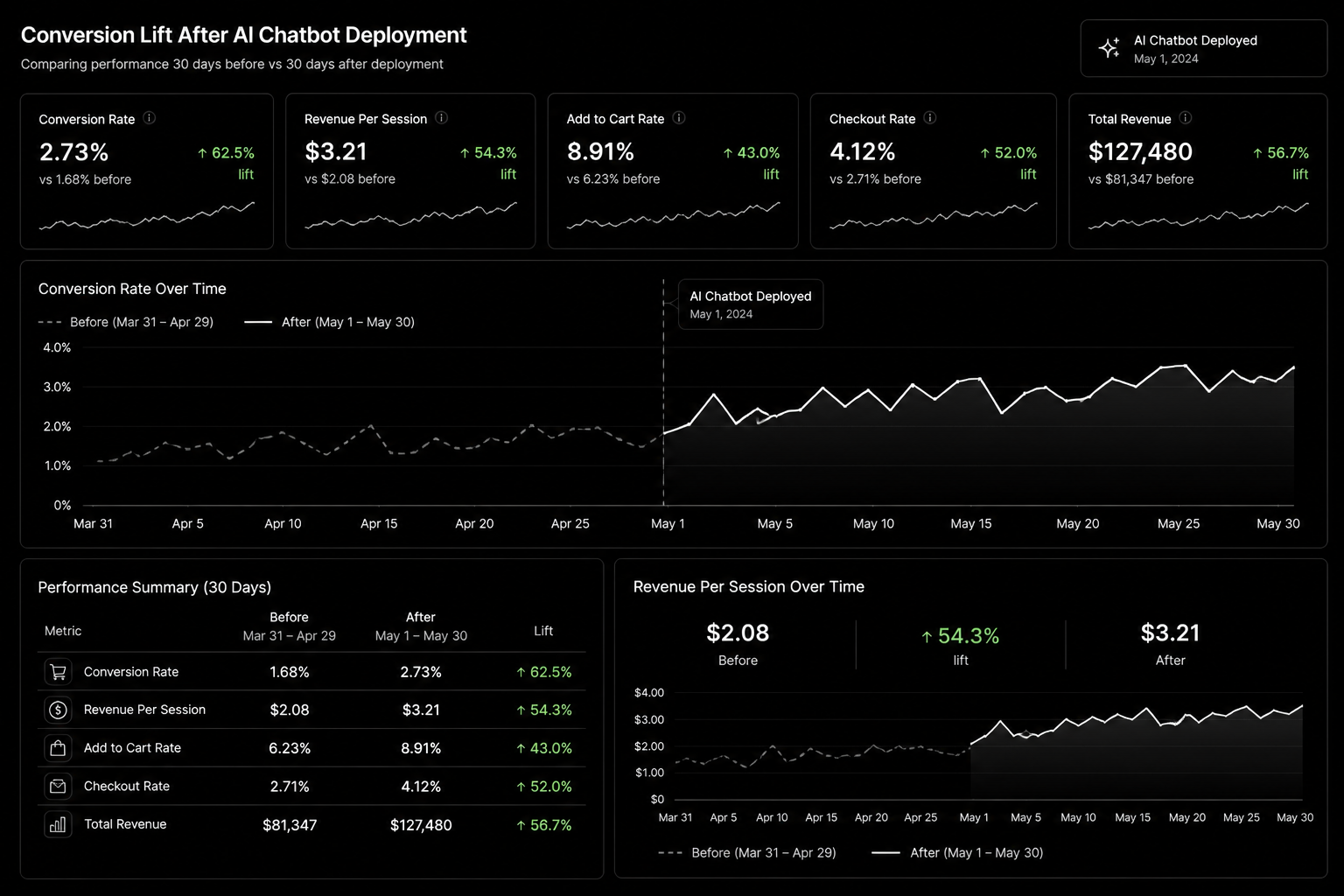
Conversion Lift AI Chatboat Development

Tools, References, and Benchmarks

  • Chatbot intent taxonomy
  • Support escalation matrix
  • Revenue impact dashboard
  • Semantic keyword targets to distribute naturally: ai chatbot shopify, best ai chatbot ecommerce, ai customer support ecommerce

Use these references during planning and QA: OpenAI platform docs, Google Search docs, and Gartner research notes.

Common Mistakes That Kill Performance

  • Deploying everywhere on day one
  • No human handoff logic
  • Tracking deflection only

FAQ - AI Chatbot for Ecommerce

How long does a ai chatbot for ecommerce project usually take?

Most teams can ship an initial version in 4 to 8 weeks, then improve outcomes over one quarter with a weekly optimization cadence.

Is ai chatbot for ecommerce relevant for UK and US teams?

Yes. The core framework is consistent across both markets. Differences are usually compliance details, buying behavior, and GBP/USD planning.

What should we measure first for ai chatbot for ecommerce?

Track one leading metric, one conversion metric, and one revenue metric so execution stays tied to business impact.

Should we run this in-house or with a specialist partner?

If your team has deep expertise and bandwidth, in-house can work. If speed and risk control matter, working with a specialist partner is usually faster.

What is the most common failure mode?

Teams skip governance after launch. Data quality drifts, process quality declines, and performance plateaus. A simple weekly operating rhythm prevents this.

Conclusion

AI Chatbot for Ecommerce performs best when execution decisions are tied to measurable outcomes from day one. Use this playbook to prioritize what matters, reduce risk, and create a repeatable optimization rhythm.Want a specialist team to accelerate delivery? Talk to our AI automation team or book a consultation and we will map a practical rollout plan.Download the Ecommerce AI Chatbot Selection Guide to implement this framework with templates and checklists.

Ecommerce AI Chatbot Selection Guide — compare leading AI chatbots, deployment checklists, integration templates, and ROI calculators.

AI Sales Agents for B2B Teams: What Works in 2026
AI Automation

AI Sales Agents for B2B Teams: What Works in 2026

AI sales agents promise a sales development rep that never sleeps: researching accounts, writing personalised outreach, answering inbound questions and booking meetings around the clock. Some of that promise is real. Some of it ends with a burned domain, a few hundred annoyed prospects and a sales team that refuses to touch the tool again.

This guide separates what AI sales agents do well in B2B today from where they still fail, and lays out a rollout plan that adds capacity without putting your pipeline or reputation at risk.

What an AI sales agent actually is

An AI sales agent is software built on a large language model that can take actions, not just write text. It reads data from your CRM and other sources, decides what to do next within rules you set, and acts: drafting an email, updating a record, replying to a website visitor or booking a meeting. CRM vendors now ship their own agents, such as HubSpot's Breeze agents and Salesforce's Agentforce, alongside standalone AI SDR tools and custom agents built on model APIs.

Where AI agents work well today

  • Account and contact research. Summarising a company's website, news, hiring and tech stack into a short brief before a rep reaches out.
  • Inbound response. Answering website chat and form follow-ups instantly, qualifying with a few questions and booking meetings for qualified buyers.
  • First drafts of outreach. Personalised openers and follow-ups that a rep reviews and sends.
  • CRM hygiene. Logging calls, summarising meetings, updating fields and creating follow-up tasks.
  • Re-engaging old leads. Working through closed-lost deals and dormant contacts with relevant, low-pressure messages.
  • Routing and prioritisation. Combining lead scores with fresh signals to decide who a rep should call today.

Where they still fail

  • Fully autonomous cold outbound at volume. Sending thousands of AI-written emails with no human review risks deliverability problems, factual mistakes and brand damage.
  • Complex, multi-stakeholder deals. Enterprise buying involves politics, procurement and negotiation that need human judgement.
  • Anything requiring commitments. Pricing exceptions, contract terms and technical promises should never come from an agent.
  • Thin or messy data. An agent working from a dirty CRM personalises confidently and wrongly.

A safe rollout plan

Phase 1: assist, don't send (weeks 1–4)

Start with research briefs, meeting summaries and draft emails that reps approve. Measure time saved and draft acceptance rate. This builds trust and shows where the agent's output is weak.

Phase 2: automate inbound (weeks 4–8)

Let the agent respond to inbound enquiries and book meetings, with clear rules: which questions it can answer, when to hand over to a human, and what it must never say. Review every conversation for the first few weeks.

Phase 3: supervised outbound (from week 8)

Allow the agent to send follow-ups and re-engagement messages to small, well-defined segments, with daily volume limits, approved templates and a human checking samples. Expand only when reply quality, unsubscribe rates and meeting quality hold up.

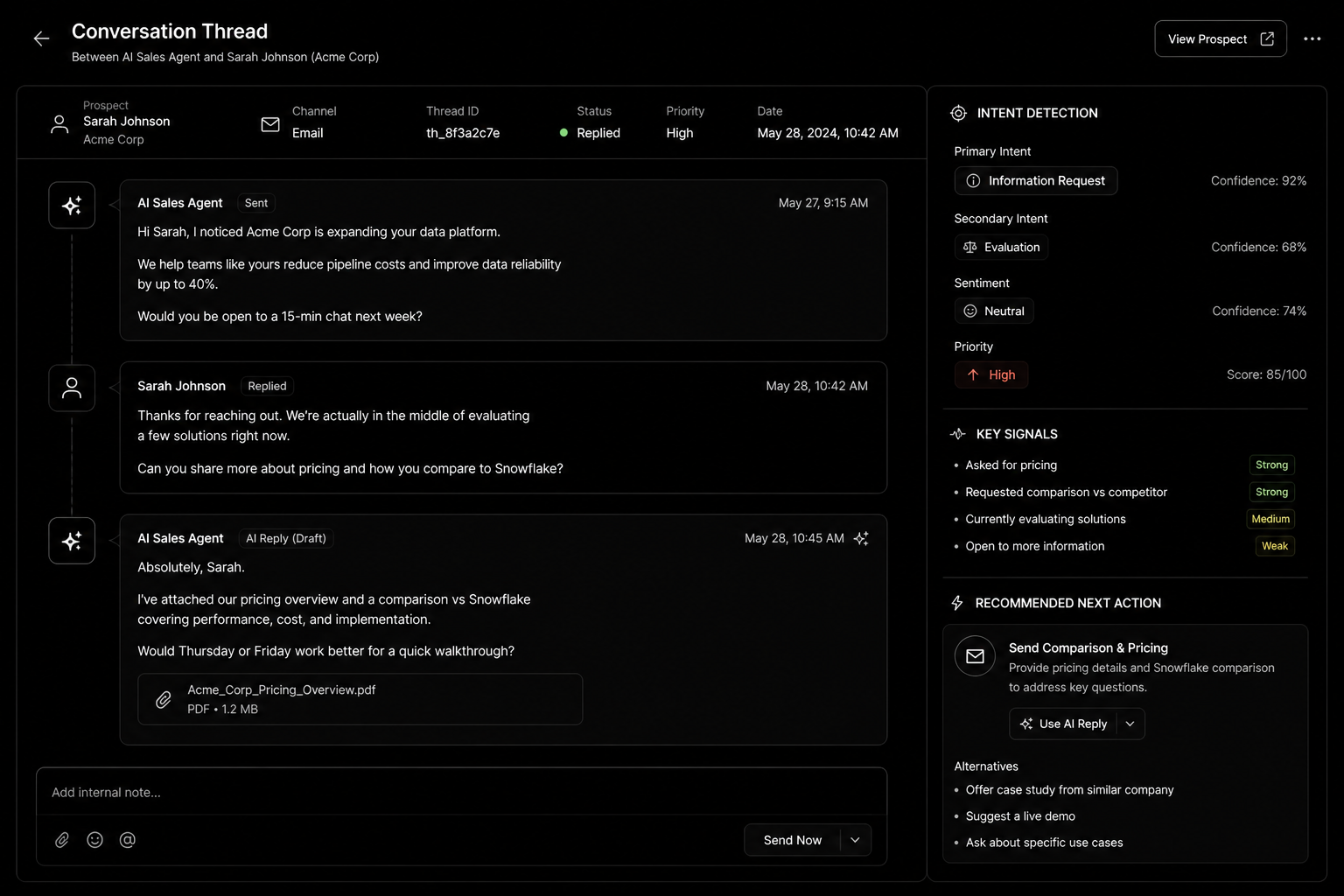
AI sales agent conversation thread

Guardrails every deployment needs

  1. A knowledge base the agent must use. Approved product information, pricing ranges, case study facts and FAQs. No improvising.
  2. Escalation rules. Hand over to a human for pricing, legal, technical depth, complaints or any negative sentiment.
  3. Volume and domain protection. Send outbound from properly warmed domains with authentication set up (SPF, DKIM, DMARC), and cap daily sends.
  4. Disclosure and consent. Follow the email and privacy rules in each market you sell to, and be honest when buyers ask whether they're talking to AI.
  5. Logging. Record every message and action in the CRM so you can audit what the agent did.
  6. A kill switch. One person who can pause the agent instantly.

What to measure

  • Response time to inbound leads.
  • Meetings booked and, more importantly, meetings that turn into opportunities.
  • Reply rate and negative reply rate on agent-sent messages.
  • Rep hours saved per week.
  • Errors found in conversation reviews.

If meetings go up but opportunities don't, the agent is booking the wrong people. Tighten qualification before scaling.

Build, buy or configure?

If you already run HubSpot or Salesforce, start with their native agents: they read your CRM data without extra integration. Standalone AI SDR tools suit teams that want a ready-made outbound workflow. Custom agents make sense when your process, data sources or compliance needs don't fit off-the-shelf tools. Our custom AI agents service covers that route.

FAQ

Will AI sales agents replace SDRs?

Not in most B2B teams. They take over research, admin and first responses, so SDRs spend more time on real conversations.

Are AI-written emails bad for deliverability?

The writing isn't the problem; volume, poor targeting and weak domain setup are. Keep volumes sensible and lists relevant.

How much data does an AI agent need?

Enough clean CRM data and approved content to answer common questions accurately. Start with your top questions and expand.

How long does setup take?

A native CRM agent for inbound can be live in a few weeks. Custom agents with integrations usually take longer, depending on systems and approval processes.

Conclusion

AI sales agents are most valuable as tireless assistants, not unsupervised senders. Roll them out in phases, protect your domain and brand with clear guardrails, and measure opportunities rather than activity. If you want help choosing or building one, see our AI agents service, read our AI automation agency guide, or book a call.

AI Sales Agent Deployment Guide — the complete implementation toolkit featuring AI SDR workflows, prompt templates, guardrail frameworks, CRM integration checklists, KPI dashboards, and deployment playbooks to automate lead engagement and accelerate pipeline growth.