
 Website Designing
 Web Development
 Mobile Applications
 Marketing
 CMS & Ecommerce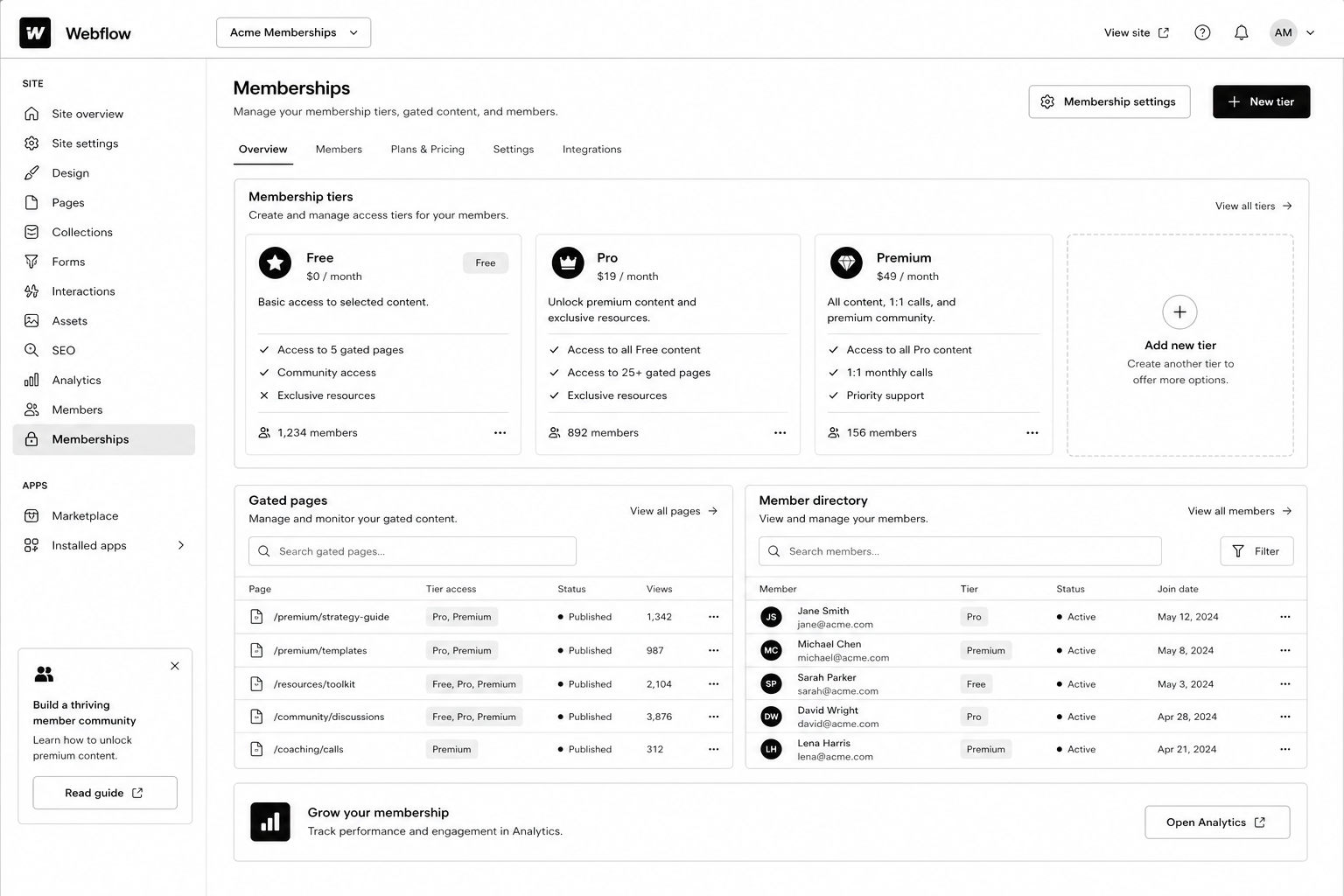
Table of Contents
For years, the answer to “can I gate content on Webflow?” was “use Memberstack.” It worked, but it added another tool, another bill, and another point of failure. Webflow Memberships changed that — and after two years of GA maturity, it’s finally the right answer for most use cases in 2026.
This Webflow membership site guide walks through the architecture, setup steps, gated-content patterns, and the trade-offs between native Webflow Memberships and Memberstack. By the end you’ll know which one fits your project, how to wire it up, and how to scale to thousands of paying members without rebuilding.
If you haven’t built the underlying CMS yet, read the Webflow CMS tutorial first — Memberships is layered on top of CMS architecture, and a clean foundation matters.
What Are Webflow Memberships?
Webflow Memberships is a native module that lets you create user accounts, gate pages and CMS items, and integrate paid plans via Stripe. It handles sign-up, log-in, password reset, and access control without third-party tools.
You configure access in three places: page settings (gate any page to logged-in users or paid plan members), CMS Collection settings (gate dynamic content), and the Designer (show / hide elements based on auth state).
Released GA in 2023 and matured significantly through 2024–2025, the 2026 version supports paid plans, free plans, plan upgrades, and webhooks for integration with downstream tools.
Why Webflow Memberships Matters in 2026
Three reasons gated content became a serious play this year.
1. AI killed ungated thin content. Free PDFs and ebook-bait lead magnets convert worse every quarter. Substantive gated resources (calculators, video courses, communities) still convert — and warrant a real membership system.
2. The “free + paid tier” pattern is now standard for content businesses. Newsletters, courses, niche communities — most run a free tier (email gate) and a paid tier (Stripe-backed). Webflow Memberships handles both natively.
3. Memberstack’s pricing crept up. A 200-member site that cost $50/mo on Memberstack Lite in 2022 now runs $200+/mo. Native Webflow Memberships is included in CMS plans, no per-member fee.
How Webflow Memberships Works
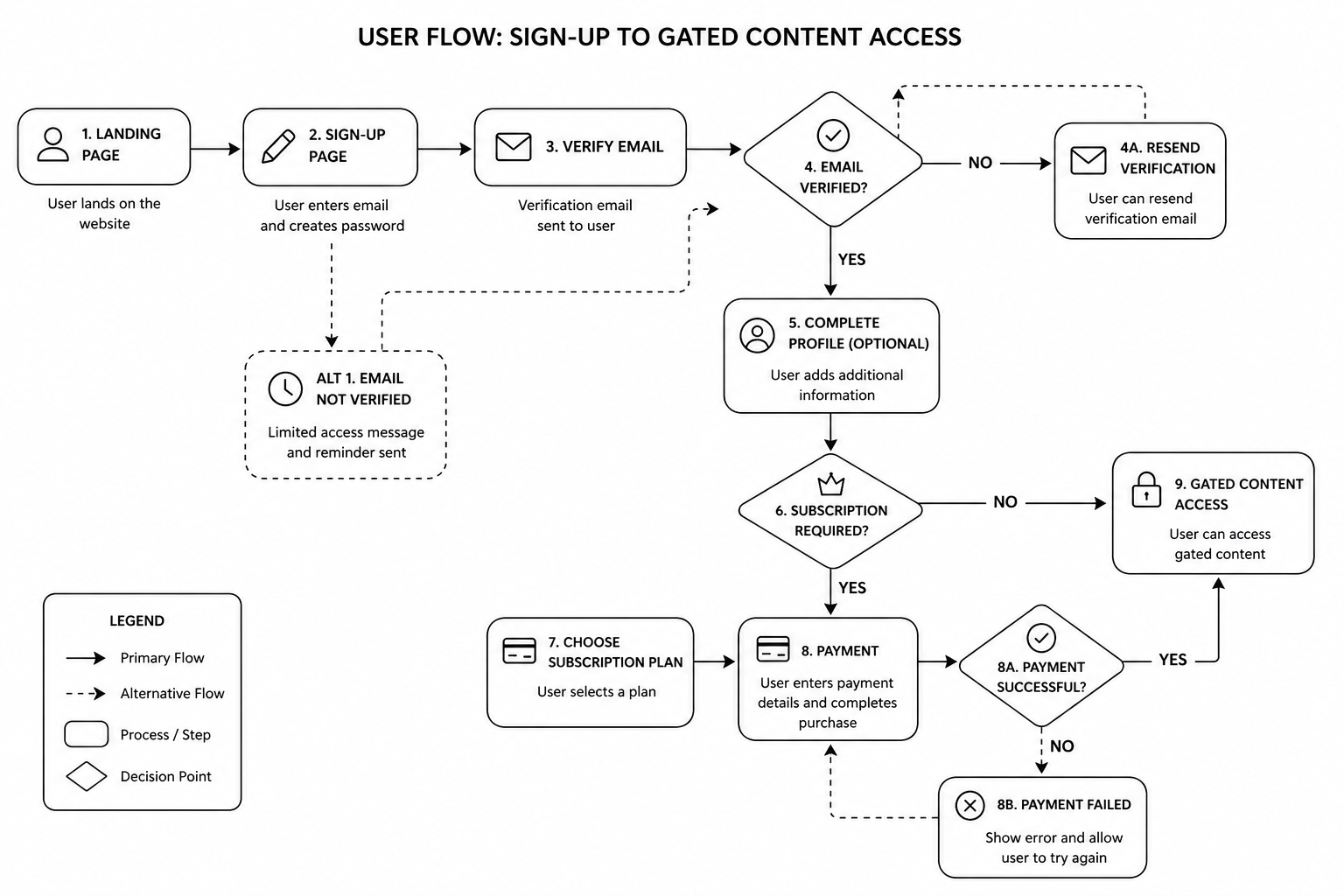
The mental model: pages and CMS items can be public, gated to “any logged-in user,” or gated to specific paid plans. Users sign up, choose a plan (or stay free), pay via Stripe if needed, and the site dynamically gates content based on their auth state and plan membership.
The four building blocks
- User Accounts — sign-up, log-in, profile, password reset
- Plans — free, paid (one-time, monthly, yearly), with Stripe integration
- Access Groups — collections of plans that can access specific content
- Gated Pages and CMS — set per page or collection
Step-by-Step: Build a Webflow Membership Site
1. Plan your tier model first
Decide on the structure before opening Webflow. Common patterns:
- Free + paid (most common). Email gate for free content, Stripe-backed paid tier for premium.
- Free + Pro + Premium. Three tiers with progressive access.
- Members-only community. Single paid tier, all content gated.
- Course / cohort model. One-time payment for a fixed-length course access window.
2. Connect Stripe (for paid plans)
In Project Settings → Memberships → Payments, connect your Stripe account. Webflow uses Stripe Checkout for the payment flow — no PCI overhead. Set up Stripe Tax if you sell internationally.
3. Create plans
Add plans in the Memberships panel. For each plan, configure: name, price, billing cycle, trial (optional), and the access group.
4. Set up access groups
Access groups are collections of plans. Example: a “Premium Content” access group that includes both “Pro” and “Premium” plans. Then any page or CMS gated to that group is accessible to either plan.
5. Build sign-up, log-in, account, and password-reset pages
Webflow generates default versions; replace them with branded ones. Use the Memberships User Logged-In / Logged-Out states to conditionally show navigation, account menus, and CTAs.
6. Gate pages and CMS items
Per page: in page settings, set the access group. Per CMS: in collection settings, gate the entire collection or specific items via a reference field on each item.
7. Build the member dashboard
A dedicated logged-in homepage showing the user’s name (via User Account binding), their plan, their resources, and a way to upgrade or manage billing (Stripe Customer Portal link).
8. Test the full flow end-to-end
- Sign up free → access free content, gated correctly
- Upgrade to paid → Stripe Checkout → return to dashboard with new access
- Cancel paid → access reverts
- Password reset email arrives correctly
- Webhook fires to your CRM / email tool on plan changes
9. Wire up downstream integrations
Use Webflow Logic or third-party automations (Zapier, Make) to push new members into HubSpot, ConvertKit, or your CRM. See our marketing automation guide for patterns.
Mid-article CTA → Want a specialist to architect your membership site so it scales? Book a free Webflow membership scoping call — we’ll map your tier model and integrations in 45 minutes.
Best Tools and Decisions: Native Webflow Memberships vs Memberstack
| Capability | Webflow Memberships | Memberstack |
|---|---|---|
| Native Webflow integration | Yes (built-in) | Yes (via embed) |
| Pricing | Included in CMS plans | $50–500/mo |
| Stripe integration | Yes | Yes |
| Free tier | Yes | Yes |
| Custom user fields | Limited | Extensive |
| Webhooks / API | Webhooks yes, API limited | Full API |
| Custom auth flows | Limited | Highly customisable |
| Best for | Standard membership and gated content | SaaS-grade auth and complex flows |
Native Webflow Memberships is the right answer for ~80% of projects. Use Memberstack when you need custom user metadata, advanced API integrations, or SaaS-grade auth flows that exceed native capabilities.
Common Webflow Memberships Mistakes
- Gating too much, too early. If your free tier is thin, no one converts to paid. The paid offer needs to look obviously valuable from the free experience.
- Forgetting password-reset and email styling. Default Webflow emails look unbranded. Customise them in Project Settings.
- Not setting up Stripe Customer Portal. Members need a self-service way to manage billing, update cards, cancel. Stripe’s Customer Portal handles it — link from the member dashboard.
- Skipping webhook integration. If new paid members don’t auto-flow into your CRM, your retention and engagement automation is dead on arrival.
- Hard-coding access in custom code instead of using Access Groups. Brittle and unmaintainable.
- Ignoring SEO on gated content. Decide whether each gated piece should be indexed (with a paywall metadata signal) or noindexed.
FAQ — Webflow Memberships
How much does Webflow Memberships cost?
It’s included in CMS, Business, and Enterprise plans at no per-member fee. Stripe takes its standard processing fee on paid plans. No additional monthly subscription beyond your Webflow site plan.
How many members can a Webflow site handle?
The current cap is 10,000 members on Business plans, higher on Enterprise. Plenty of headroom for most B2B membership sites.
Can I migrate from Memberstack to Webflow Memberships?
Yes. Export users from Memberstack, import into Webflow via the Members API. Plan password resets — passwords don’t carry across platforms.
Does Webflow Memberships support social log-in (Google, etc.)?
Not natively as of 2026. If social log-in is critical, Memberstack remains the better choice.
Can I run subscription billing through Webflow Memberships?
Yes — monthly and yearly plans via Stripe. For more complex subscription logic (proration, dunning, multiple subscription items), Stripe handles the billing logic.
Can gated content rank on Google?
Yes, with proper schema. Use the `isAccessibleForFree: false` flag in Article schema and serve the first paragraph or two to crawlers via Webflow’s preview rules. Google supports this pattern formally.
Conclusion: Memberships Is Now the Default, Not the Workaround
If you’re starting a new membership site or community in 2026, default to Webflow Memberships. The native integration, included pricing, and matured feature set make it the right call for the vast majority of projects. Memberstack is still the answer for SaaS-grade auth flows and deep API customisation — but those use cases are narrower than they used to be.
Our Webflow agency has shipped membership sites for SaaS resource libraries, course businesses, and gated communities across the UK and USA. Book a free membership site scoping call and we’ll map your tier model, integrations, and timeline in 45 minutes.
Download the Membership Site Architecture Brief — the tier-model template and integration map we use on production builds.