
 Website Designing
 Web Development
 Mobile Applications
 Marketing
 CMS & Ecommerce
Table of Contents
Most companies wait too long to redesign. They know the site is tired, but they’re not sure if the time is now or later. Result: six more months of lost traffic, low conversions, and executive frustration that could have been avoided with a decision framework.
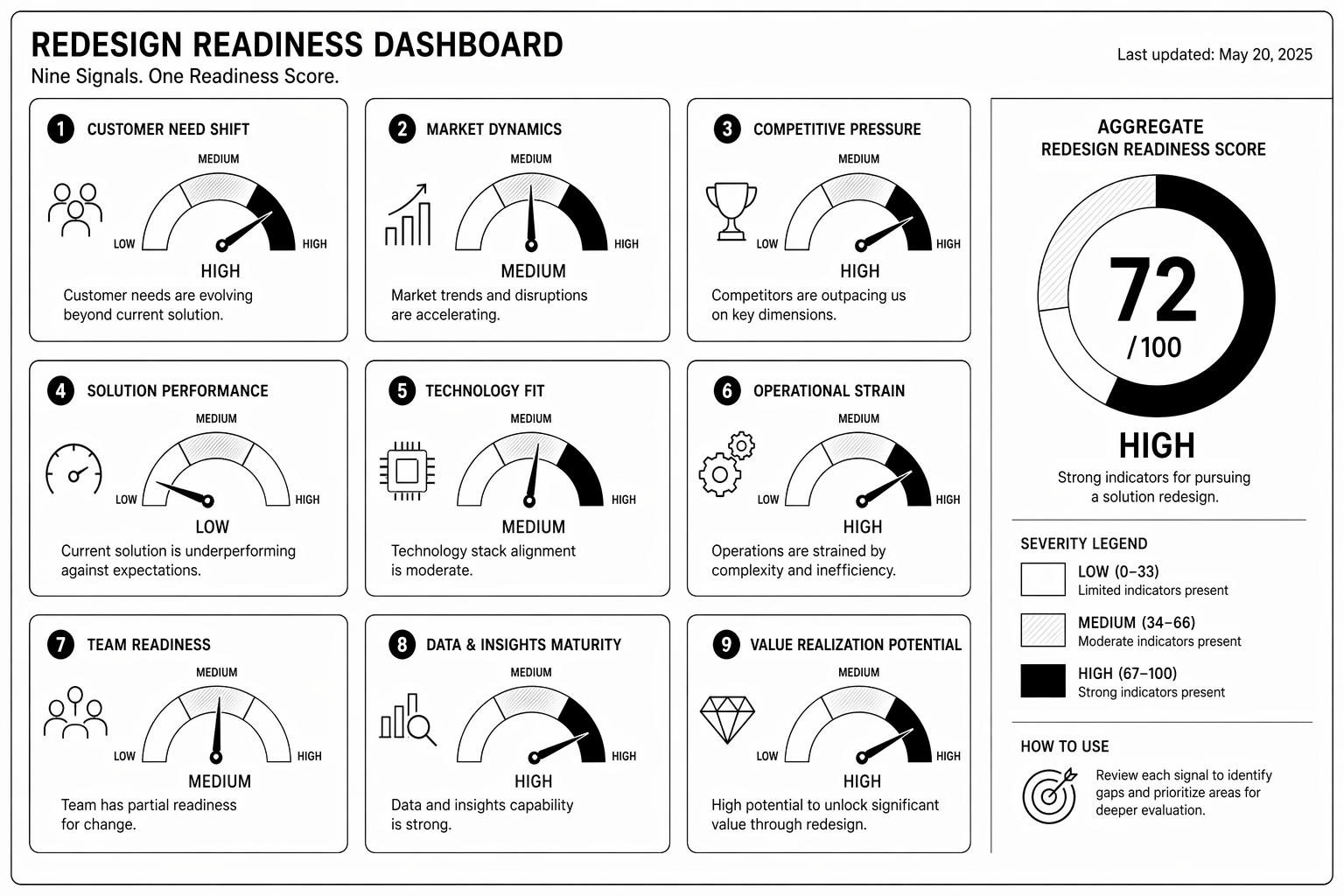
This guide covers the 9 clear signals that a redesign is overdue, the framework to choose between refresh vs redesign vs rebuild, and how to prioritise redesign in your roadmap.
The 9 Signals Your Website Needs a Redesign
1. Organic traffic has plateaued or declined for 6+ months. If traffic isn’t growing despite increased content and backlinks, the site itself may be the ceiling. Sites over three years old often need architecture refresh.
2. Core Web Vitals are red (especially INP or CLS). Your site is slow, janky, or unstable on mobile. Google sees it, so do visitors. Redesign is the reset button.
3. Conversion rate is 30%+ below your category benchmark. If demo request rate or lead conversion is substantially worse than competitors, messaging, design, or tech architecture is wrong.
4. Bounce rate is above 60% on key pages. Visitors land, see outdated design or unclear value prop, leave immediately. Redesign won’t fix bad positioning, but it removes design as the objection.
5. Mobile conversion is 50%+ lower than desktop. Site wasn’t designed mobile-first. Responsive fix is a patch. True mobile optimization requires redesign.
6. Design no longer matches current brand or product. Last redesign was 3–4 years ago. Brand has evolved. Site looks like an old company.
7. Marketing team says “we can’t get anything shipped.” CMS is slow, editing is painful, approval workflows are broken. Operations problem, usually solved by platform migration.
8. You’ve added so many feature requests the site feels bloated. Homepage is 5,000px long. Navigation has 40+ items. Information architecture broke under weight of feature creep.
9. Support team logs 20+ tickets/month about the site. UX confusion, forms breaking, checkout issues. Users are telling you the site is broken before analytics do.
Refresh vs Redesign vs Rebuild: The Decision Framework
Refresh (4–8 weeks, £5k–20k):
- Brand colours, fonts, imagery updated.
- Same CMS, same platform, same IA.
- No structural changes.
- Choose this if: Brand is tired but strategy is sound. Content performs well. No major platform complaints.
Redesign (10–16 weeks, £20k–60k):
- New visual design + IA rethink + CMS optimisation.
- Same platform (usually) but restructured content.
- CRO-focused changes.
- Choose this if: Signals 1–5 above are present. Information architecture is broken but strategy is sound.
Rebuild (16–24 weeks, £60k–150k+):
- New platform entirely or complete technical rewrite.
- New strategy, new positioning, new IA.
- Everything changes.
- Choose this if: Platform is actively hurting growth. Multiple signals present. Need major strategic reset.
Timing: When to Start Planning
Start planning immediately if: 3+ signals are present. Planning takes 4–8 weeks. You want the redesign live before your busiest season.
Start planning within 90 days if: 1–2 signals are present but trending worse. Monitor. If it gets to 3, accelerate.
Wait if: No signals present, site is performing well, team is happy. Don’t redesign for the sake of redesign.
Unsure if your site needs a redesign? Our team runs free 30-minute readiness assessments. Book one and we’ll tell you honestly whether refresh, redesign, or rebuild is right.
Common Mistakes When Deciding to Redesign
1. Redesigning without understanding why traffic slowed. Redesign is a potential solution, not the solution. Audit first.
2. “Let’s refresh the design” when the problem is information architecture. Pretty site with bad IA still doesn’t convert.
3. Redesigning too often. Every two years is expensive and demoralising. Every four years is standard. Refresh between redesigns.
4. Redesigning during peak season. Launch during slow periods. January, April, September are safer than Black Friday or product launch season.
5. No baseline metrics before redesign. You won’t know if it worked. Capture traffic, conversions, and performance before launch.
For the actual redesign process, see our complete redesign guide to protect SEO and execution quality.
FAQ
How often should I redesign my website?
Every 3–4 years for major redesigns. Refresh between redesigns annually or every two years. Continuous small iterations always beat big periodic overhauls.
Should I redesign during growth season?
No. Launch during off-season (Q1 or Q3 for most B2B). You need 4–6 weeks post-launch to monitor and fix issues without impacting revenue.
Can I redesign gradually or do I need a hard cutover?
Hard cutover is cleaner SEO-wise. Gradual rollouts are messier redirect-wise. Pick one or the other, avoid in-between.
Will a redesign hurt my SEO?
Only with bad execution. Proper 301 redirects, content parity, and metadata preservation keep rankings intact. See the redesign SEO guide.
What’s the simplest signal I should redesign?
If your site is over four years old and you haven’t refreshed design or IA, that’s reason enough. Design trends change. User expectations change. Your site should reflect current reality.
Conclusion: Redesign When Multiple Signals Align
Don’t redesign on a hunch or trend alone. Use this signal framework. If 3+ signals are present, redesign is likely overdue. If 1–2 signals are present, monitor and plan for the next quarter.
Start planning early. Launch during off-season. Measure baselines before and after. You’ll know within 90 days if redesign was worth it.
Our redesign team runs readiness audits and execution. Book a consultation if you’re on the fence.
The Redesign Readiness Self-Assessment
— a worksheet to score your site against the 9 signals and get a clear recommendation.