



Inbound Logo
Web Development
Resources
Free audit
Free HubSpot Portal Audit
Get an instant audit of your HubSpot portal with actionable insights to improve CRM setup, automation, marketing, and overall performance.
Start Free Audit
button arrowbutton arrow
Webflow

Webflow Memberships and Gated Content: Complete 2026 Setup Guide

12 MIN
December 10, 2025
In this article

For years, the answer to "can I gate content on Webflow?" was "use Memberstack." It worked, but it added another tool, another bill, and another point of failure. Webflow Memberships changed that — and after two years of GA maturity, it's finally the right answer for most use cases in 2026.This Webflow membership site guide walks through the architecture, setup steps, gated-content patterns, and the trade-offs between native Webflow Memberships and Memberstack. By the end you'll know which one fits your project, how to wire it up, and how to scale to thousands of paying members without rebuilding.If you haven't built the underlying CMS yet, read the Webflow CMS tutorial first — Memberships is layered on top of CMS architecture, and a clean foundation matters.

What Are Webflow Memberships?

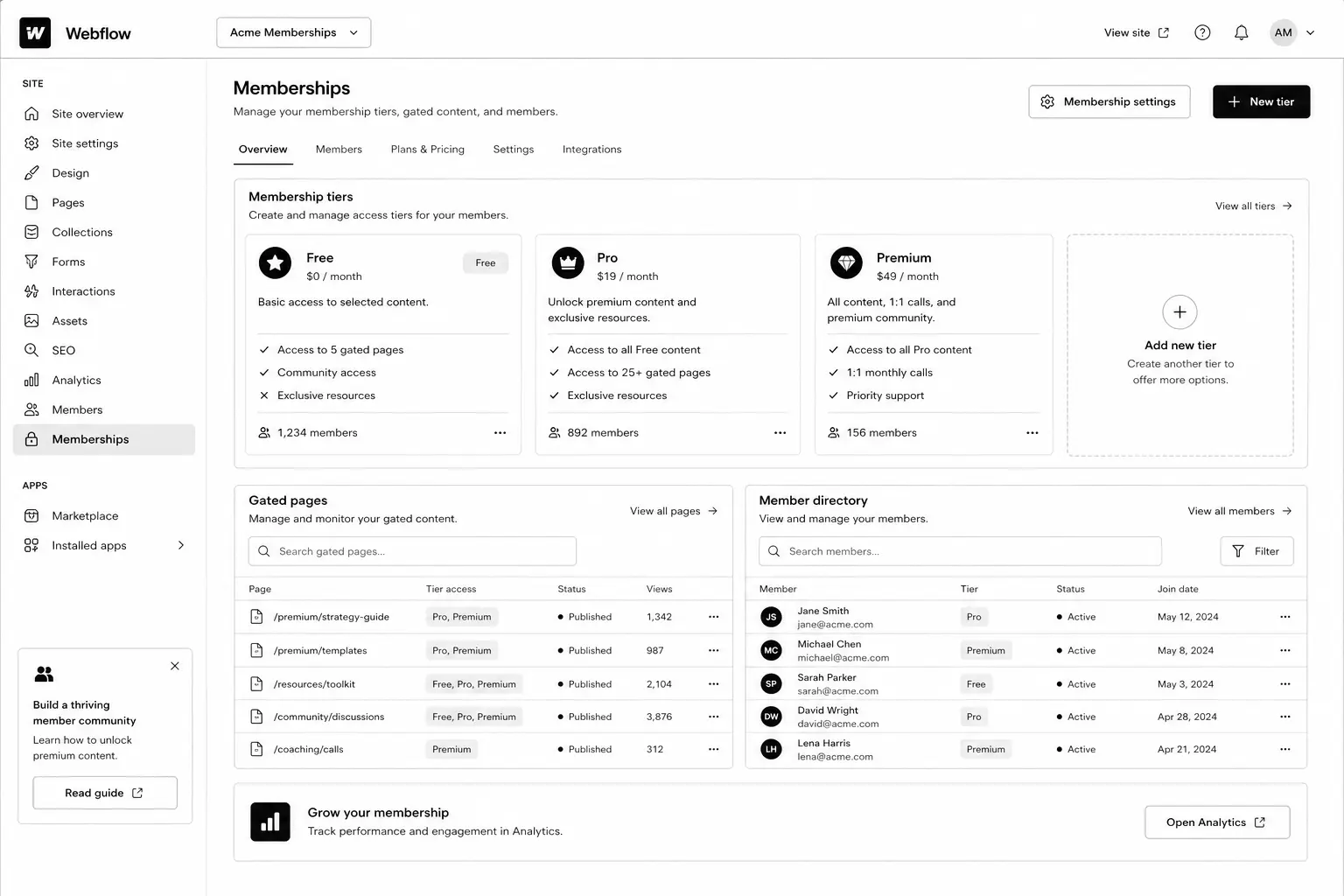
Webflow Memberships is a native module that lets you create user accounts, gate pages and CMS items, and integrate paid plans via Stripe. It handles sign-up, log-in, password reset, and access control without third-party tools.You configure access in three places: page settings (gate any page to logged-in users or paid plan members), CMS Collection settings (gate dynamic content), and the Designer (show / hide elements based on auth state).Released GA in 2023 and matured significantly through 2024–2025, the 2026 version supports paid plans, free plans, plan upgrades, and webhooks for integration with downstream tools.

Why Webflow Memberships Matters in 2026

Three reasons gated content became a serious play this year.1. AI killed ungated thin content. Free PDFs and ebook-bait lead magnets convert worse every quarter. Substantive gated resources (calculators, video courses, communities) still convert — and warrant a real membership system.2. The "free + paid tier" pattern is now standard for content businesses. Newsletters, courses, niche communities — most run a free tier (email gate) and a paid tier (Stripe-backed). Webflow Memberships handles both natively.3. Memberstack's pricing crept up. A 200-member site that cost $50/mo on Memberstack Lite in 2022 now runs $200+/mo. Native Webflow Memberships is included in CMS plans, no per-member fee.

How Webflow Memberships Works

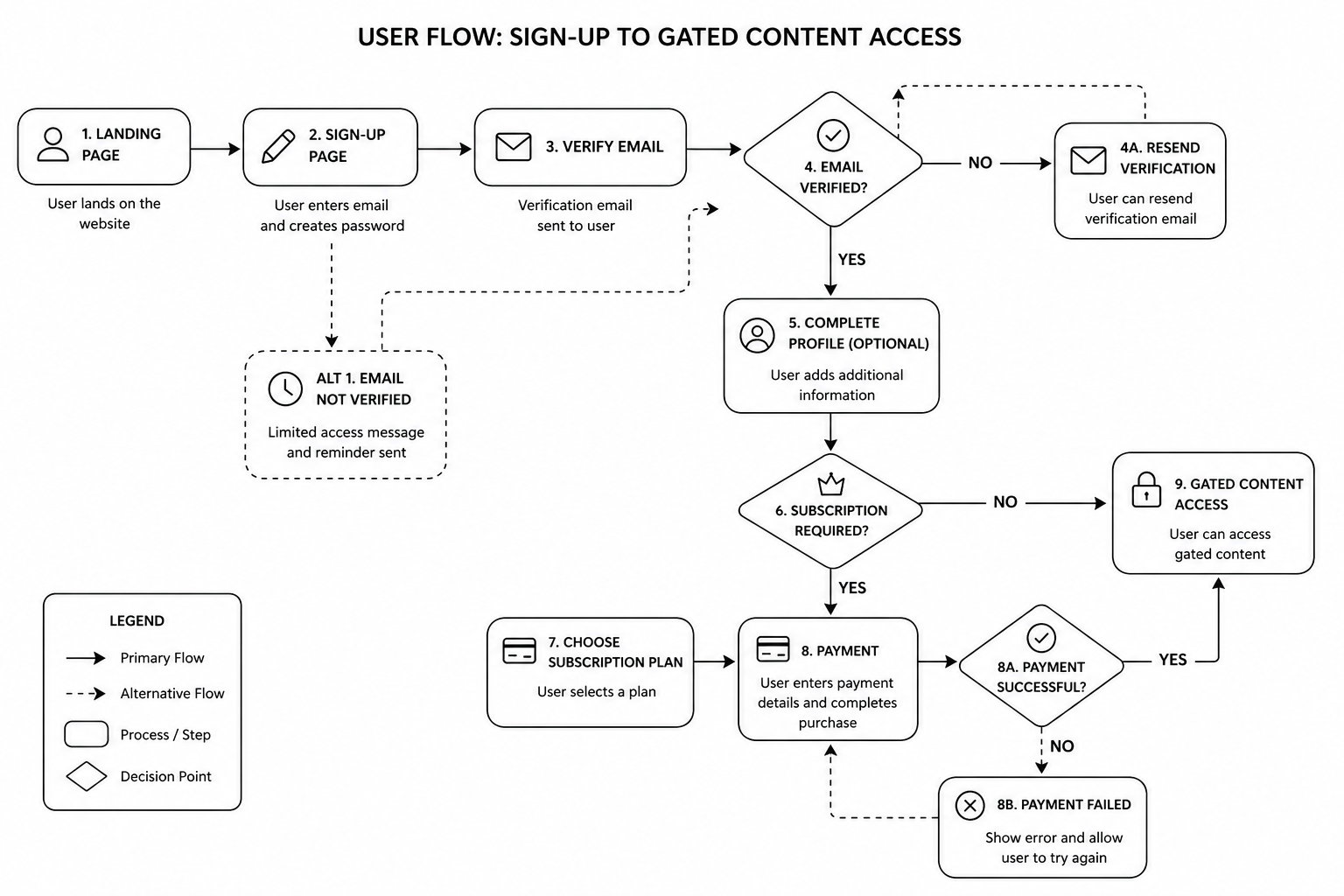
The mental model: pages and CMS items can be public, gated to "any logged-in user," or gated to specific paid plans. Users sign up, choose a plan (or stay free), pay via Stripe if needed, and the site dynamically gates content based on their auth state and plan membership.

The four building blocks

  • User Accounts — sign-up, log-in, profile, password reset
  • Plans — free, paid (one-time, monthly, yearly), with Stripe integration
  • Access Groups — collections of plans that can access specific content
  • Gated Pages and CMS — set per page or collection

Step-by-Step: Build a Webflow Membership Site

1. Plan your tier model first

Decide on the structure before opening Webflow. Common patterns:

  • Free + paid (most common). Email gate for free content, Stripe-backed paid tier for premium.
  • Free + Pro + Premium. Three tiers with progressive access.
  • Members-only community. Single paid tier, all content gated.
  • Course / cohort model. One-time payment for a fixed-length course access window.

2. Connect Stripe (for paid plans)

In Project Settings → Memberships → Payments, connect your Stripe account. Webflow uses Stripe Checkout for the payment flow — no PCI overhead. Set up Stripe Tax if you sell internationally.

3. Create plans

Add plans in the Memberships panel. For each plan, configure: name, price, billing cycle, trial (optional), and the access group.

4. Set up access groups

Access groups are collections of plans. Example: a "Premium Content" access group that includes both "Pro" and "Premium" plans. Then any page or CMS gated to that group is accessible to either plan.

5. Build sign-up, log-in, account, and password-reset pages

Webflow generates default versions; replace them with branded ones. Use the Memberships User Logged-In / Logged-Out states to conditionally show navigation, account menus, and CTAs.

6. Gate pages and CMS items

Per page: in page settings, set the access group. Per CMS: in collection settings, gate the entire collection or specific items via a reference field on each item.

7. Build the member dashboard

A dedicated logged-in homepage showing the user's name (via User Account binding), their plan, their resources, and a way to upgrade or manage billing (Stripe Customer Portal link).

8. Test the full flow end-to-end

  • Sign up free → access free content, gated correctly
  • Upgrade to paid → Stripe Checkout → return to dashboard with new access
  • Cancel paid → access reverts
  • Password reset email arrives correctly
  • Webhook fires to your CRM / email tool on plan changes

9. Wire up downstream integrations

Use Webflow Logic or third-party automations (Zapier, Make) to push new members into HubSpot, ConvertKit, or your CRM. See our marketing automation guide for patterns.Mid-article CTA → Want a specialist to architect your membership site so it scales? Book a free Webflow membership scoping call — we'll map your tier model and integrations in 45 minutes.
Best Tools and Decisions: Native Webflow Memberships vs Memberstack

CapabilityWebflow MembershipsMemberstackNative Webflow integrationYes (built-in)Yes (via embed)PricingIncluded in CMS plans$50–500/moStripe integrationYesYesFree tierYesYesCustom user fieldsLimitedExtensiveWebhooks / APIWebhooks yes, API limitedFull APICustom auth flowsLimitedHighly customisableBest forStandard membership and gated contentSaaS-grade auth and complex flowsNative Webflow Memberships is the right answer for ~80% of projects. Use Memberstack when you need custom user metadata, advanced API integrations, or SaaS-grade auth flows that exceed native capabilities.

Common Webflow Memberships Mistakes

  • Gating too much, too early. If your free tier is thin, no one converts to paid. The paid offer needs to look obviously valuable from the free experience.
  • Forgetting password-reset and email styling. Default Webflow emails look unbranded. Customise them in Project Settings.
  • Not setting up Stripe Customer Portal. Members need a self-service way to manage billing, update cards, cancel. Stripe's Customer Portal handles it — link from the member dashboard.
  • Skipping webhook integration. If new paid members don't auto-flow into your CRM, your retention and engagement automation is dead on arrival.
  • Hard-coding access in custom code instead of using Access Groups. Brittle and unmaintainable.
  • Ignoring SEO on gated content. Decide whether each gated piece should be indexed (with a paywall metadata signal) or noindexed.

FAQ — Webflow Memberships

How much does Webflow Memberships cost?

It's included in CMS, Business, and Enterprise plans at no per-member fee. Stripe takes its standard processing fee on paid plans. No additional monthly subscription beyond your Webflow site plan.

How many members can a Webflow site handle?

The current cap is 10,000 members on Business plans, higher on Enterprise. Plenty of headroom for most B2B membership sites.

Can I migrate from Memberstack to Webflow Memberships?

Yes. Export users from Memberstack, import into Webflow via the Members API. Plan password resets — passwords don't carry across platforms.

Does Webflow Memberships support social log-in (Google, etc.)?

Not natively as of 2026. If social log-in is critical, Memberstack remains the better choice.

Can I run subscription billing through Webflow Memberships?

Yes — monthly and yearly plans via Stripe. For more complex subscription logic (proration, dunning, multiple subscription items), Stripe handles the billing logic.

Can gated content rank on Google?

Yes, with proper schema. Use the `isAccessibleForFree: false` flag in Article schema and serve the first paragraph or two to crawlers via Webflow's preview rules. Google supports this pattern formally.

Conclusion: Memberships Is Now the Default, Not the Workaround

If you're starting a new membership site or community in 2026, default to Webflow Memberships. The native integration, included pricing, and matured feature set make it the right call for the vast majority of projects. Memberstack is still the answer for SaaS-grade auth flows and deep API customisation — but those use cases are narrower than they used to be.Our Webflow agency has shipped membership sites for SaaS resource libraries, course businesses, and gated communities across the UK and USA. Book a free membership site scoping call and we'll map your tier model, integrations, and timeline in 45 minutes.Download the Membership Site Architecture Brief — the tier-model template and integration map we use on production builds.

KEEP BUILDING

You've got the plan. Let's build it.

We turn the frameworks you just read into the flows, pages, and automation behind them — under your brand, always.

Keep reading

View all articles
Ecommerce

Subscription Ecommerce Growth: The 2026 Strategy for Recurring Revenue

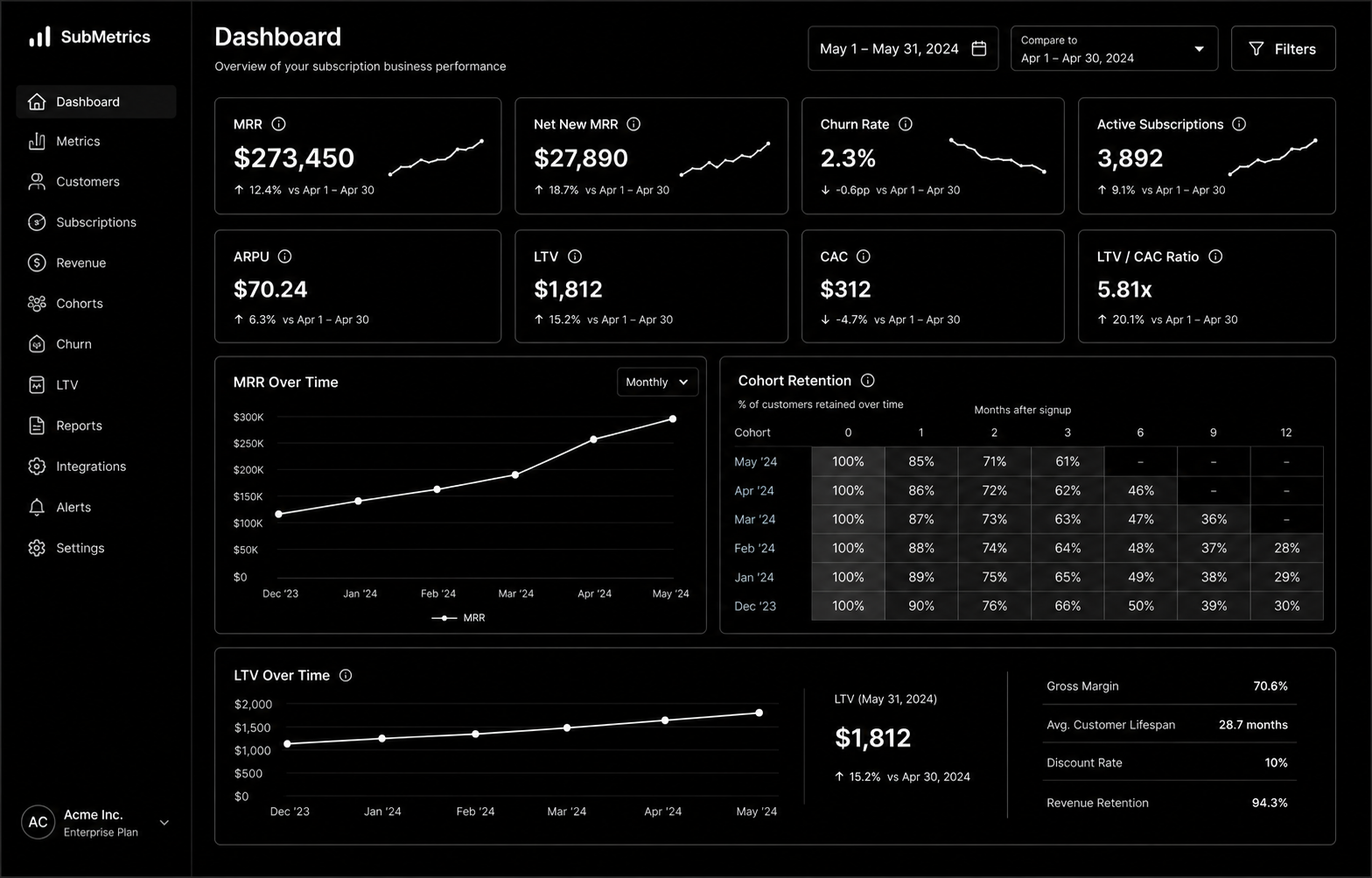
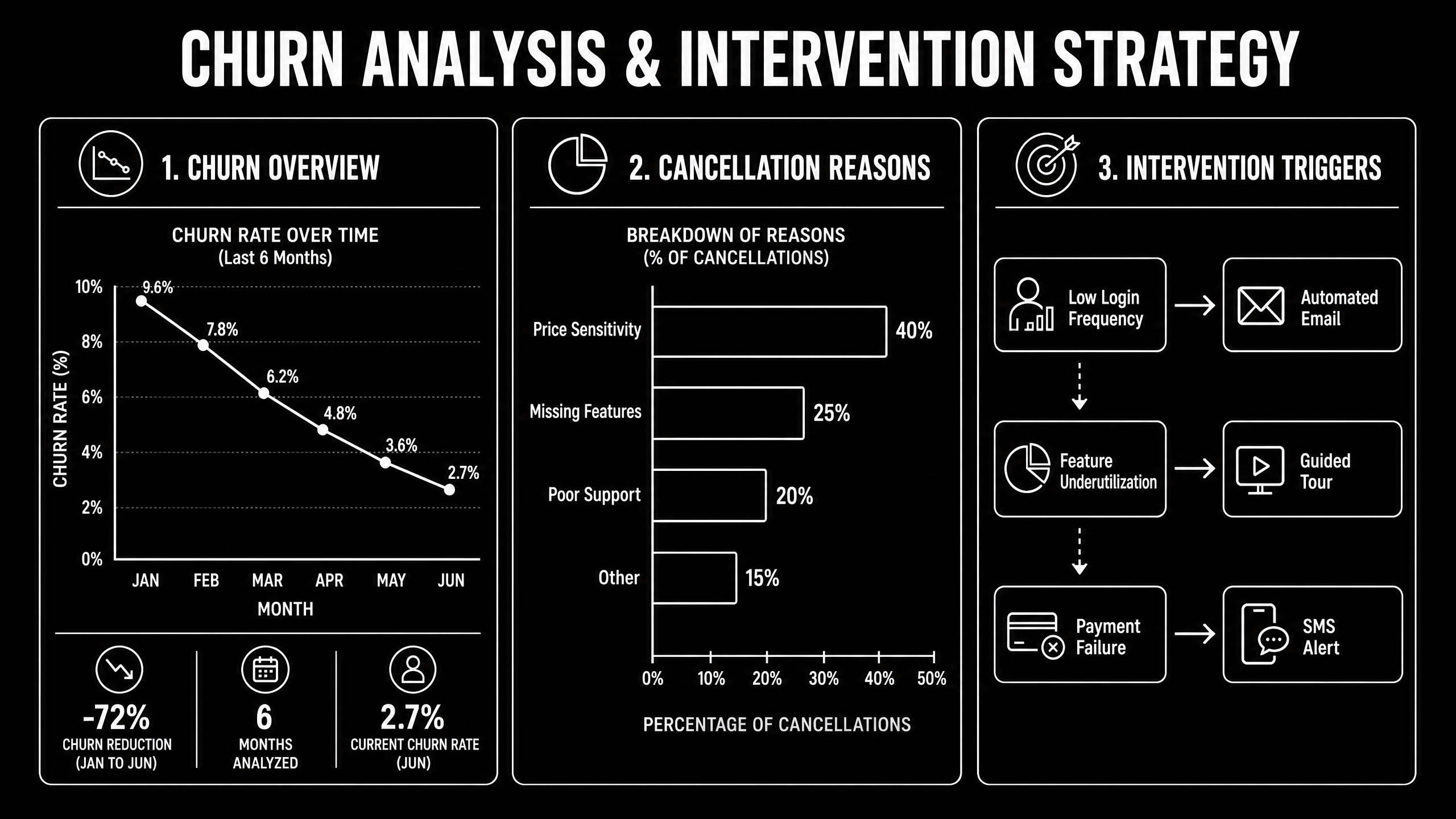
Subscription Ecommerce Growth in 2026 is won by execution quality, not platform hype. Teams that perform consistently align strategy, implementation, and measurement into one operating system. This guide gives the practical framework, internal link map, and optimization cadence to do that.Subscription ecommerce is built on retention math most brands ignore. Here's the 2026 growth strategy that actually works. If you want implementation help, work with Shopify development. For connected strategy, also review Shopify Plus Development Guide and DTC Ecommerce Growth.

What Subscription Ecommerce Growth Means in Practice

Subscription ecommerce growth is driven by retention math more than subscriber volume. Sustainable recurring revenue comes from solid unit economics, churn prevention, and disciplined experimentation.

Why subscription ecommerce Matters in 2026

1. Recurring models fail fast when churn and fulfillment costs are ignored.2. Leadership cares more about LTV quality than raw subscriber count.3. Cancellation interventions now require tighter experimentation and segmentation.

Step-by-Step Playbook

1. Model unit economics by cohort

Track CAC payback, gross margin, and LTV by acquisition source.

2. Design subscription architecture

Define cadence options and flexibility to reduce early churn.

3. Implement churn intervention flows

Trigger save offers and outreach by cancellation signals.

4. Improve post-purchase value loop

Reinforce value between shipments with lifecycle communication.

5. Run monthly retention tests

Test pricing, bundles, and cancellation UX with guardrails.Mid-article CTA -> Need support applying this to your stack? Subscription scoping and get a scoped roadmap with timeline, owners, and KPI targets.

Tools, References, and Benchmarks

  • Subscription unit economics model
  • Cancellation reason taxonomy
  • Retention experiment backlog
  • Semantic keyword targets to distribute naturally: subscription commerce shopify, recurring revenue ecommerce, subscription box growth

Use these references during planning and QA: Shopify enterprise resources, Klaviyo resources, and web.dev ecommerce guidance.

Common Mistakes That Kill Performance

  • Acquisition-first strategy
  • Weak churn instrumentation
  • No cohort profitability analysis

FAQ - Subscription Ecommerce Growth

How long does a subscription ecommerce project usually take?

Most teams can ship an initial version in 4 to 8 weeks, then improve outcomes over one quarter with a weekly optimization cadence.

Is subscription ecommerce relevant for UK and US teams?

Yes. The core framework is consistent across both markets. Differences are usually compliance details, buying behavior, and GBP/USD planning.

What should we measure first for subscription ecommerce?

Track one leading metric, one conversion metric, and one revenue metric so execution stays tied to business impact.

Should we run this in-house or with a specialist partner?

If your team has deep expertise and bandwidth, in-house can work. If speed and risk control matter, working with a specialist partner is usually faster.

What is the most common failure mode?

Teams skip governance after launch. Data quality drifts, process quality declines, and performance plateaus. A simple weekly operating rhythm prevents this.

Conclusion

Subscription Ecommerce Growth performs best when execution decisions are tied to measurable outcomes from day one. Use this playbook to prioritize what matters, reduce risk, and create a repeatable optimization rhythm.Want a specialist team to accelerate delivery? Talk to Shopify development or book a consultation and we will map a practical rollout plan.Download the Subscription Ecommerce Unit Economics Model to implement this framework with templates and checklists.

Ecommerce

DTC Ecommerce Growth Playbook: 14 Levers That Compound in 2026

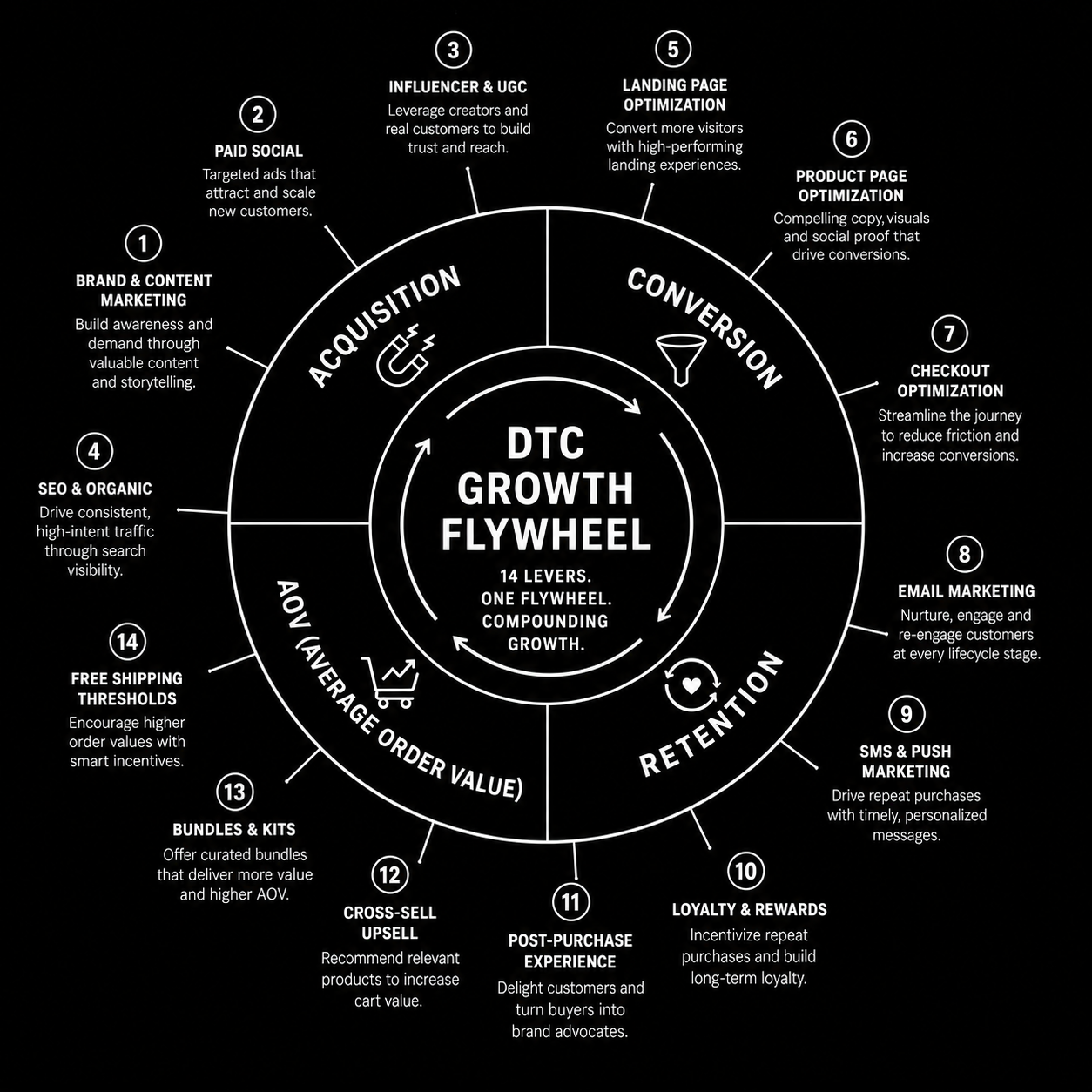
DTC Ecommerce Growth Playbook in 2026 is won by execution quality, not platform hype. Teams that perform consistently align strategy, implementation, and measurement into one operating system. This guide gives the practical framework, internal link map, and optimization cadence to do that.DTC growth in 2026 isn't a single channel — it's 14 levers compounding. Here's the playbook that works. If you want implementation help, work with our Shopify developers. For connected strategy, also review Shopify Plus Development Guide and Shopify Conversion Rate Optimization.

What DTC Ecommerce Growth Playbook Means in Practice

DTC ecommerce growth is a compounding system across acquisition, conversion, retention, and AOV. The strongest brands avoid single-channel dependence and run an integrated growth flywheel.

Why dtc ecommerce growth Matters in 2026

1. Paid channel volatility makes one-channel strategies fragile.2. Retention quality now drives profitability more than traffic volume.3. Winning teams iterate quickly across offers, creative, and lifecycle mechanics.

Step-by-Step Playbook

1. Audit growth mix

Quantify channel contribution and margin impact.

2. Pick highest-leverage constraint

Fix one bottleneck at a time for compounding gains.

3. Improve merchandising strategy

Align bundles and offers to margin-aware demand signals.

4. Expand retention automations

Improve post-purchase, replenishment, and win-back flows.

5. Review flywheel monthly

Track how changes in one lever affect the whole system.Mid-article CTA -> Need support applying this to your stack? DTC growth audit and get a scoped roadmap with timeline, owners, and KPI targets.

Tools, References, and Benchmarks

  • 14-lever growth map
  • Channel contribution scorecard
  • Cohort retention tracker
  • Semantic keyword targets to distribute naturally: dtc growth playbook, direct to consumer growth, scaling dtc brand

Use these references during planning and QA: Shopify enterprise resources, Klaviyo resources, and web.dev ecommerce guidance.

Common Mistakes That Kill Performance

  • Acquisition-only focus
  • Ignoring contribution margin
  • No cross-channel operating rhythm

FAQ - DTC Ecommerce Growth Playbook

How long does a dtc ecommerce growth project usually take?

Most teams can ship an initial version in 4 to 8 weeks, then improve outcomes over one quarter with a weekly optimization cadence.

Is dtc ecommerce growth relevant for UK and US teams?

Yes. The core framework is consistent across both markets. Differences are usually compliance details, buying behavior, and GBP/USD planning.

What should we measure first for dtc ecommerce growth?

Track one leading metric, one conversion metric, and one revenue metric so execution stays tied to business impact.

Should we run this in-house or with a specialist partner?

If your team has deep expertise and bandwidth, in-house can work. If speed and risk control matter, working with a specialist partner is usually faster.

What is the most common failure mode?

Teams skip governance after launch. Data quality drifts, process quality declines, and performance plateaus. A simple weekly operating rhythm prevents this.

Conclusion

DTC Ecommerce Growth Playbook performs best when execution decisions are tied to measurable outcomes from day one. Use this playbook to prioritize what matters, reduce risk, and create a repeatable optimization rhythm.Want a specialist team to accelerate delivery? Talk to our Shopify developers or book a consultation and we will map a practical rollout plan.Download the DTC Growth Lever Map to implement this framework with templates and checklists.

UI/UX

SaaS Onboarding Flow Design: The 2026 Activation Playbook

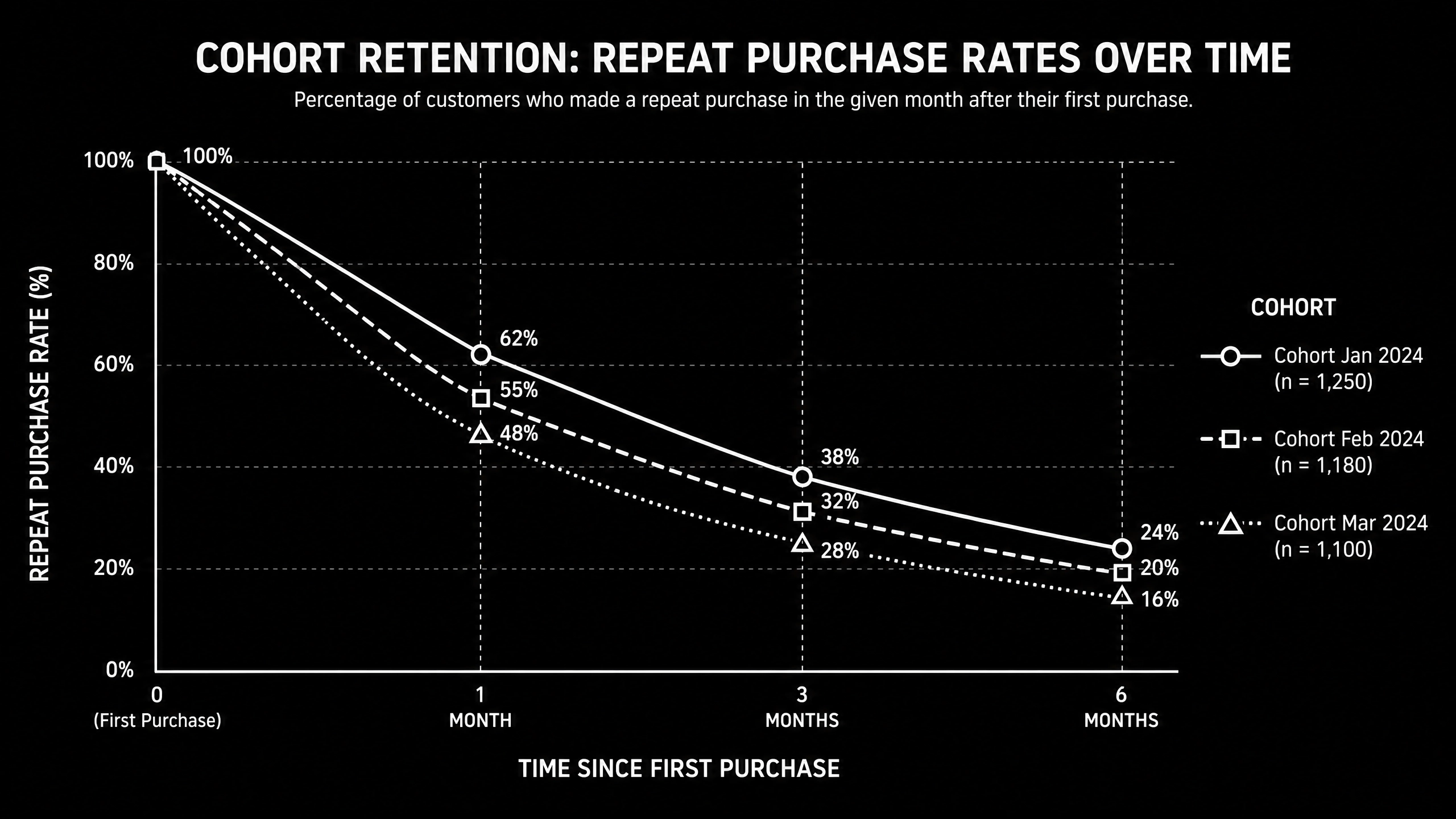
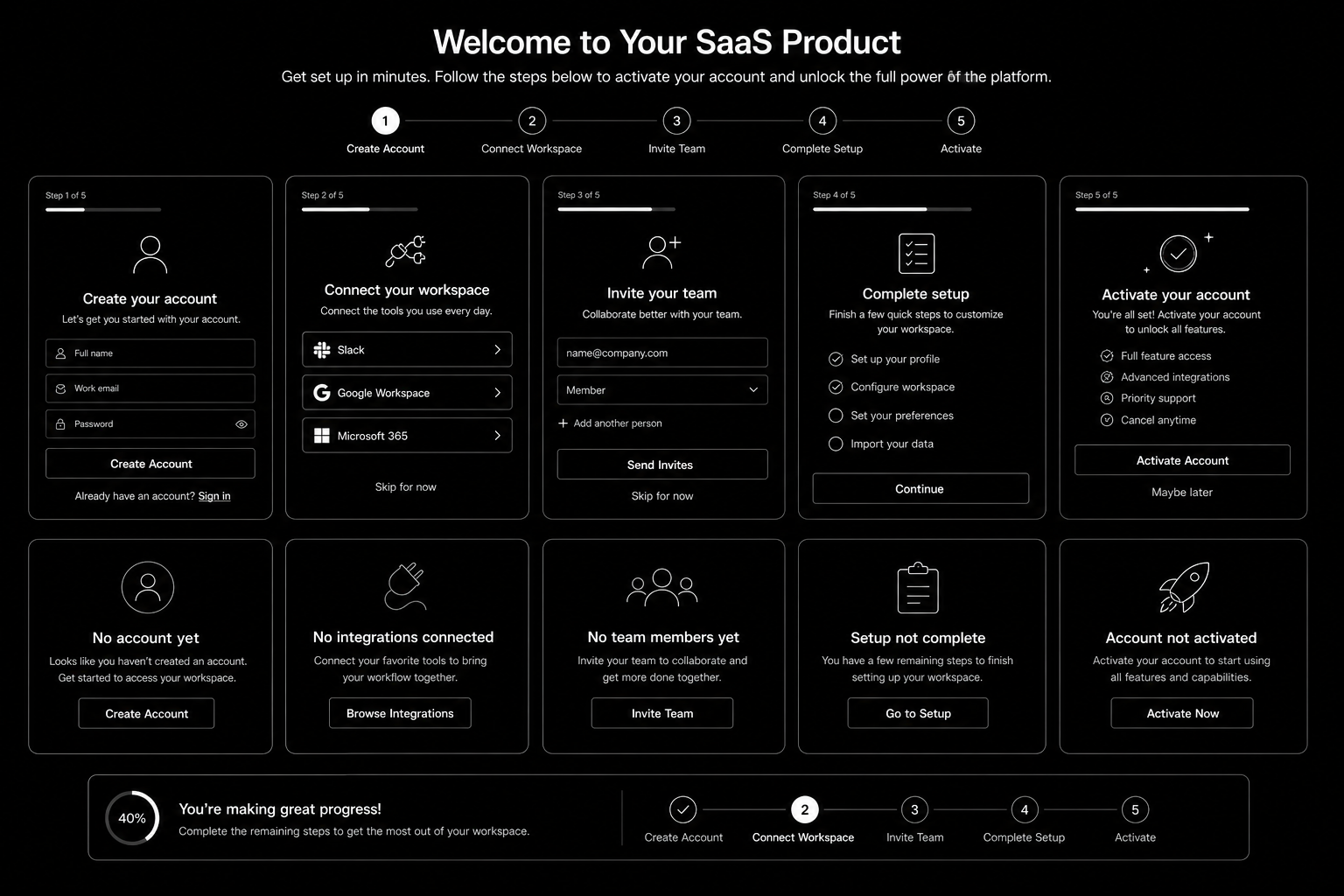
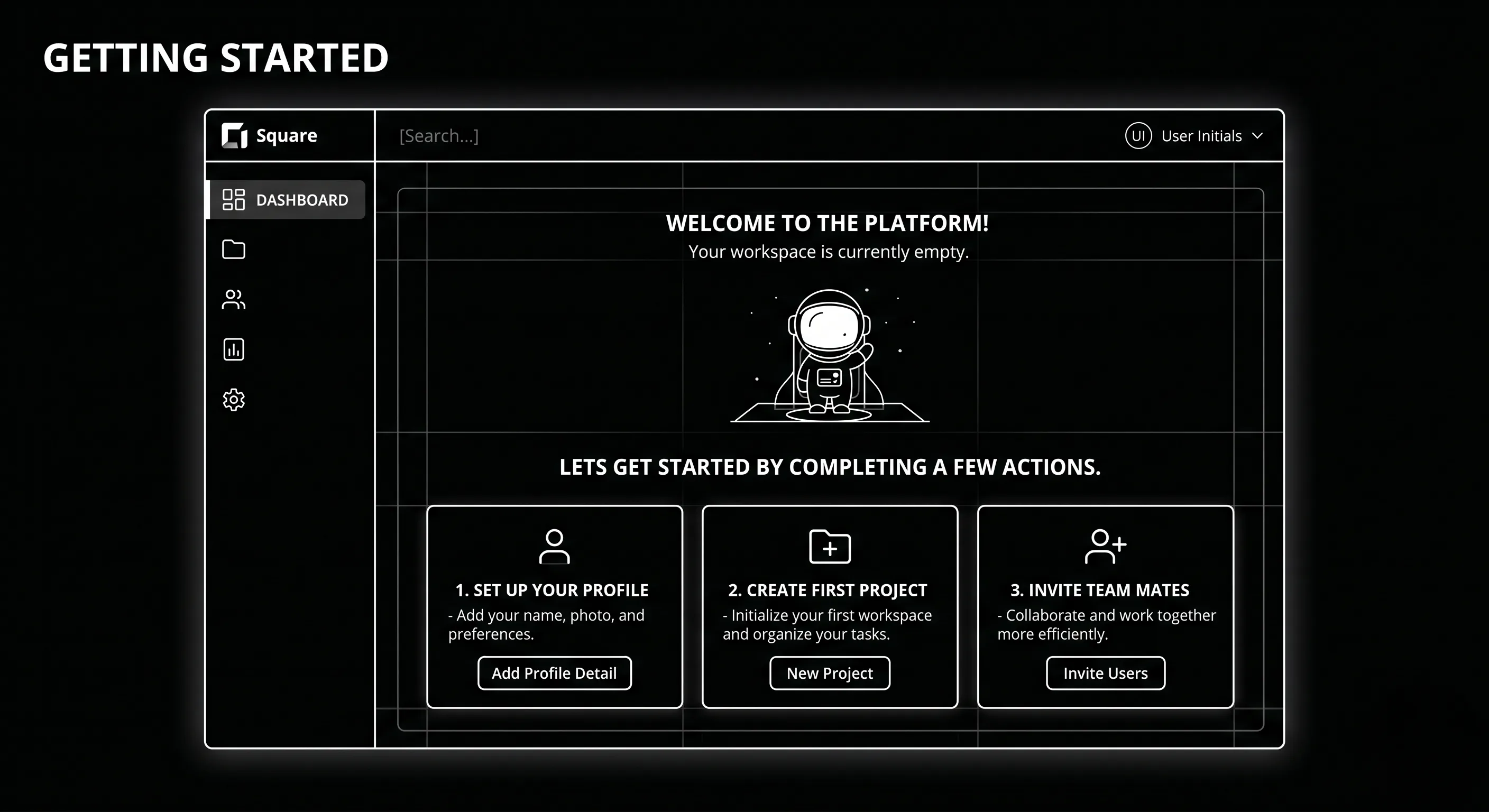
SaaS Onboarding Flow Design in 2026 is won by execution quality, not platform hype. Teams that perform consistently align strategy, implementation, and measurement into one operating system. This guide gives the practical framework, internal link map, and optimization cadence to do that.Onboarding decides retention. Here's the flow design that takes SaaS trial-to-paid from 12 to 22 percent. If you want implementation help, work with product design team. For connected strategy, also review Saas UI UX Design Principles and Saas Website Growth Strategy.

What SaaS Onboarding Flow Design Means in Practice

SaaS onboarding flow design drives activation and retention by guiding users to first value quickly. The strongest flows use milestone logic, contextual guidance, and recovery paths for stalled users.

Why saas onboarding flow Matters in 2026

1. Activation efficiency now strongly affects CAC payback.2. Users reject long generic onboarding tours.3. Milestone completion predicts retention better than vanity engagement metrics.

Step-by-Step Playbook

1. Define activation milestone

Set one clear event that predicts long-term value.

2. Map first-session friction

Identify where users stall before activation.

3. Design progressive guidance

Trigger contextual support based on user state.

4. Create recovery paths

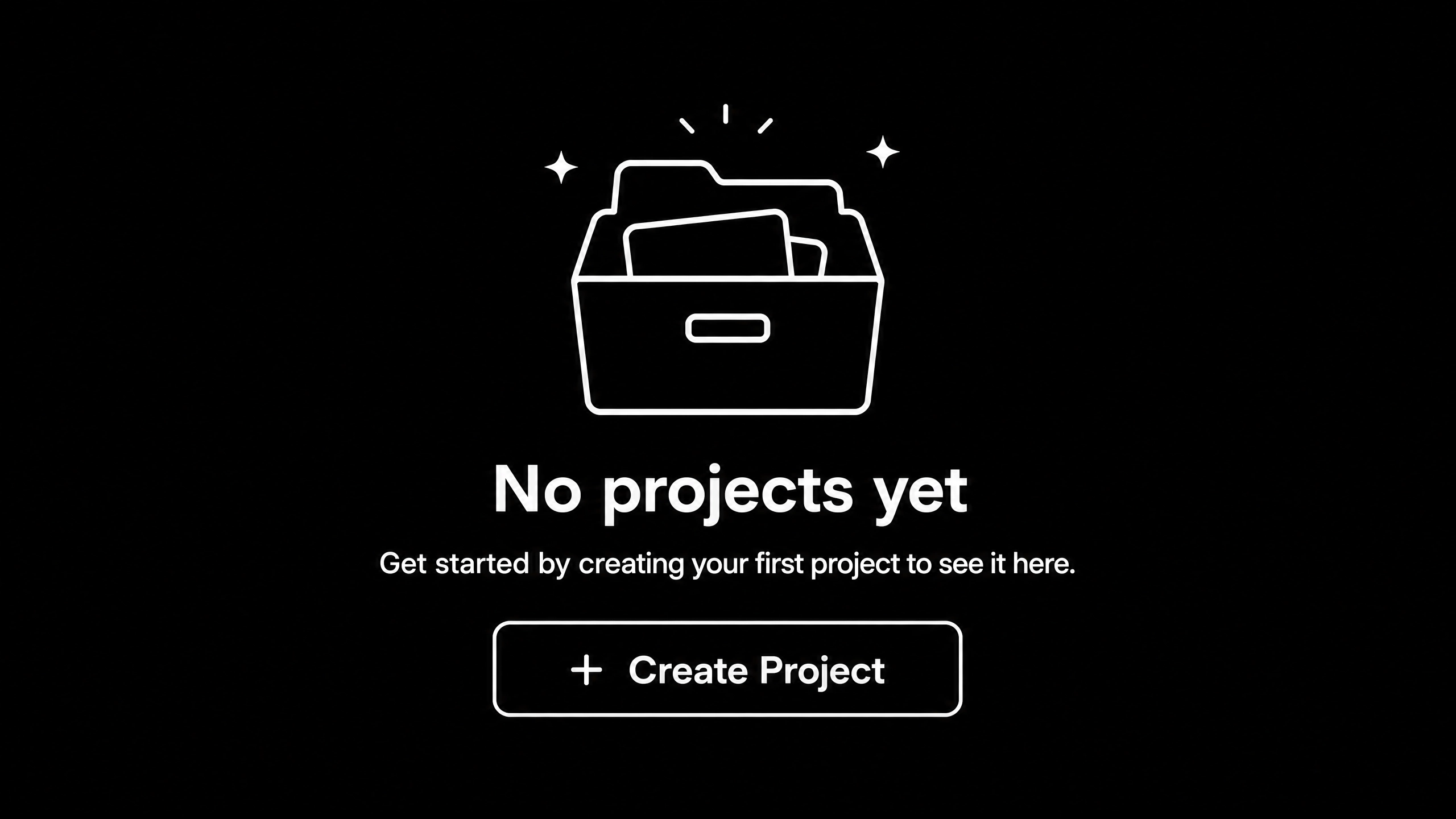
Use empty states and reactivation nudges for stuck users.

5. Track cohorts weekly

Monitor milestone completion and improve weakest steps.Mid-article CTA -> Need support applying this to your stack? Onboarding UX audit and get a scoped roadmap with timeline, owners, and KPI targets.

Tools, References, and Benchmarks

  • Activation map
  • Onboarding state matrix
  • Cohort progression dashboard
  • Semantic keyword targets to distribute naturally: saas onboarding ux, saas activation flow, product onboarding design

Use these references during planning and QA: Nielsen Norman Group UX articles, Material design guidance, and web.dev mobile UX guidance.

Common Mistakes That Kill Performance

  • No clear activation definition
  • Overloaded first session
  • No recovery path for stalled users

FAQ - SaaS Onboarding Flow Design

How long does a saas onboarding flow project usually take?

Most teams can ship an initial version in 4 to 8 weeks, then improve outcomes over one quarter with a weekly optimization cadence.

Is saas onboarding flow relevant for UK and US teams?

Yes. The core framework is consistent across both markets. Differences are usually compliance details, buying behavior, and GBP/USD planning.

What should we measure first for saas onboarding flow?

Track one leading metric, one conversion metric, and one revenue metric so execution stays tied to business impact.

Should we run this in-house or with a specialist partner?

If your team has deep expertise and bandwidth, in-house can work. If speed and risk control matter, working with a specialist partner is usually faster.

What is the most common failure mode?

Teams skip governance after launch. Data quality drifts, process quality declines, and performance plateaus. A simple weekly operating rhythm prevents this.

Conclusion

SaaS Onboarding Flow Design performs best when execution decisions are tied to measurable outcomes from day one. Use this playbook to prioritize what matters, reduce risk, and create a repeatable optimization rhythm.Want a specialist team to accelerate delivery? Talk to product design team or book a consultation and we will map a practical rollout plan.Download the SaaS Onboarding Activation Map to implement this framework with templates and checklists.