Tag Archives: migration

How to Migrate from WordPress to HubSpot CMS (Without Losing Traffic)

WordPress to HubSpot CMS migrations are one of the most under-scoped projects in B2B SaaS. Teams see HubSpot CMS Hub as a drop-in WordPress replacement. It’s not. It’s a fundamentally different system with different data models, different CRM integration patterns, and different SEO implications.

This guide covers realistic scope, the process that protects traffic, and where most teams underestimate complexity. Written for marketing leaders and RevOps heads planning the move.

Why WordPress to HubSpot Migrations Are Bigger Than You Think

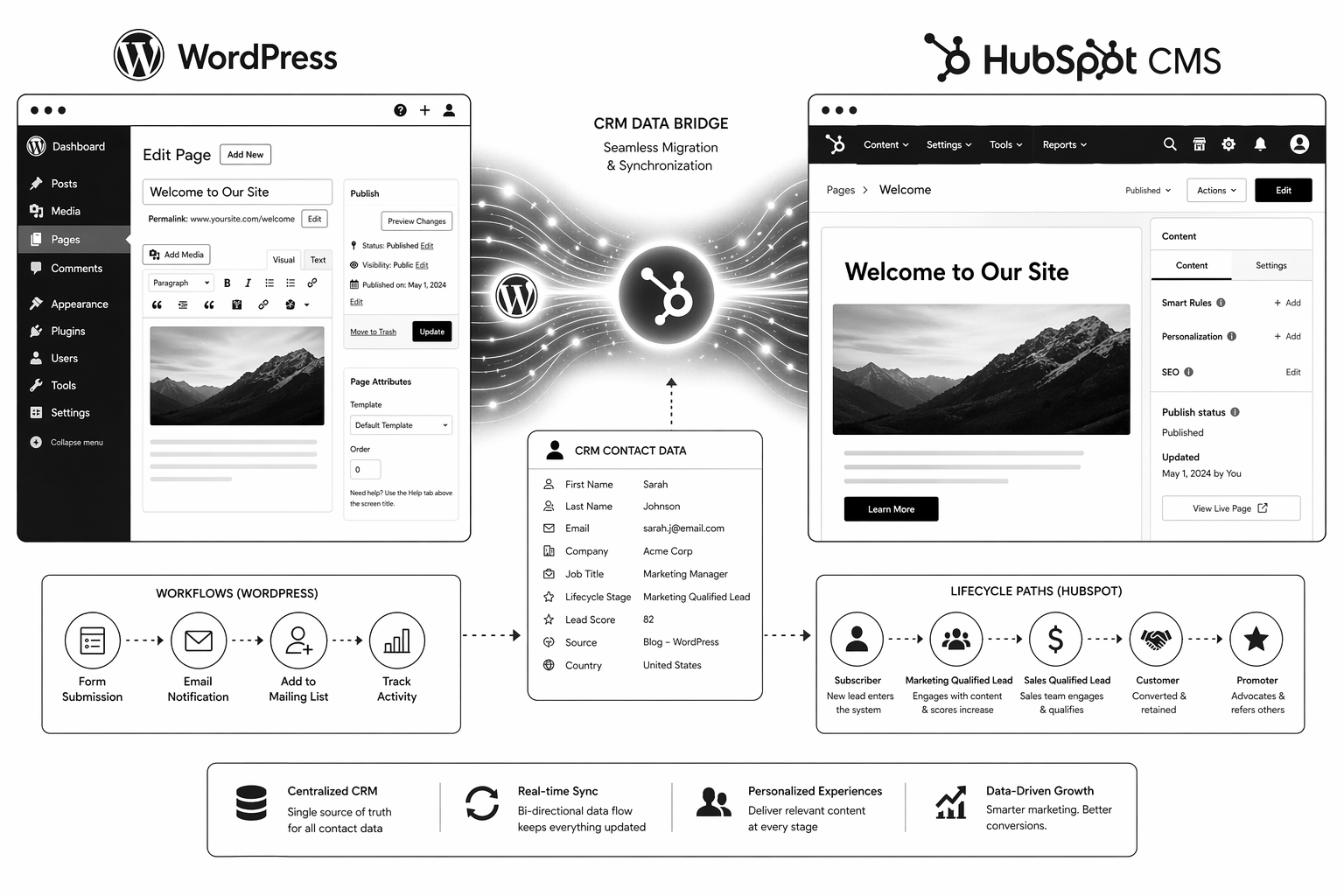
WordPress is a content-first platform. HubSpot is a CRM-first platform that happens to have a CMS. The difference matters for:

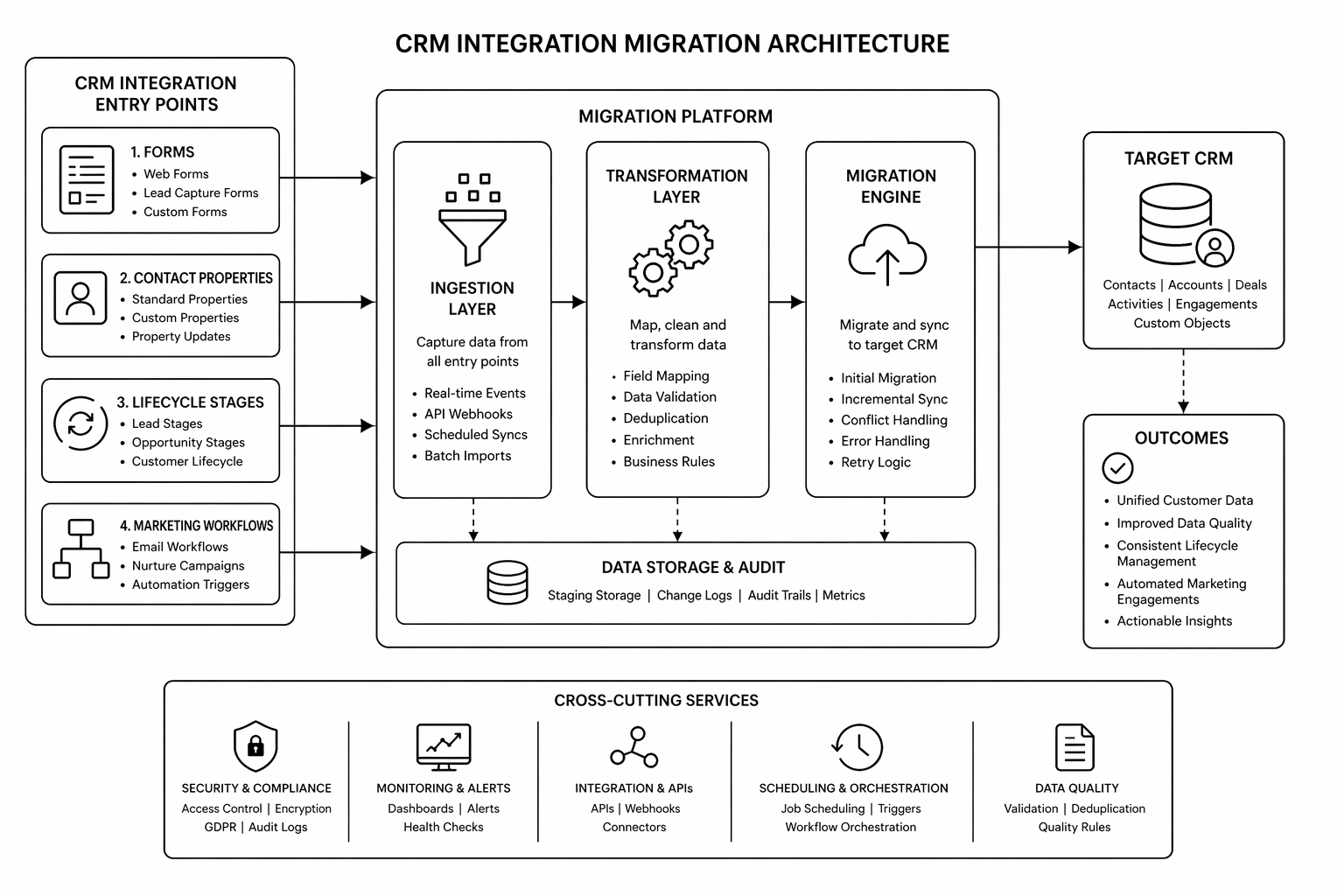
  • Data model. HubSpot requires properties, contact records, and lifecycle mapping. WordPress is content records + optional metadata.
  • Form architecture. WordPress forms go to an email or third-party service. HubSpot forms feed directly into CRM. This requires property mapping.
  • CMS scale. HubSpot CMS performs well up to 500–1000 CMS items. Beyond that, editing can feel slow.
  • URL structure. URL preservation is harder on HubSpot than Webflow because the CMS model is different.
  • Team workflow. WordPress teams often use plugins and custom workflows. HubSpot mandates a specific RevOps structure.

With planning, none of these are blockers. Without planning, they compound into a multi-quarter nightmare.

Pre-Migration: The Audit Phase (Weeks 1–3)

1. Content audit. How many pages? How many blog posts? Which pages drive traffic? Which rank for keywords? Export this to a spreadsheet.

2. Current metadata audit. Export all meta titles, descriptions, and existing canonicals from WordPress. You’ll need to reapply these in HubSpot.

3. Form audit. How many forms do you have? What fields do they collect? Where do submissions go currently? This maps to HubSpot CRM property creation.

4. Integration audit. What plugins/integrations does WordPress currently connect to? Which of these are critical? Which can be replaced by HubSpot native features?

5. URL structure decision. Keep existing URL structure or restructure? URL changes cost SEO link equity. Only restructure if the benefit outweighs the cost.

Planning Phase: CRM Architecture (Weeks 4–6)

6. HubSpot property mapping. Every form field should map to a specific CRM property. Every contact data point should have a designated property. Document this before building anything in HubSpot.

7. Lifecycle model alignment. Where do leads enter the funnel? Which contacts are qualified for what? This determines workflows, smart content, and reporting.

8. HubDB schema design. Blog, case studies, integrations directory, team members — anything dynamic should use HubDB tables. Design the schema before building.

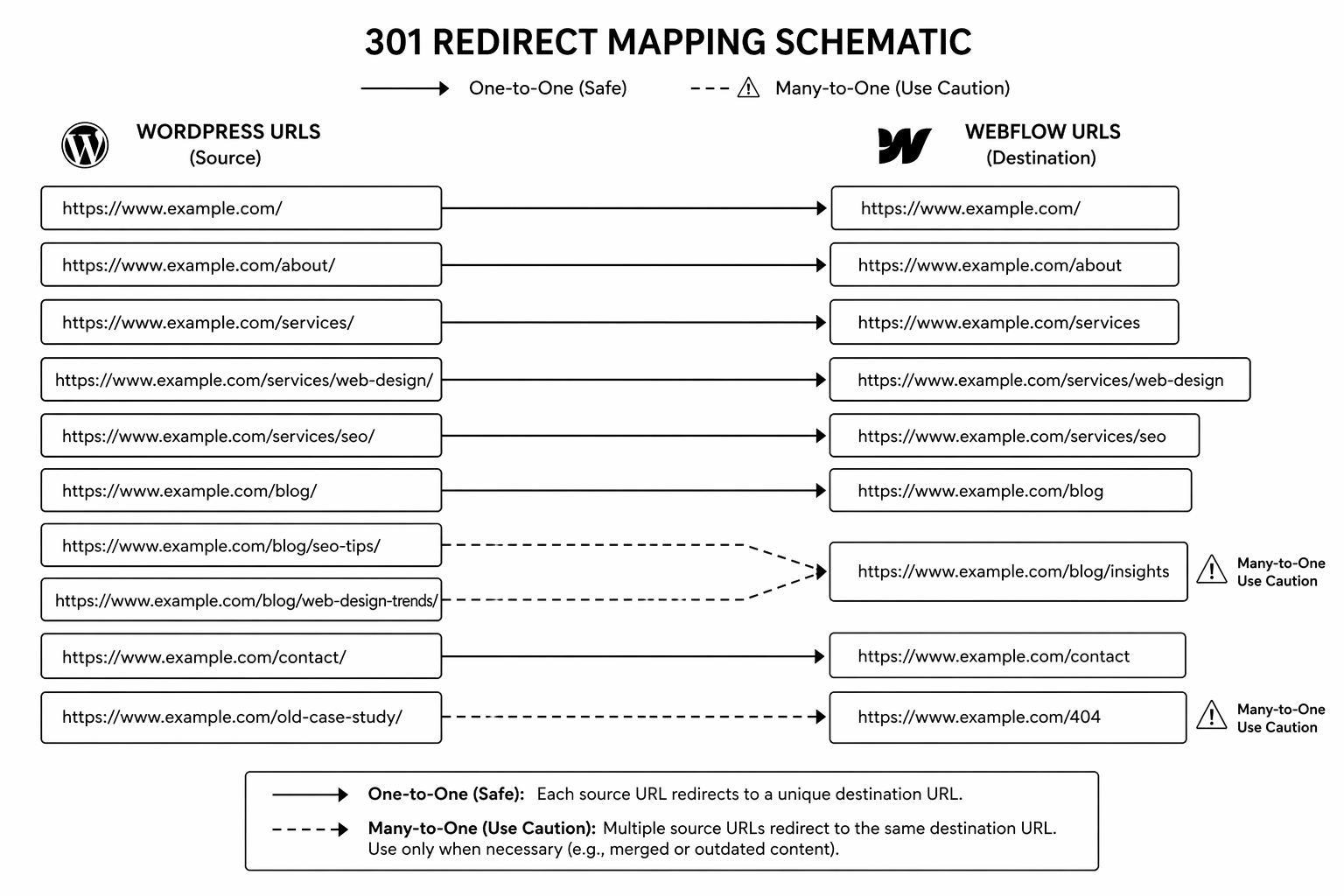
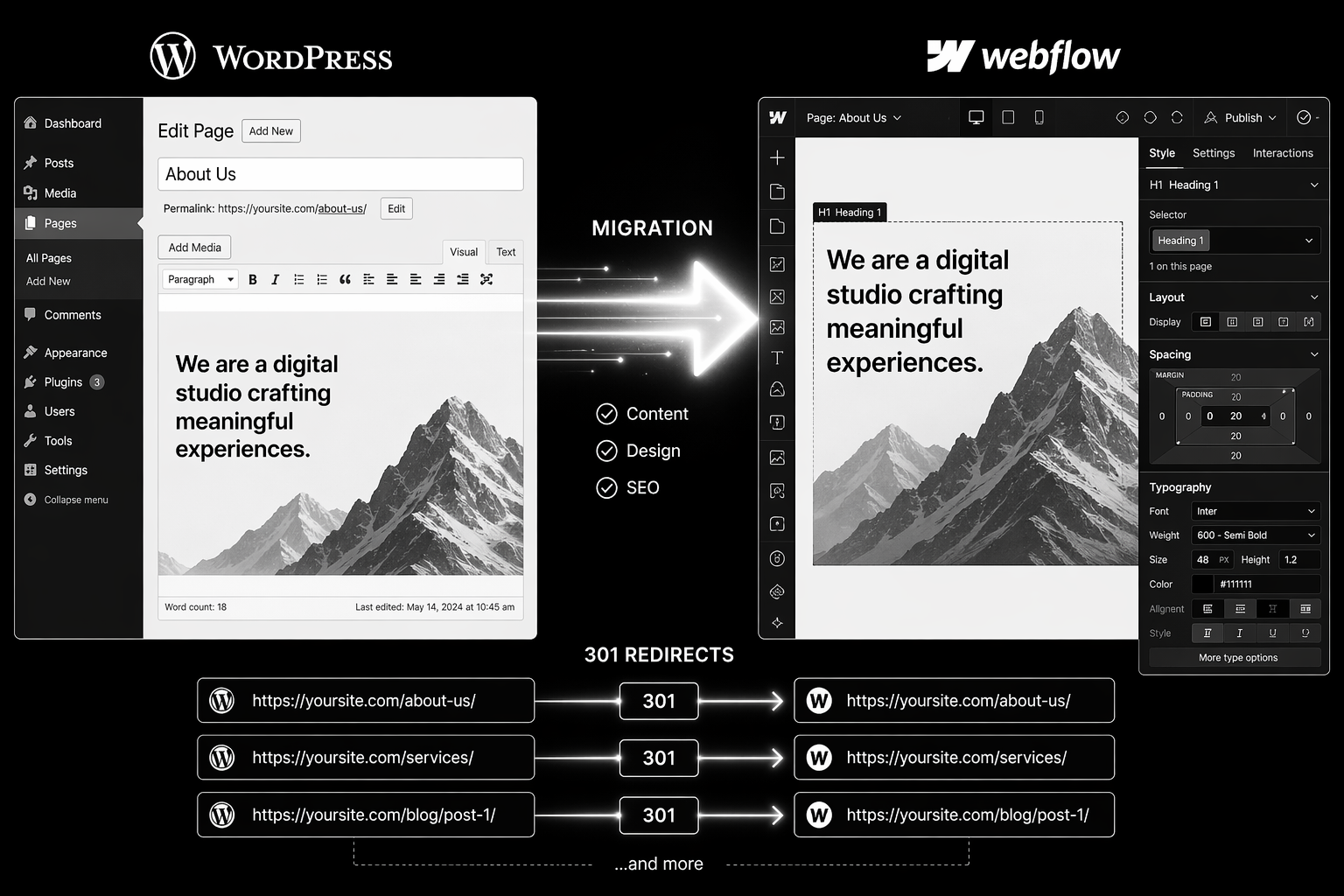
9. 301 redirect strategy. URL mapping from old WordPress URLs to new HubSpot URLs. Use one-to-one redirects. Never redirect high-traffic pages to the homepage.
Build Phase: Implementation (Weeks 7–14)

10. HubSpot theme and modules. Build the design system and reusable modules first. All pages should use these — no bespoke one-off designs.

11. Content migration. Import blog posts, pages, and assets. Use HubSpot’s content import or manual migration depending on volume. Test thoroughly.

12. Form and workflow setup. Build each form with correct property mapping. Set up workflows to fire on form submission. Test the full flow with real submissions.

13. Smart content rules. Create lifecycle-aware content variations for key pages (homepage, pricing, key solutions).

14. SEO technical setup. Meta titles and descriptions for every page. Schema markup. Canonical tags. Sitemap generation. Robots.txt configuration.

QA Phase: Pre-Launch Validation (Weeks 15–16)

15. Redirect testing. Spot-check 100+ old URLs. Verify they land on the correct new page with no chain redirects.

16. Form submission testing. Every form should post contact data correctly to CRM and trigger intended workflows.

17. Analytics and event mapping. GA4 event structure should match new page hierarchy. Test tracking on key conversion pages.

18. Mobile and browser testing. All key pages on mobile, tablet, Chrome, Safari, Firefox, Edge.

19. Lighthouse and Core Web Vitals. All green on key pages before launch.

Launch Phase (Week 17)

20. Pre-cutover. New Search Console property created, sitemap submitted, DNS cutover scheduled.

21. DNS change. Point domain to HubSpot. Ideally Tuesday or Wednesday morning.

22. Monitoring. First 48 hours: constant attention. Watch for crawl errors, 404s, traffic anomalies.

Post-Launch Phase (Weeks 18–24)

23. Traffic monitoring. Traffic dips are normal weeks 2–4. Recovery by 60–90 days is typical. If slower, audit redirects and technical setup.

24. Ranking recovery. Pages should recover original rankings. If not, check for schema breaks, meta changes, or internal linking issues.

25. CRM data quality. Audit form submissions for data anomalies or missing properties. Fix mapping issues.

Planning a WordPress to HubSpot migration? The right partner maps pre-move risk and locks architecture before building. Book a HubSpot migration audit.

Common Mistakes

1. Starting build before CRM architecture is locked. Three weeks into development, team realizes the property model is wrong. Rebuild required. Fix: spend extra time in planning phase.

2. Misaligning URL structure. Team changes URLs for “cleaner paths” without redirect strategy. Traffic tank and link equity lost. Fix: preserve old URL structure whenever possible.

3. Not testing forms before launch. Launch day, forms stop submitting. Sales team notices first. Fix: week of form testing in staging with real data.

4. Underestimating content audit. 200 pages exists in WordPress. Team assumes it can be migrated in a day. Reality: 3 weeks of property mapping, form field alignment, and data cleanup. Fix: budget time accurately.

5. Weak internal linking strategy. Pages migrated, but no updated internal linking. Blog never compounds. Fix: audit and update internal links during migration.

Also compare with HubSpot CMS vs WordPress to confirm platform fit before you start.

FAQ

How long does WordPress to HubSpot migration take?

8–16 weeks depending on content volume, complexity of CRM data model, and integration dependencies. Most migrations sit at 12 weeks.

Will I lose traffic?

A 2–4 week dip is normal. With proper redirects and content parity, most sites recover within 60–90 days. Losses beyond 30% suggest a technical issue.

Can I keep WordPress for a while and migrate gradually?

You can run both systems in parallel for 2–4 weeks during launch to catch issues. Running indefinitely creates maintenance debt and confusion for visitors.

Do I need a HubSpot-certified partner?

Not essential, but helpful. HubSpot-specialized teams understand HubDB schema design, property mapping, and workflow architecture faster than generalists.

What if my current WordPress URLs have lots of backlinks?

Preserve URLs through 301 redirects. The backlinks stay valuable when the URL redirects correctly to the topically similar new page.

Conclusion: Migration Success Requires Process, Not Heroics

WordPress to HubSpot migrations fail when teams skip planning or underestimate scope. They succeed when the team spends the first third of the project on architecture and redirect planning, not on building.

Use this framework. Your margins on the project depend on it.

Need guidance through the process? Our HubSpot development team has migrated 30+ B2B SaaS sites. Book your migration audit.

📥 Free resource: The WordPress to HubSpot Migration Playbook — a detailed roadmap covering architecture decisions, CRM schema design, and launch monitoring.
That's enough scrolling for now - chat to a HubSpot expert today!
Contact Us
How to Migrate from WordPress to Webflow Without Losing SEO

WordPress to Webflow migrations are one of the highest-risk platform moves. Done badly, a team can lose 30–50% of organic traffic inside two weeks. Done right, sites often recover and exceed prior traffic within 90 days.

This guide walks through the exact process that protects rankings. It’s written for CMOs, founders, and technical teams planning the move. Follow this step-by-step and you will preserve your organic equity.

Why WordPress to Webflow Migrations Fail

The failure pattern is always the same:

  • Team builds a beautiful Webflow site.
  • Launches without 301 redirect strategy.
  • Old WordPress URLs return 404s.
  • Backlinks point to dead pages.
  • Organic traffic collapses.
  • Team spends two months firefighting redirects and re-submitting to Search Console.

This is completely avoidable with planning.

The Step-by-Step Migration Process

Phase 1: Pre-Launch Audit (Weeks 1–2)

1. Full URL inventory. Export from Screaming Frog, Google Search Console, and your WordPress sitemap. Every URL currently indexed matters.

2. Traffic report by URL. Which pages drive the most organic traffic? Which rank for valuable keywords? Which have backlinks? Prioritise these for one-to-one redirects.

3. 301 redirect map. Create a spreadsheet with old WordPress URL → new Webflow URL. Maintain keyword alignment. Never redirect high-traffic pages to the homepage.

4. Content parity check. Every page that drives traffic should exist in Webflow with equal or better content. If a page is being cut, it needs a topical redirect match, not a 404.

Phase 2: Technical Setup (Weeks 3–4)

5. Webflow build staging. Build the full site on Webflow, including 301 redirects in the hosting settings or via a reverse proxy layer.

6. Meta, schema, and canonicals. Verify every page has correct meta title, meta description, canonical tag, and schema markup before going live.

7. Staging QA. Test redirect flows. Verify all inbound links still work. Check Core Web Vitals on key pages.

Phase 3: Launch (Week 5)

8. Pre-cutover checklist.

  • DNS change planned for Tuesday or Wednesday (off-peak).
  • Full team on standby for 48 hours.
  • Search Console new property ready and sitemap pre-submitted.
  • Analytics events mapped to new page structure.

9. DNS cutover. Point domain to Webflow. Monitor for 4–6 hours.

10. Redirect testing. Spot-check 50+ old URLs. Verify they land on the correct new page.

Phase 4: Post-Launch Monitoring (Weeks 6–12)

11. First 48 hours. Monitor Search Console for crawl errors. Fix any broken redirects immediately.

12. Weeks 2–4: Traffic monitoring. Traffic dips 2–4 weeks post-launch are normal. If a major drop happens, check:

  • Are high-traffic pages redirecting correctly?
  • Have schema errors appeared?
  • Has robots.txt blocked Googlebot?
  • Are Core Web Vitals still green?

13. Weeks 4–12: Ranking recovery. Sites usually recover pre-launch rankings within 60–90 days. If recovery stalls, audit internal linking and content keyword density.

Planning a WordPress to Webflow move? Our migration specialists run pre-move audits to identify risk areas and lock redirect strategy. Book a migration consultation.

Common Mistakes to Avoid

1. Chain redirects. WordPress → staging → Webflow adds redirect hops and loses link equity. Use one-hop redirects only (old URL → new URL, full stop).

2. Changing URL structure. “We want cleaner URLs on Webflow.” If the old URLs have backlinks, structure changes tank rankings. Preserve URL format where possible.

3. Missing redirects on old pages. One forgotten page generating 500 monthly visits now returns 404. That’s lost traffic and link equity. Redirect everything with traffic.

4. No 301 monitoring after launch. First month is critical. Automate Slack alerts when 404s spike.

5. Launching on a Friday. Something breaks, team is unavailable. Always launch Tuesday–Thursday.

For broader platform decisions before migrating, see Webflow vs WordPress comparison.

FAQ

How long does WordPress to Webflow migration take?

4–6 weeks for straightforward builds under 100 URLs. 10–16 weeks for complex sites with 300+ URLs and deep integrations.

Will I lose traffic when I migrate?

A 2–4 week traffic dip is normal. Most sites recover fully within 60–90 days. If the dip exceeds 30%, something in the redirect strategy or technical setup is broken.

Can I migrate content manually?

You can, but it’s slow and error-prone for 100+ pages. Tools like All in One WP Migration or database exports are faster. Webflow has import tooling to accelerate content bulk uploads.

Do I need 301 redirects or can I use meta refresh?

301 redirects. Meta refresh is an outdated tactic and doesn’t pass link equity to search engines.

Should I migrate all 500 old URLs or just high-traffic pages?

Redirect everything with traffic or backlinks. Orphan pages without traffic can return 404s. Low-traffic pages: check if they drive even 10 monthly visits — if yes, redirect.

Conclusion: Migration Success Requires Planning, Not Luck

WordPress to Webflow migrations succeed when the team invests in redirect mapping and technical SEO before launch, not after. Most failures come from teams rushing to launch without this work.

If you have a WordPress site with serious organic traffic, this checklist is not optional — it’s required. Use it.

Need specialist support through the process? Our Webflow migration team has moved 50+ sites without losing meaningful traffic. Book your migration audit.

📥 Free resource: The WordPress to Webflow Migration Checklist — a detailed 35-point checklist covering pre-move audit, redirect strategy, and post-launch monitoring.

That's enough scrolling for now - chat to a HubSpot expert today!
Contact Us
Shopify Plus Migration: Moving From Standard Without Breaking Revenue

Shopify Plus Migration in 2026 is won by execution quality, not platform hype. Teams that perform consistently align strategy, implementation, and measurement into one operating system. This guide gives the practical framework, internal link map, and optimization cadence to do that.

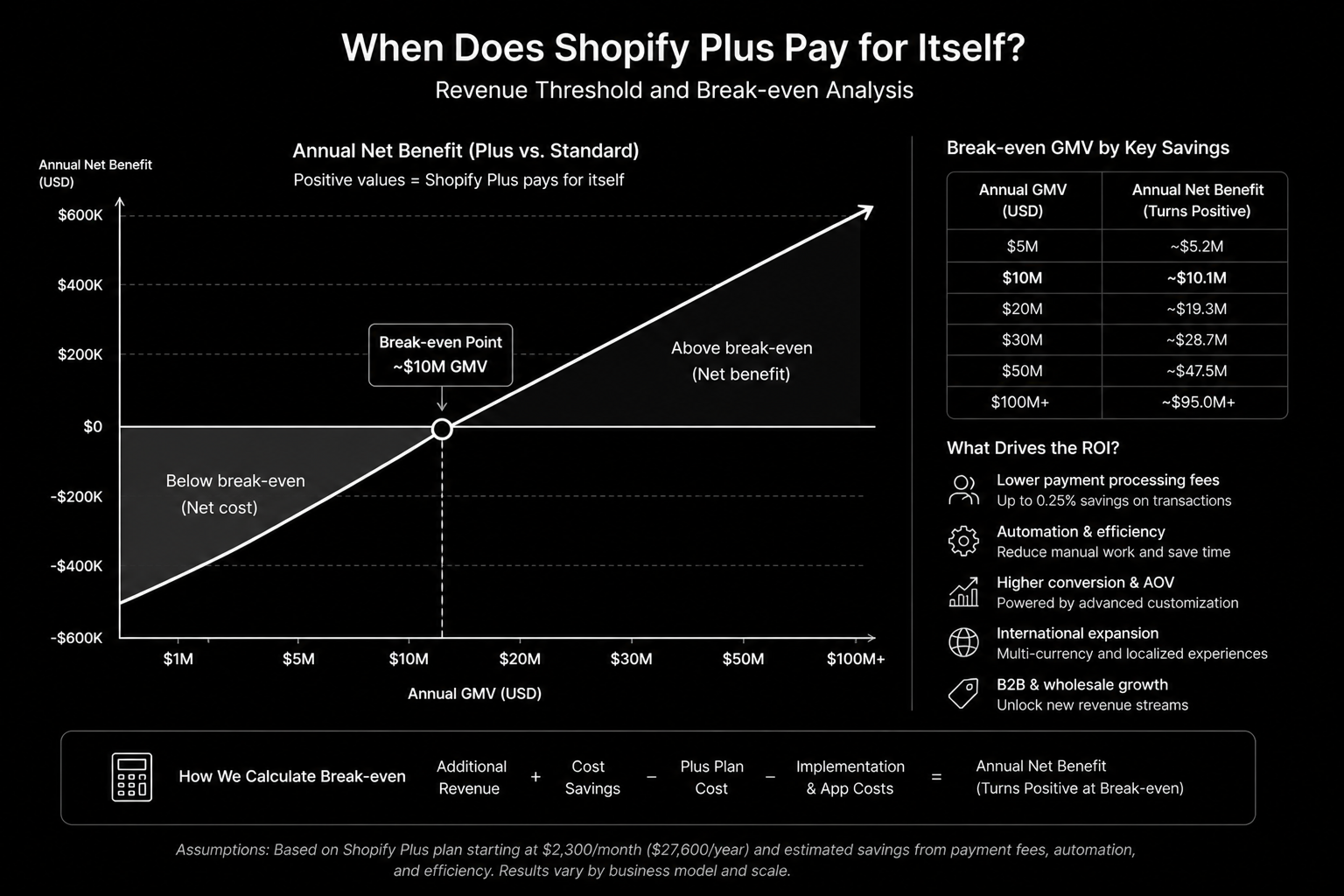
Most Shopify-to-Plus migrations are scheduled six months too late. Here’s the upgrade trigger and migration plan. If you want implementation help, work with Shopify development. For connected strategy, also review Shopify Plus Development Guide and Shopify Hydrogen.

What Shopify Plus Migration Means in Practice

Shopify Plus migration should be triggered by operational complexity and growth needs, not prestige. The safest migrations are phased, risk-mapped, and built around conversion protection.

Why shopify plus migration Matters in 2026

1. Late upgrades often cause avoidable revenue risk.

2. Plus unlocks only matter if workflows are designed around them.

3. Migration outcomes depend more on sequencing and QA than platform labels.

Step-by-Step Playbook

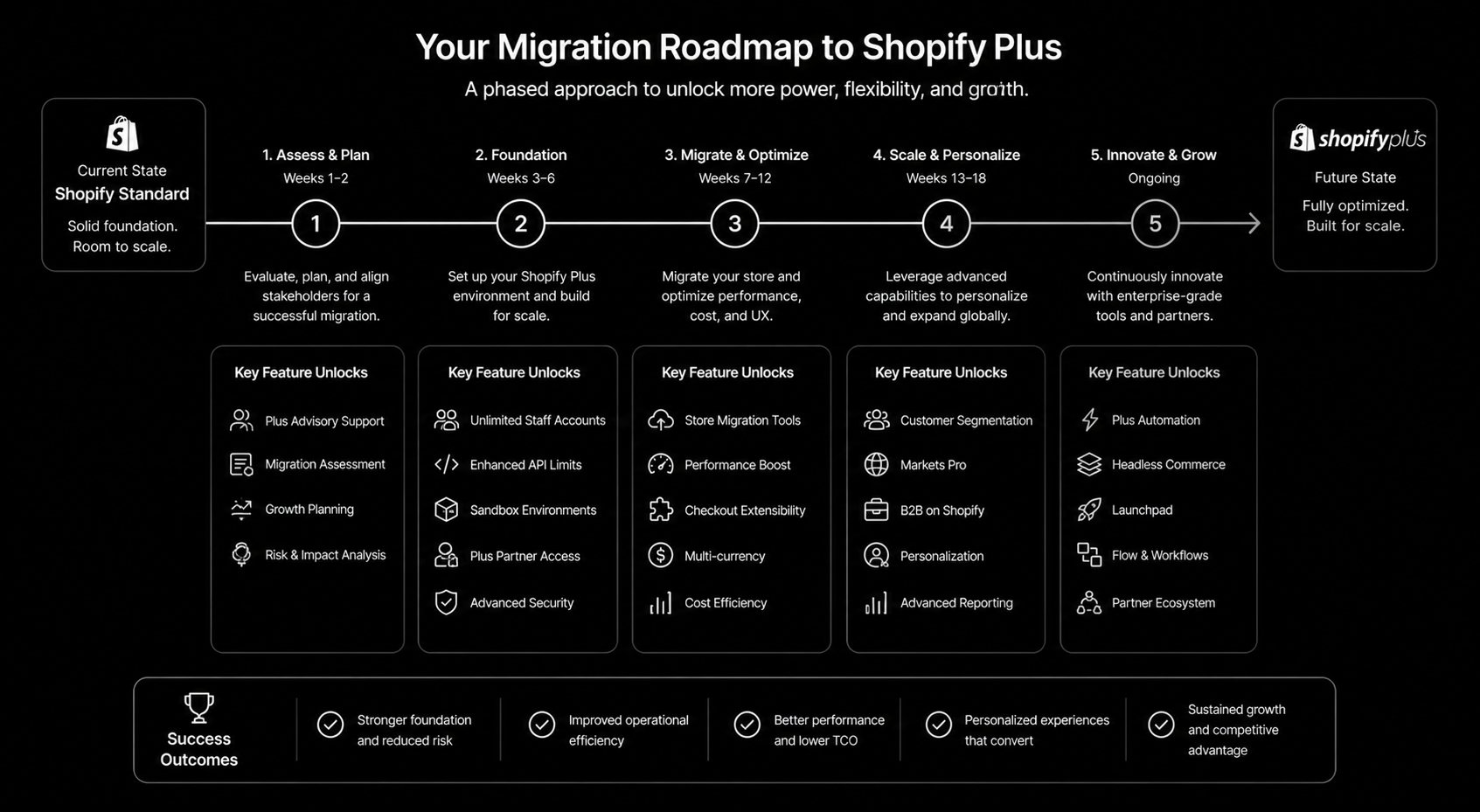
1. Confirm readiness triggers

Validate GMV, complexity, and roadmap requirements.

2. Scope migration streams

Separate storefront, checkout, automation, and ops dependencies.

3. Build rollback plan

Define fallback routes and launch gates before cutover.

4. Re-platform critical automation

Rebuild scripts and flows using Plus-compatible methods.

5. Run hypercare monitoring

Track conversion and order integrity post-launch.

Mid-article CTA -> Need support applying this to your stack? Plus upgrade audit and get a scoped roadmap with timeline, owners, and KPI targets.

Tools, References, and Benchmarks

  • Plus readiness checklist
  • Migration risk register
  • Hypercare dashboard
  • Semantic keyword targets to distribute naturally: shopify to shopify plus, when to upgrade to shopify plus, shopify plus upgrade

Use these references during planning and QA: Shopify developer docsShopify Help Center, and web.dev performance guidance.

Common Mistakes That Kill Performance

  • Migrating too late
  • No rollback path
  • Understaffed launch support

FAQ – Shopify Plus Migration

How long does a shopify plus migration project usually take?

Most teams can ship an initial version in 4 to 8 weeks, then improve outcomes over one quarter with a weekly optimization cadence.

Is shopify plus migration relevant for UK and US teams?

Yes. The core framework is consistent across both markets. Differences are usually compliance details, buying behavior, and GBP/USD planning.

What should we measure first for shopify plus migration?

Track one leading metric, one conversion metric, and one revenue metric so execution stays tied to business impact.

Should we run this in-house or with a specialist partner?

If your team has deep expertise and bandwidth, in-house can work. If speed and risk control matter, working with a specialist partner is usually faster.

What is the most common failure mode?

Teams skip governance after launch. Data quality drifts, process quality declines, and performance plateaus. A simple weekly operating rhythm prevents this.

Conclusion

Shopify Plus Migration performs best when execution decisions are tied to measurable outcomes from day one. Use this playbook to prioritize what matters, reduce risk, and create a repeatable optimization rhythm.

Want a specialist team to accelerate delivery? Talk to Shopify development or book a consultation and we will map a practical rollout plan.

Lead magnet: Download the Shopify Plus Upgrade Readiness Checklist to implement this framework with templates and checklists.

That's enough scrolling for now - chat to a HubSpot expert today!
Contact Us