Tag Archives: cms comparison

HubSpot CMS vs WordPress: Which Is Better for B2B SaaS in 2026?

The HubSpot CMS vs WordPress decision is one of the highest-leverage choices a B2B SaaS marketing team makes. It affects content velocity, CRM data quality, attribution confidence, and how quickly pipeline insights can turn into page-level changes.

Most comparisons treat this like a template battle. It is not. In 2026, this is a systems question: do you want a tightly integrated revenue platform, or a flexible CMS stack you can assemble yourself?

The Core Difference

WordPress is a highly extensible CMS that can connect to almost anything. HubSpot CMS is a CRM-native CMS designed to work as part of one growth system. WordPress gives freedom. HubSpot gives alignment.

  • WordPress strength: ecosystem breadth and custom flexibility.
  • HubSpot strength: lifecycle-aware content, native attribution, and cleaner operations.
  • B2B SaaS reality: most teams need execution speed and data consistency more than endless plugin optionality.

Pricing and TCO: What You Actually Pay

WordPress usually looks cheaper on paper: low hosting costs, open-source core, low-cost themes. But B2B SaaS teams often add premium plugins, analytics layers, form tools, ABM tooling, and maintenance retainers that increase total cost over time.

HubSpot CMS has a higher upfront platform cost but reduces tool sprawl and integration overhead if you are already inside HubSpot for CRM and marketing automation. The cost is concentrated, but execution is often cleaner.

If you need exact tier-level breakdowns, use our HubSpot CMS Hub pricing guide alongside this comparison.

Marketing and Sales Alignment

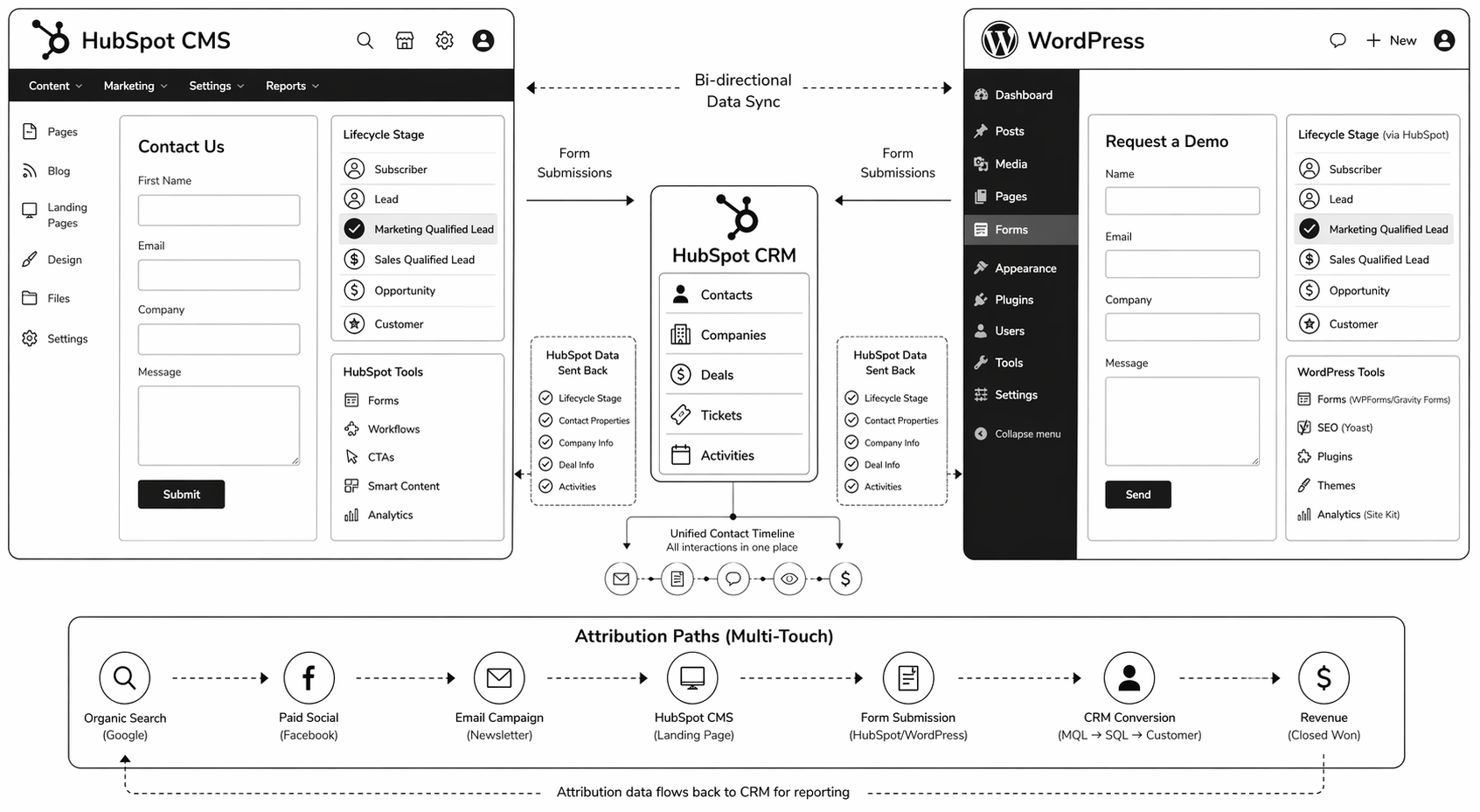
This is where HubSpot CMS vs WordPress becomes less debatable for many SaaS teams. HubSpot CMS is built for closed-loop operations. Form activity, page engagement, lifecycle updates, and campaign attribution live in one record.

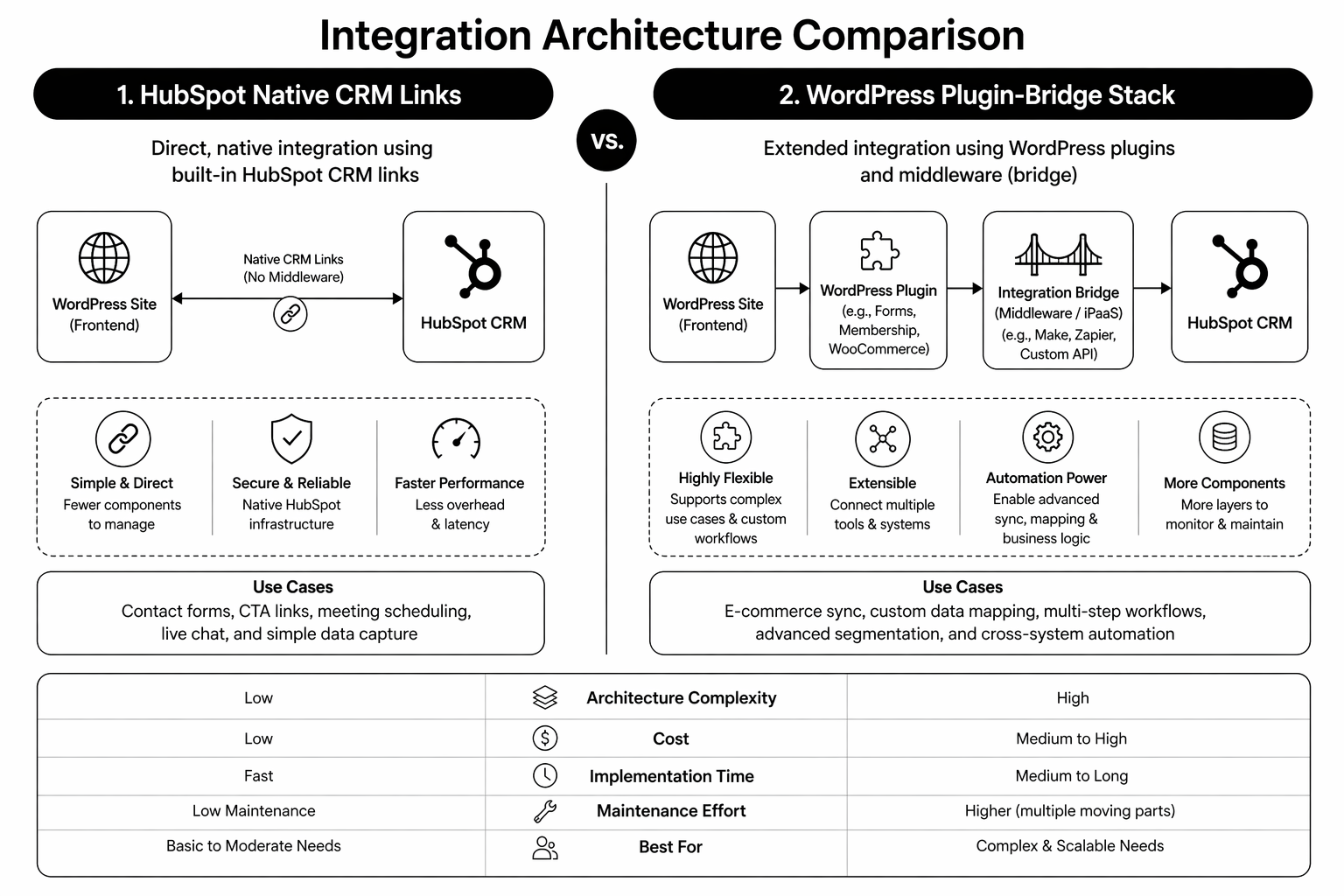
WordPress can replicate this with integrations, but each additional connector adds failure points. If marketing and sales alignment is already fragile, a stack that needs constant integration maintenance usually makes it worse.

SEO and Content Performance

Both platforms can rank very well. WordPress has stronger plugin-level SEO tooling variety. HubSpot offers robust built-in SEO controls and cleaner operational consistency for content teams that do not want to manage plugin complexity.

If your team publishes a lot, consistency matters more than feature depth. A platform your team can use correctly every week tends to outperform a platform with more theoretical power.
When HubSpot CMS Is Usually Better

  • You already use HubSpot CRM and Marketing Hub extensively.
  • You need lifecycle-aware CTAs and smart content without custom engineering.
  • You need clear attribution tied directly to contact and pipeline data.
  • Your team wants fewer tools, fewer integrations, and faster execution cycles.

When WordPress Is Usually Better

  • You require highly custom backend workflows and niche plugin logic.
  • You have strong internal technical ownership for long-term maintenance.
  • Your CRM strategy is not HubSpot-centric.
  • You prefer stack flexibility over native system coherence.

Planning a CMS move this year? Our team maps migration scope, tracking continuity, and implementation risk before platform decisions are final. Book a HubSpot migration audit.

Migration Considerations

Moving from WordPress to HubSpot is usually less about design and more about data model decisions: URL structure, HubDB schema, form-to-property mapping, and attribution continuity. Teams that skip this prep often preserve page design while breaking pipeline reporting.

Use a structured checklist before any move. Our WordPress to HubSpot migration guide walks through the implementation order.

Also compare strategic overlap with Webflow vs WordPress if you’re deciding across multiple CMS options.

FAQ

Is HubSpot CMS better than WordPress for B2B SaaS?

For CRM-driven B2B SaaS teams, often yes. The native alignment between site, CRM, and attribution usually creates faster execution and cleaner reporting.

Is HubSpot CMS more expensive?

Upfront platform cost is higher. Total cost can be competitive when you account for plugin spend, integration maintenance, and operational drag in WordPress stacks.

Can WordPress match HubSpot functionality?

Technically yes, with the right plugins and integrations. The trade-off is complexity and ongoing maintenance overhead.

Should early-stage SaaS choose WordPress or HubSpot CMS?

If budget is tight and CRM complexity is low, WordPress can be fine. If the team is already committed to HubSpot and needs fast RevOps alignment, HubSpot CMS can be the better strategic choice earlier.

How long does WordPress to HubSpot migration take?

Most B2B SaaS migrations run 8 to 16 weeks depending on content volume, CRM schema complexity, and integration dependencies.

Conclusion: Choose Based on System Fit, Not Feature Lists

The right answer in HubSpot CMS vs WordPress is the platform your team can run as a repeatable growth system. For many B2B SaaS companies in 2026, that means HubSpot CMS because CRM and content are already inseparable. For others, WordPress remains the right fit where flexibility is genuinely required.

If your decision criteria are still fuzzy, start with pipeline requirements first, then pick the CMS that supports them with the least operational friction.

Need an external view before migrating? Our HubSpot development specialists can map platform fit and implementation risk. Book your audit.

📥 Free resource: The HubSpot vs WordPress TCO Calculator — a practical worksheet to model software, maintenance, and team-time cost over 36 months.
That's enough scrolling for now - chat to a HubSpot expert today!
Contact Us
Webflow vs WordPress: The Honest 2026 Comparison

The Webflow vs WordPress debate is usually framed as “visual builder versus open-source CMS.” That’s too shallow to make a six-figure platform decision. In 2026, the real question is operational: which platform helps your team ship faster, rank better, and convert more without creating long-term maintenance debt?

This guide is for founders, CMOs, and growth leads comparing both platforms for serious marketing sites. We’ll break down cost, performance, SEO, content operations, and scalability with practical trade-offs. If you already suspect your current stack is slowing your team down, this will give you a clean answer.

Webflow vs WordPress in One Sentence

Webflow is opinionated, faster to manage, and lower maintenance. WordPress is more flexible, more extensible, and easier to overcomplicate. Which one wins depends less on features and more on your operating model.

  • Pick Webflow if speed, design consistency, and low technical overhead matter most.
  • Pick WordPress if you need heavy plugin-specific functionality or bespoke backend workflows.
  • Avoid both mistakes: picking WordPress “because it’s standard” or picking Webflow “because it looks modern” without a content and growth plan.

Performance: Which Platform Is Faster?

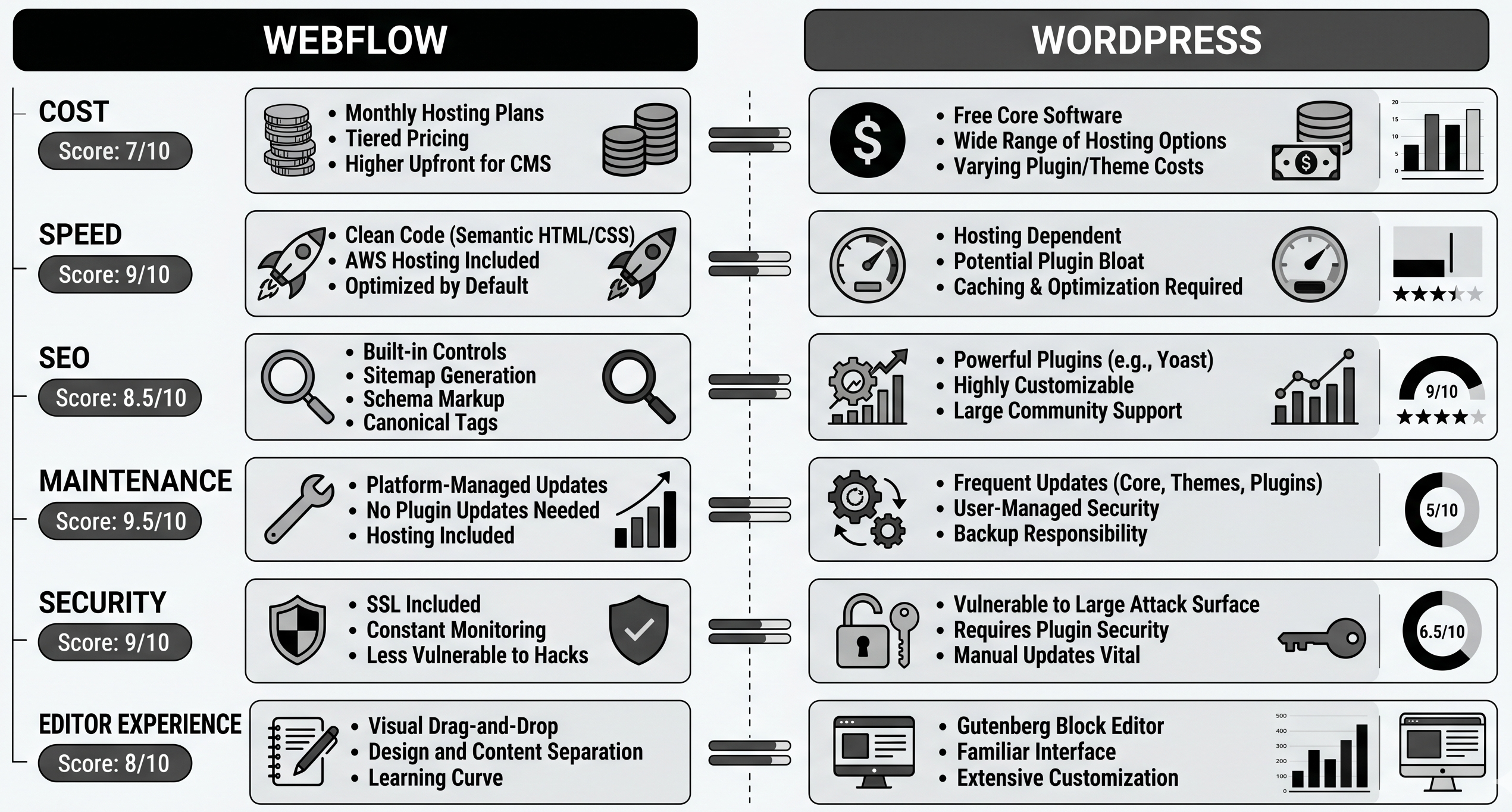
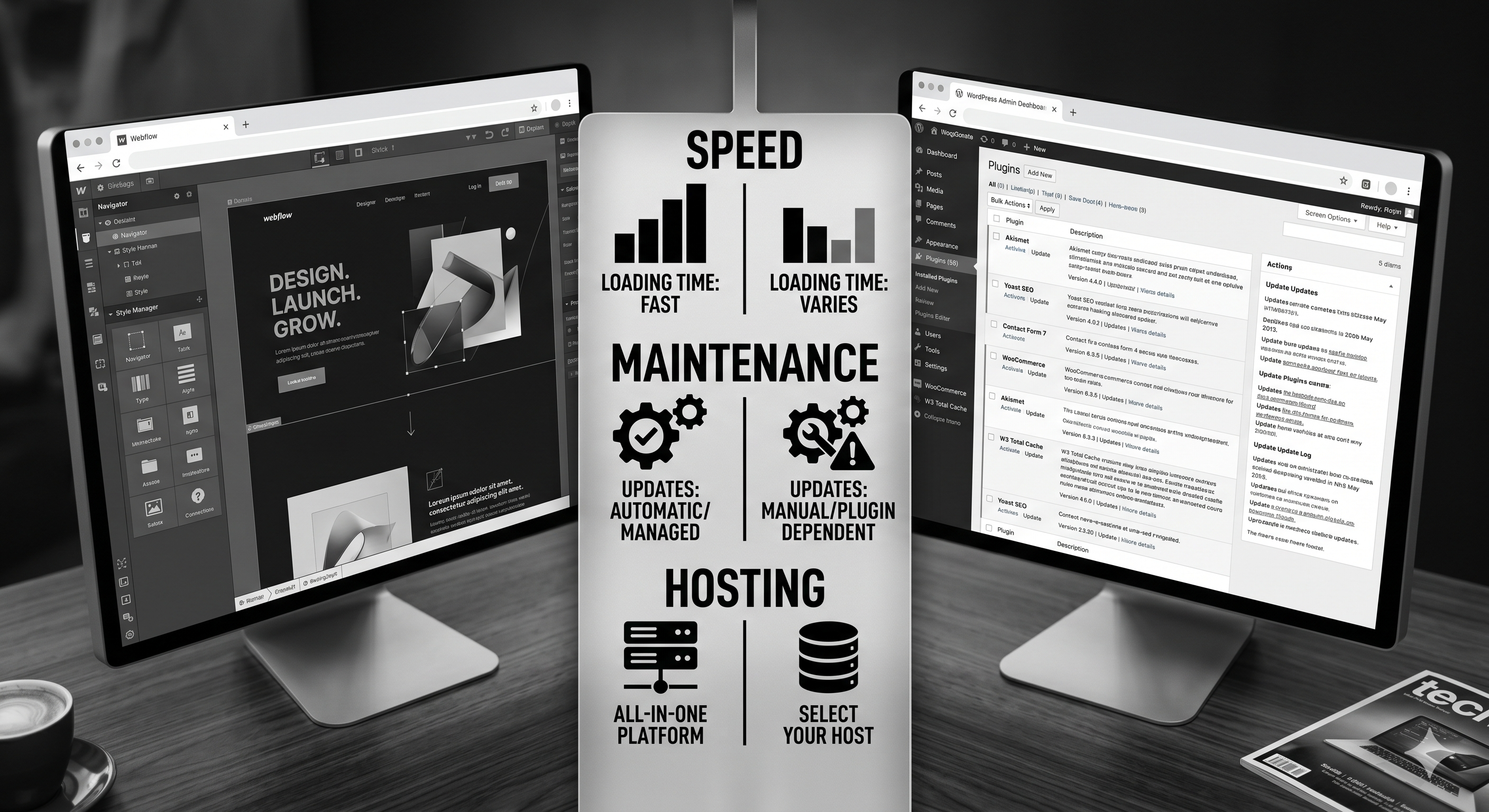
On default builds, Webflow usually wins. It ships on a managed infrastructure with CDN delivery, sensible code output, and fewer moving parts. WordPress performance can match it, but only with disciplined hosting, caching, image optimisation, and plugin control.

In practice, most mid-market teams don’t maintain that discipline over 24 months. They add plugins, scripts, and quick fixes until Core Web Vitals degrade. That’s why many companies move to Webflow after a redesign cycle that got slower every quarter.

If performance and marketing velocity are priorities, this is why many teams move from WordPress to Webflow using a structured migration process rather than another WordPress rebuild.

SEO: Is WordPress Better for Rankings?

Not inherently. WordPress has excellent SEO tooling, but tooling is not execution. Both platforms can rank extremely well when architecture, internal linking, technical hygiene, and publishing quality are strong.

Where WordPress can still shine is edge-case control for custom technical SEO requirements. Where Webflow shines is reducing the number of ways teams accidentally break SEO with plugin conflicts, theme updates, or bloated page builders.

If your team publishes consistently and wants fewer breakpoints, Webflow development often compounds faster over time.

Total Cost of Ownership: The Real Difference

The biggest misunderstanding in the Webflow vs WordPress conversation is cost. WordPress often looks cheaper in year one. By year two, maintenance and troubleshooting erase most of that gap for growth-stage teams.

WordPress cost layers: hosting, premium theme, plugin subscriptions, security tooling, maintenance retainers, and emergency fixes. Webflow cost layers: platform plan, occasional custom code, and lower maintenance overhead.

Rule of thumb: if your site is a core growth channel and your team publishes weekly, Webflow usually becomes cheaper to operate by months 12 to 18. If your site is low-change and plugin-heavy, WordPress can remain cost-effective.

Unsure which platform actually fits your team? We run practical platform reviews for SaaS and service businesses. Book a migration consultation and we’ll map scope, risk, and a realistic cost model before you commit.

Security and Maintenance Overhead

Webflow’s managed environment removes most routine security tasks from your team. WordPress gives you control, but that control comes with patch management, plugin audits, and ongoing monitoring responsibility.

Neither is insecure by default. The difference is responsibility distribution. If your team lacks in-house platform operations, managed systems reduce risk.

Content Operations and Team Workflow

Webflow’s editor is cleaner for non-technical teams and enforces stronger design-system consistency. WordPress editor flexibility is powerful but varies heavily depending on theme, builder, and plugin stack.

If your marketing team wants to publish without engineering tickets, Webflow generally creates less friction. If your content model relies on highly custom editorial workflows, WordPress can still be the better operational choice.

For B2B teams evaluating CRM-native alternatives, compare this with HubSpot CMS vs WordPress before finalising your CMS decision.

When Webflow Is the Better Choice

  • You want a fast marketing site with low maintenance overhead.
  • Your team needs visual editing with strong brand consistency.
  • You care about speed-to-launch and frequent iteration.
  • You do not need complex plugin-dependent backend logic.

When WordPress Is the Better Choice

  • You need deep plugin ecosystem access for niche requirements.
  • You already have strong in-house WordPress technical ownership.
  • Your content operation depends on custom backend workflows.
  • You can enforce strict performance and security governance over time.

FAQ

Is Webflow better than WordPress for SEO?

Neither is automatically better. Both can rank well. Webflow often wins operationally because it’s harder for teams to degrade performance and technical hygiene over time.

Is Webflow more expensive than WordPress?

Upfront, sometimes yes. Over 24 months, often no, because maintenance and plugin overhead in WordPress grows faster than expected.

Can I migrate from WordPress to Webflow without losing traffic?

Yes, if you run URL inventory, one-to-one redirects, and content parity. Most losses come from poor migration planning, not platform choice.

Who should stay on WordPress in 2026?

Teams with genuine plugin-heavy requirements and strong internal ownership. If you’re mostly publishing marketing content, Webflow is often simpler and faster.

Should agencies still build on WordPress?

Yes for specific use cases, but many agencies now deliver faster and with less support burden on Webflow. Platform choice should follow client operations, not agency habit.

Conclusion: Pick the Platform Your Team Can Operate Well

Webflow vs WordPress is not about which platform has more features on paper. It’s about which one your team can run consistently for the next three years without performance decay, publishing friction, or maintenance drag.

If your goal is a faster, cleaner growth engine, Webflow usually wins. If your goal is maximum extensibility and you can support the overhead, WordPress still has a place. The wrong answer is making the decision on brand familiarity alone.

Need a neutral recommendation before you choose? Our Webflow agency team can map whether Webflow is a fit and where WordPress still makes more sense. Book a consultation.

📥 Free resource: The Platform Selection Decision Matrix — a practical scoring sheet to choose between Webflow, WordPress, and other CMS options by team structure, growth goals, and total cost.

That's enough scrolling for now - chat to a HubSpot expert today!
Contact Us